
One-to-many relationships are the backbone of relational database design. As the most common relationship type, mastering one-to-many patterns is essential for building efficient, scalable databases and writing powerful queries.
This comprehensive guide covers everything from basic concepts to advanced implementation patterns, with real-world examples, performance optimization techniques, and solutions to common challenges.
Throughout this guide, you’ll find interactive SQL exercises where you can practice querying one-to-many relationships directly in your browser. These hands-on examples cover joining parent and child tables, counting related records, aggregating data, and finding orphaned records—all essential patterns for working with hierarchical data.
Table of Contents
- Understanding One-to-Many Relationships
- Implementation Fundamentals
- Real-World Examples
- Advanced Query Patterns
- Performance Optimization
- Hierarchical Data Patterns
- Common Pitfalls and Solutions
- Best Practices
Understanding One-to-Many Relationships
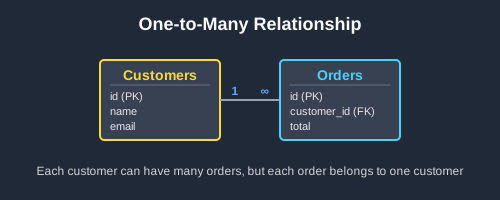
A one-to-many (1:N) relationship exists when one record in the parent table can relate to multiple records in the child table, but each child record relates to exactly one parent record.
Key Characteristics
- Asymmetric relationship: One parent can have many children, but each child has exactly one parent
- Foreign key placement: The foreign key always goes in the “many” side (child table)
- Natural hierarchy: Creates parent-child or owner-owned relationships
- Most common pattern: Found in virtually every database system
Conceptual Examples
- Customer → Orders: One customer can place many orders
- Author → Books: One author can write many books
- Department → Employees: One department can have many employees
- Category → Products: One category can contain many products
- Blog Post → Comments: One post can have many comments
Implementation Fundamentals
Basic Structure
The foreign key constraint is placed in the child table, referencing the parent’s primary key:
-- Parent table
CREATE TABLE customers (
    id SERIAL PRIMARY KEY,
    name VARCHAR(100) NOT NULL,
    email VARCHAR(100) UNIQUE NOT NULL,
    created_at TIMESTAMP DEFAULT CURRENT_TIMESTAMP
);

-- Child table with foreign key
CREATE TABLE orders (
    id SERIAL PRIMARY KEY,
    customer_id INTEGER NOT NULL,           -- Foreign key
    order_date DATE NOT NULL,
    total DECIMAL(10,2) NOT NULL,
    status VARCHAR(20) DEFAULT 'pending',
    FOREIGN KEY (customer_id) REFERENCES customers(id) ON DELETE CASCADE
);

-- Create index on foreign key for performance
CREATE INDEX idx_orders_customer_id ON orders(customer_id);
Sample Data and Queries
-- Sample data shows the relationship in action
-- Alice has multiple orders, Bob has multiple orders, Carol has none

-- Basic query to join related data
SELECT c.name, o.total, o.order_date
FROM customers c
INNER JOIN orders o ON c.id = o.customer_id;
Try it yourself:
[[ testData.title ]]
Query the customers and orders tables to show all customers with their order information. Use an INNER JOIN to show only customers who have placed orders.
[[ col ]]
| [[ col ]] |
|---|
| [[ formatCell(cell) ]] |
[[ i18n.your_results ]]
| [[ col ]] |
|---|
| [[ formatCell(cell) ]] |
[[ i18n.expected_results ]]
| [[ col ]] |
|---|
| [[ formatCell(cell) ]] |
| [[ col ]] |
|---|
| [[ formatCell(cell) ]] |
[[ testData.solution ]]
Tabelas Disponíveis
[[ table.name ]]
| [[ col ]] |
|---|
| [[ formatCell(cell) ]] |
Referential Integrity Options
Choose the appropriate constraint behavior for your business logic:
-- CASCADE: Delete child records when parent is deleted
FOREIGN KEY (customer_id) REFERENCES customers(id) ON DELETE CASCADE

-- RESTRICT: Prevent parent deletion if children exist
FOREIGN KEY (customer_id) REFERENCES customers(id) ON DELETE RESTRICT

-- SET NULL: Set foreign key to NULL when parent is deleted
FOREIGN KEY (customer_id) REFERENCES customers(id) ON DELETE SET NULL

-- SET DEFAULT: Set foreign key to default value when parent is deleted
FOREIGN KEY (customer_id) REFERENCES customers(id) ON DELETE SET DEFAULT
Real-World Examples
Example 1: E-commerce Order Management
In an e-commerce system, customers can place multiple orders, but each order belongs to exactly one customer. This creates a clear one-to-many relationship.
-- Simple e-commerce example
CREATE TABLE customers (
    id SERIAL PRIMARY KEY,
    name VARCHAR(100),
    email VARCHAR(100)
);

CREATE TABLE orders (
    id SERIAL PRIMARY KEY,
    customer_id INTEGER,
    total DECIMAL(10,2),
    order_date DATE,
    FOREIGN KEY (customer_id) REFERENCES customers(id)
);
Key Points:
- One customer can have many orders (Alice might have 5 orders)
- Each order belongs to exactly one customer (Order #123 belongs only to Alice)
- The foreign key
customer_idin the orders table links to the customer - If you delete a customer, you need to decide what happens to their orders (CASCADE, RESTRICT, etc.)
Example 2: Blog System with Comments
In a blog system, multiple one-to-many relationships work together. Authors can write many posts, and posts can have many comments.
-- Authors write many posts
CREATE TABLE authors (
    id SERIAL PRIMARY KEY,
    name VARCHAR(100),
    email VARCHAR(100)
);

CREATE TABLE posts (
    id SERIAL PRIMARY KEY,
    author_id INTEGER,
    title VARCHAR(255),
    content TEXT,
    FOREIGN KEY (author_id) REFERENCES authors(id)
);

-- Posts can have many comments
CREATE TABLE comments (
    id SERIAL PRIMARY KEY,
    post_id INTEGER,
    commenter_name VARCHAR(100),
    comment_text TEXT,
    FOREIGN KEY (post_id) REFERENCES posts(id)
);
What’s happening here:
- Authors → Posts: One author can write many posts
- Posts → Comments: One post can receive many comments
- This creates a chain of relationships through your data
- Notice how
post_idin comments links back to the posts table, not directly to authors
Example 3: Project Management System
A project management system demonstrates cascading one-to-many relationships across multiple levels.
-- Simple project hierarchy
CREATE TABLE teams (
    id SERIAL PRIMARY KEY,
    name VARCHAR(100)
);

CREATE TABLE projects (
    id SERIAL PRIMARY KEY,
    team_id INTEGER,
    name VARCHAR(200),
    FOREIGN KEY (team_id) REFERENCES teams(id)
);

CREATE TABLE tasks (
    id SERIAL PRIMARY KEY,
    project_id INTEGER,
    title VARCHAR(255),
    assigned_to VARCHAR(100),
    FOREIGN KEY (project_id) REFERENCES projects(id)
);
Relationship Chain:
- Teams → Projects: Each team can manage multiple projects
- Projects → Tasks: Each project breaks down into multiple tasks
- This creates a hierarchy: Team > Project > Task
- Data flows down the hierarchy through foreign keys
Advanced Query Patterns
Once you understand basic one-to-many relationships, you can leverage advanced SQL techniques to analyze your data more effectively.
Common Query Patterns
Counting related records:
-- How many orders does each customer have?
SELECT c.name, COUNT(o.id) as order_count
FROM customers c
LEFT JOIN orders o ON c.id = o.customer_id
GROUP BY c.id, c.name;
Try it yourself:
[[ testData.title ]]
Query the authors and articles tables to count how many articles each author has written. Include all authors, even those with no articles (show 0 for them).
[[ col ]]
| [[ col ]] |
|---|
| [[ formatCell(cell) ]] |
[[ i18n.your_results ]]
| [[ col ]] |
|---|
| [[ formatCell(cell) ]] |
[[ i18n.expected_results ]]
| [[ col ]] |
|---|
| [[ formatCell(cell) ]] |
| [[ col ]] |
|---|
| [[ formatCell(cell) ]] |
[[ testData.solution ]]
Tabelas Disponíveis
[[ table.name ]]
| [[ col ]] |
|---|
| [[ formatCell(cell) ]] |
Finding customers without orders:
-- Which customers have never ordered?
SELECT c.name
FROM customers c
LEFT JOIN orders o ON c.id = o.customer_id
WHERE o.customer_id IS NULL;
Try it yourself:
[[ testData.title ]]
Query the departments and projects tables to find departments that have no active projects. This demonstrates finding parent records with no related child records.
[[ col ]]
| [[ col ]] |
|---|
| [[ formatCell(cell) ]] |
[[ i18n.your_results ]]
| [[ col ]] |
|---|
| [[ formatCell(cell) ]] |
[[ i18n.expected_results ]]
| [[ col ]] |
|---|
| [[ formatCell(cell) ]] |
| [[ col ]] |
|---|
| [[ formatCell(cell) ]] |
[[ testData.solution ]]
Tabelas Disponíveis
[[ table.name ]]
| [[ col ]] |
|---|
| [[ formatCell(cell) ]] |
Aggregating child data:
-- Total spending per customer
SELECT c.name, COALESCE(SUM(o.total), 0) as total_spent
FROM customers c
LEFT JOIN orders o ON c.id = o.customer_id
GROUP BY c.id, c.name;
Try it yourself:
[[ testData.title ]]
Query the categories and products tables to calculate the total inventory value per category. Include all categories and show 0 for those with no products.
[[ col ]]
| [[ col ]] |
|---|
| [[ formatCell(cell) ]] |
[[ i18n.your_results ]]
| [[ col ]] |
|---|
| [[ formatCell(cell) ]] |
[[ i18n.expected_results ]]
| [[ col ]] |
|---|
| [[ formatCell(cell) ]] |
| [[ col ]] |
|---|
| [[ formatCell(cell) ]] |
[[ testData.solution ]]
Tabelas Disponíveis
[[ table.name ]]
| [[ col ]] |
|---|
| [[ formatCell(cell) ]] |
Key Concepts:
- Use LEFT JOIN to include parents without children
- GROUP BY the parent to aggregate child data
- Use COUNT, SUM, AVG to analyze relationships
- COALESCE handles NULL values gracefully
Performance Optimization
Indexing Strategies
-- Basic foreign key index (essential)
CREATE INDEX idx_orders_customer_id ON orders(customer_id);

-- Composite indexes for common query patterns
CREATE INDEX idx_orders_customer_status ON orders(customer_id, status);
CREATE INDEX idx_orders_customer_date ON orders(customer_id, order_date);

-- Partial indexes for specific conditions
CREATE INDEX idx_orders_pending ON orders(customer_id, order_date)
WHERE status = 'pending';

-- Covering indexes to avoid table lookups
CREATE INDEX idx_orders_summary ON orders(customer_id, status)
INCLUDE (order_date, total);

-- Expression indexes for computed values
CREATE INDEX idx_orders_year_month ON orders(customer_id, EXTRACT(YEAR FROM order_date), EXTRACT(MONTH FROM order_date));
Query Optimization Techniques
-- Use EXISTS instead of IN for large datasets
-- Efficient
SELECT c.name
FROM customers c
WHERE EXISTS (
    SELECT 1 FROM orders o
    WHERE o.customer_id = c.id
    AND o.total > 1000
);

-- Less efficient for large order tables
SELECT c.name
FROM customers c
WHERE c.id IN (
    SELECT customer_id FROM orders
    WHERE total > 1000
);

-- Use LIMIT with ORDER BY for pagination
SELECT c.name, o.order_date, o.total
FROM customers c
INNER JOIN orders o ON c.id = o.customer_id
ORDER BY o.order_date DESC
LIMIT 20 OFFSET 0;  -- First page

-- Use window functions instead of correlated subqueries
-- Efficient
SELECT
    c.name,
    o.order_date,
    o.total,
    ROW_NUMBER() OVER (PARTITION BY c.id ORDER BY o.order_date DESC) as order_rank
FROM customers c
INNER JOIN orders o ON c.id = o.customer_id;

-- Less efficient
SELECT
    c.name,
    o.order_date,
    o.total,
    (SELECT COUNT(*) FROM orders o2
     WHERE o2.customer_id = c.id
     AND o2.order_date >= o.order_date) as order_rank
FROM customers c
INNER JOIN orders o ON c.id = o.customer_id;
Bulk Operations
-- Efficient bulk updates using JOINs
UPDATE orders
SET status = 'shipped'
FROM (
    SELECT order_id
    FROM shipping_manifest
    WHERE shipped_date = CURRENT_DATE
) shipped
WHERE orders.id = shipped.order_id;

-- Bulk insert with foreign key validation
INSERT INTO orders (customer_id, order_date, total, status)
SELECT
    c.id,
    CURRENT_DATE,
    new_orders.total,
    'pending'
FROM customers c
INNER JOIN temp_new_orders new_orders ON c.email = new_orders.customer_email
WHERE c.status = 'active';

-- Efficient deletion with EXISTS
DELETE FROM orders
WHERE EXISTS (
    SELECT 1 FROM customers c
    WHERE c.id = orders.customer_id
    AND c.status = 'inactive'
    AND c.last_login < CURRENT_DATE - INTERVAL '2 years'
);
Hierarchical Data Patterns
Self-Referencing One-to-Many
For hierarchical structures within the same entity type:
-- Employee hierarchy
CREATE TABLE employees (
    id SERIAL PRIMARY KEY,
    name VARCHAR(100) NOT NULL,
    email VARCHAR(100) UNIQUE NOT NULL,
    manager_id INTEGER,  -- Self-referencing foreign key
    department VARCHAR(50),
    salary DECIMAL(10,2),
    hire_date DATE,
    FOREIGN KEY (manager_id) REFERENCES employees(id) ON DELETE SET NULL
);

-- Category tree
CREATE TABLE categories (
    id SERIAL PRIMARY KEY,
    name VARCHAR(100) NOT NULL,
    parent_id INTEGER,
    sort_order INTEGER DEFAULT 0,
    FOREIGN KEY (parent_id) REFERENCES categories(id) ON DELETE CASCADE
);

-- Recursive queries for hierarchical data
WITH RECURSIVE employee_hierarchy AS (
    -- Base case: top-level managers (no manager)
    SELECT
        id, name, manager_id, salary, 0 as level,
        CAST(name AS TEXT) as path,
        ARRAY[id] as path_ids
    FROM employees
    WHERE manager_id IS NULL

    UNION ALL

    -- Recursive case: employees with managers
    SELECT
        e.id, e.name, e.manager_id, e.salary, eh.level + 1,
        eh.path || ' > ' || e.name,
        eh.path_ids || e.id
    FROM employees e
    INNER JOIN employee_hierarchy eh ON e.manager_id = eh.id
)
SELECT
    REPEAT('  ', level) || name as indented_name,
    level,
    salary,
    path
FROM employee_hierarchy
ORDER BY path_ids;

-- Calculate total team size for each manager
WITH RECURSIVE team_size AS (
    SELECT id, name, 1 as team_size
    FROM employees
    WHERE id NOT IN (SELECT DISTINCT manager_id FROM employees WHERE manager_id IS NOT NULL)

    UNION ALL

    SELECT
        e.id, e.name,
        1 + COALESCE(SUM(ts.team_size), 0)
    FROM employees e
    LEFT JOIN team_size ts ON ts.id IN (
        SELECT id FROM employees WHERE manager_id = e.id
    )
    GROUP BY e.id, e.name
)
SELECT name, team_size
FROM team_size
ORDER BY team_size DESC;
Common Pitfalls and Solutions
Pitfall 1: Missing Foreign Key Indexes
Problem:
-- Foreign key without index - poor JOIN performance
CREATE TABLE orders (
    id SERIAL PRIMARY KEY,
    customer_id INTEGER NOT NULL,  -- No index!
    FOREIGN KEY (customer_id) REFERENCES customers(id)
);
Solution:
-- Always index foreign key columns
CREATE INDEX idx_orders_customer_id ON orders(customer_id);

-- Consider composite indexes for common query patterns
CREATE INDEX idx_orders_customer_status_date ON orders(customer_id, status, order_date);
Pitfall 2: N+1 Query Problem
Problem:
# This creates N+1 queries (1 for customers + N for their orders)
customers = Customer.objects.all()  # 1 query
for customer in customers:
    orders = customer.orders.all()  # N queries
    print(f"{customer.name}: {len(orders)} orders")
Solution:
# Use eager loading to fetch related data in one query
customers = Customer.objects.prefetch_related('orders').all()  # 2 queries total
for customer in customers:
    orders = customer.orders.all()  # No additional query
    print(f"{customer.name}: {len(orders)} orders")
SQL Solution:
-- Instead of multiple queries, use aggregation
SELECT
    c.name,
    COUNT(o.id) as order_count
FROM customers c
LEFT JOIN orders o ON c.id = o.customer_id
GROUP BY c.id, c.name;
Pitfall 3: Incorrect CASCADE Rules
Problem:
-- Wrong: This prevents customer deletion if they have orders
FOREIGN KEY (customer_id) REFERENCES customers(id) ON DELETE RESTRICT

-- Wrong: This deletes order history when customer is deleted
FOREIGN KEY (customer_id) REFERENCES customers(id) ON DELETE CASCADE
Solution:
-- Better: Archive customer but keep order history
-- Add archived flag to customers table
ALTER TABLE customers ADD COLUMN archived BOOLEAN DEFAULT FALSE;

-- Use SET NULL if order history should remain
FOREIGN KEY (customer_id) REFERENCES customers(id) ON DELETE SET NULL

-- Or create a separate archived_customers table for deleted customers
CREATE TABLE archived_customers (
    id INTEGER PRIMARY KEY,
    name VARCHAR(100),
    email VARCHAR(100),
    archived_at TIMESTAMP DEFAULT CURRENT_TIMESTAMP
);
Pitfall 4: Not Handling Optional Relationships
Problem:
-- This excludes customers without orders
SELECT c.name, o.total
FROM customers c
INNER JOIN orders o ON c.id = o.customer_id;
Solution:
-- Use LEFT JOIN to include all customers
SELECT
    c.name,
    COALESCE(SUM(o.total), 0) as total_spent,
    COUNT(o.id) as order_count
FROM customers c
LEFT JOIN orders o ON c.id = o.customer_id
GROUP BY c.id, c.name;
Best Practices
1. Naming Conventions
-- Consistent, descriptive naming
CREATE TABLE customers (id, name, email);           -- Parent table
CREATE TABLE customer_orders (id, customer_id);    -- Child with clear reference

-- Foreign key naming
customer_id  -- References customers.id
author_id    -- References authors.id
category_id  -- References categories.id

-- Index naming
idx_orders_customer_id           -- Basic foreign key index
idx_orders_customer_status_date  -- Composite index
2. Data Types and Constraints
-- Use consistent data types
CREATE TABLE customers (
    id SERIAL PRIMARY KEY,          -- Standard primary key type
    name VARCHAR(100) NOT NULL      -- Appropriate length limits
);

CREATE TABLE orders (
    id SERIAL PRIMARY KEY,
    customer_id INTEGER NOT NULL,   -- Same type as customers.id
    total DECIMAL(10,2) NOT NULL,   -- Appropriate precision for money
    order_date DATE NOT NULL,       -- Use specific date/time types
    status VARCHAR(20) DEFAULT 'pending',
    FOREIGN KEY (customer_id) REFERENCES customers(id) ON DELETE RESTRICT
);

-- Add appropriate constraints
ALTER TABLE orders ADD CONSTRAINT chk_total_positive CHECK (total > 0);
ALTER TABLE orders ADD CONSTRAINT chk_valid_status
    CHECK (status IN ('pending', 'processing', 'shipped', 'delivered', 'cancelled'));
3. Documentation and Comments
-- Document complex relationships
COMMENT ON TABLE orders IS 'Customer orders with line items tracked separately';
COMMENT ON COLUMN orders.customer_id IS 'References customers.id - CASCADE delete not used to preserve order history';

-- Document business rules
COMMENT ON CONSTRAINT fk_orders_customer IS 'RESTRICT prevents customer deletion with existing orders - archive customer instead';
4. Testing Referential Integrity
-- Test foreign key constraints
-- This should fail
INSERT INTO orders (customer_id, total) VALUES (999, 100.00);  -- Non-existent customer

-- This should succeed
INSERT INTO customers (name, email) VALUES ('Test Customer', 'test@example.com');
INSERT INTO orders (customer_id, total) VALUES (
    (SELECT id FROM customers WHERE email = 'test@example.com'),
    100.00
);

-- Test cascade behavior
DELETE FROM customers WHERE email = 'test@example.com';  -- Should handle based on ON DELETE rule
5. Performance Monitoring
-- Monitor query performance
EXPLAIN (ANALYZE, BUFFERS)
SELECT c.name, COUNT(o.id) as order_count
FROM customers c
LEFT JOIN orders o ON c.id = o.customer_id
GROUP BY c.id, c.name
ORDER BY order_count DESC;

-- Check index usage
SELECT
    schemaname,
    tablename,
    indexname,
    idx_scan,
    idx_tup_read,
    idx_tup_fetch
FROM pg_stat_user_indexes
WHERE tablename IN ('customers', 'orders')
ORDER BY idx_scan DESC;
Conclusion
One-to-many relationships form the foundation of most database designs. Mastering these patterns enables you to:
- Model real-world hierarchies effectively
- Write efficient queries that scale with data growth
- Maintain data integrity through proper constraints
- Optimize performance with appropriate indexing
Key takeaways:
- Always place foreign keys in the child table with appropriate constraints
- Index foreign key columns for optimal JOIN performance
- Choose correct CASCADE rules based on business requirements
- Use LEFT JOINs when parent records might not have children
- Consider hierarchical patterns for self-referencing relationships
- Monitor and optimize query performance regularly
Continue Learning:
- Understanding Database Relationships: A Comprehensive Beginner’s Guide
- One-to-One Database Relationships: Complete Guide
- Many-to-Many Database Relationships: Complete Guide
- SQL JOINs for Beginners with Diagrams
Practice these concepts hands-on with Beekeeper Studio, where you can visualize relationships, test queries, and explore your data with an intuitive interface.
 Beekeeper Studio É Uma GUI de Banco de Dados Gratuita e de Código Aberto
A melhor ferramenta de consultas SQL e editor que já usei. Fornece tudo que preciso para gerenciar meu banco de dados. - ⭐⭐⭐⭐⭐ Mit
Beekeeper Studio é rápido, intuitivo e fácil de usar. Beekeeper suporta muitos bancos de dados e funciona muito bem no Windows, Mac e Linux.
O Que Os Usuários Dizem Sobre o Beekeeper Studio
"O Beekeeper Studio substituiu completamente meu antigo fluxo de trabalho com SQL. É rápido, intuitivo e torna o trabalho com banco de dados agradável novamente."
"Já experimentei muitas GUIs de banco de dados, mas o Beekeeper encontra o equilíbrio perfeito entre recursos e simplicidade. Simplesmente funciona."