
A unique constraint in PostgreSQL is a way to ensure that the values in a particular column or set of columns are unique. This means that no two rows in the table can have the same values in the specified columns. This can be useful in a variety of situations, such as when you want to ensure that each customer in a table has a unique identifier or when you want to ensure that no two users have the same email address.
Unique constraints on new tables
To create a unique constraint in PostgreSQL, you can use the CREATE TABLE or ALTER TABLE statement, depending on whether you want to add the constraint to an existing table or create a new table with the constraint. Here is an example of how to create a unique constraint on the email column of a users table:
CREATE TABLE users (
    id INTEGER PRIMARY KEY,
    email TEXT UNIQUE
);
In this example, the UNIQUE keyword is used to specify that the email column should have a unique constraint. This means that no two rows in the users table can have the same email address.
Add a unique constraint to an existing table
Alternatively, if you want to add a unique constraint to an existing table, you can use the ALTER TABLE statement like this:
ALTER TABLE users
ADD UNIQUE (email);
In this case, the ADD UNIQUE clause is used to add the unique constraint to the email column of the already existing users table.
The purpose of a unique constraint
A unique constraint will prevent you from inserting or updating a row if the values in the constrained columns are not unique. For example, if you try to insert a new row into the users table with an email address that already exists in the table, you will get an error.
Unique constraints are similar to PRIMARY KEY columns
You can also sort-of define a unique constraint as a PRIMARY KEY. The difference between the two is that a PRIMARY KEY also automatically adds a NOT NULL constraint, which means that the columns in the constraint cannot contain NULL values.
A table can only have one primary key, as a primary key uniquely identifies each row of the table, so be careful using it instead of a unique constraint.
Primary key example
Here is an example of how to create a PRIMARY KEY constraint on the id column of the users table:
CREATE TABLE users (
    id INTEGER PRIMARY KEY,
    email TEXT
);
In this example, the PRIMARY KEY constraint is applied to the id column, which means that this column will have a unique constraint and will not allow NULL values.
Composite unique constraints
Unique constraints can contain more than one column. This is useful if you want a column to be unique, but only within the scope of something else. For example in the users table, we might want email to be unique for users in the same organization.
CREATE TABLE users (
    id INTEGER PRIMARY KEY,
    organization_id INTEGER NOT NULL,
    email TEXT,
    UNIQUE (organization_id, email)
);
or to alter an existing table
ALTER TABLE users
ADD UNIQUE (organization_id, email)
One click editing of constraints
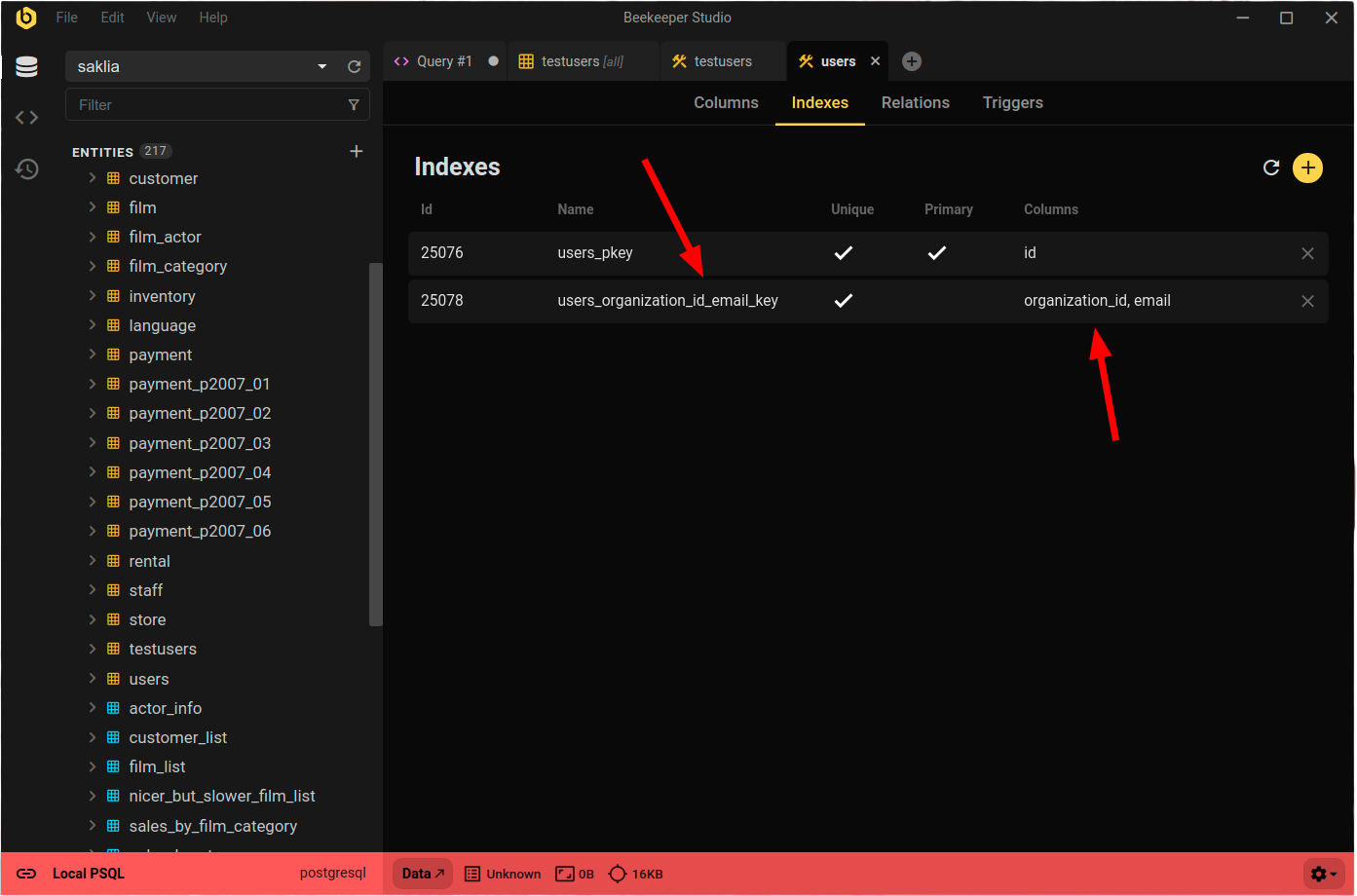
Beekeeper Studio provides a convenient GUI for working with constraints. Simply right click any table to View Structure, to view a list of all indexes and constraints. You can view, edit, delete, and create constraints without knowing any SQL.
Postgres Unique Constraint Summary
In summary, a unique constraint in PostgreSQL is a way to ensure that the values in a particular column or set of columns are unique. This can be useful for ensuring the integrity of your data and preventing duplicate values in your tables. To create a unique constraint, you can use the CREATE TABLE or ALTER TABLE statement and specify the UNIQUE or PRIMARY KEY keyword. Better yet, edit them with one click using Beekeeper Studio
 Beekeeper Studio Est Une Interface de Base de Données Gratuite et Open Source
Le meilleur outil de requêtes SQL et éditeur que j'ai jamais utilisé. Il fournit tout ce dont j'ai besoin pour gérer ma base de données. - ⭐⭐⭐⭐⭐ Mit
Beekeeper Studio est rapide, intuitif et facile à utiliser. Beekeeper prend en charge de nombreuses bases de données et fonctionne très bien sur Windows, Mac et Linux.
Ce Que Les Utilisateurs Disent De Beekeeper Studio
"Beekeeper Studio a complètement remplacé mon ancien workflow SQL. C'est rapide, intuitif et rend le travail avec les bases de données agréable à nouveau."
"J'ai essayé de nombreuses interfaces de bases de données, mais Beekeeper trouve l'équilibre parfait entre fonctionnalités et simplicité. Ça marche tout simplement."