
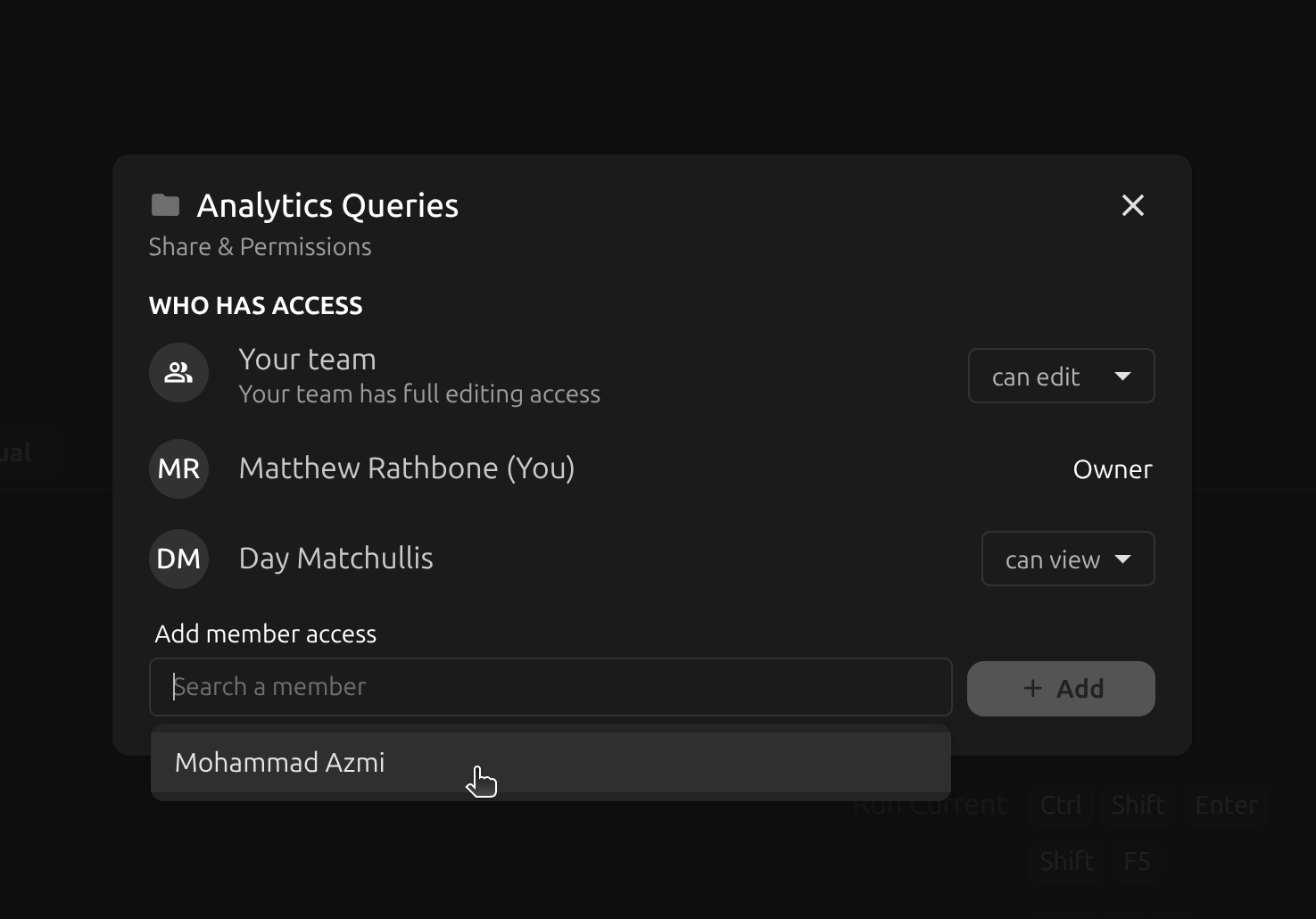
The standout feature for v6 is team collaboration v2! Full infinite depth folder trees, plus per-file and per-folder share settings make this the best Beekeeper Studio ever if you work on a team.
Hmm, what was that? Oh yes we are a little late releasing v6, it was due at the end of July, but you know what they say - good things come to those who wait.
Highlights
-
Sharing and permissions for queries, connections, and folders. In a cloud workspace you can now decide who can view and who can edit each individual item, instead of a single team folder that everyone can edit. Set a general team access level (no access / can view / can edit), then add per-member grants on top. Access is inherited down the folder tree, owners always keep full access to their own items, and only owners (or workspace admins) can change sharing. Existing team items keep their old behavior and are upgraded seamlessly as you start using the new features.
-
Folders infinite depth. Connections and saved queries use a new tree component with properly nested folders and simple drag-and-drop to move and reorder items. This combines with Beekeeper’s new sharing & permissions system to make a Google-Drive like experience, but for SQL. There’s nothing else like it available.
-
StarRocks support. New StarRocks driver, so you can browse schemas and run queries against StarRocks the same way you do everywhere else.
Other Improvements
-
Query edit history in local workspaces. Saved query version history — previously cloud-only — now works for local workspaces, so you can see past edits and restore an earlier version of a query.
-
Import a directory of SQL files. The SQL import modal can now walk a whole directory recursively and recreate its folder structure as saved query folders, with an option to preserve or skip the root directory.
-
Add a row from the grid itself. Right-click the empty space below the last row to add a new row, instead of hunting for the
+button in the bottom corner. -
Kerberos (GSSAPI) authentication for MongoDB. Configured through the connection URL with
authMechanism=GSSAPI, with friendlier errors when the ticket or SPN isn’t right. Requires a Business license and a working krb5 client. -
SSH config
Includesupport.Includedirectives in~/.ssh/configare now read in place, including glob patterns and paths relative to the config file. Thanks @Squidysquid1! -
“Select Top 100 Rows” in the table context menu. Right-click a table in the sidebar to drop a
select top 100query straight into the editor. Thanks @manos02! -
Plugin API:
disabledFeaturesongetConnectionInfo. Plugins (the ERD plugin especially) can now tell which features the connected database actually supports. -
Nicer tooltips. Keyboard shortcuts in tooltips are formatted properly, and connection and query tooltips show who created the item.
Everything Else
Another big thanks to the dozens of contributors who helped to make Beekeeper Studio better this month.
- Trino query errors are no longer swallowed and reported as empty results (#4499)
- Ctrl+Z no longer undoes several steps at once in the query editor (#4498)
- Postgres:
SQL: Createnow uses the selected overload for overloaded functions (#4551) - Postgres dollar-quoted blocks are split correctly (sql-query-identifier 3.2.0) (#4592)
- Jump-to-last-page uses the filtered row count instead of the total (#4599)
- Manual table refresh re-fetches columns, so renames show up (#4590)
- SQL → SQL exports preserve the table’s column order (#4560)
- Row delete shortcuts work again on macOS (#4556)
- Grab/grabbing cursor on the column reorder handle (#4506)
- AND/OR operators repositioned in table filters (#4559)
- Fixed overlapping context menus in the data grid (#4539)
- Database dropdown hides the selected text while searching, and its icons no longer overlap on resize (#4532, #4507)
- Editor font size now applies to modal editors (#4510)
- Query elapsed timer shows the hours field at exactly one hour (#4612)
- JSON viewer escapes regex metacharacters when locating keys by path (#4613)
- Long error messages no longer make the status bar unusable (#4543)
- Delete confirmation shows the favorite’s title (#4547)
- Alert shown when folder creation is disabled (#4535)
- Folders that fail to load show an error instead of an empty “no items” state (#4610)
- Fixed sidebar overflow caused by tree item tooltips (#4619)
- Cloud sync fixes: only poll modules that are actually on screen, poll correctly on mount, don’t clear a new folder mid-poll, and handle remotely deleted items and merges (#4584, #4617)
- Fixed the import-from-local-workspace modals, and skip
.gitfolders when importing (#4609, #4615) - Fixed the last-used workspace not being restored (#4578)
- Azure CLI discovery and launch fixed on Windows (#4538). Thanks @jasonnutter!
- Improved AppImageLauncher detection (#4562)
- Swahili README translation (#4555). Thanks @cleven12!
- Docs: paste-as-new-rows, plugin view types,
setDebugComms, plugin prerequisites, Snowflake moved to full support, SAP HANA listed as coming soon - Dependency updates including Electron 39.8.10, dompurify, nanoid, js-yaml, axios, typeorm, tar, protobufjs, and undici
 Beekeeper Studio Ist Eine Kostenlose & Open-Source-Datenbank-GUI
Das beste SQL-Abfrage- und Editor-Tool, das ich je benutzt habe. Es bietet alles, was ich zur Verwaltung meiner Datenbank brauche. - ⭐⭐⭐⭐⭐ Mit
Beekeeper Studio ist schnell, intuitiv und einfach zu bedienen. Beekeeper unterstützt viele Datenbanken und funktioniert hervorragend unter Windows, Mac und Linux.
Was Benutzer Über Beekeeper Studio Sagen
"Beekeeper Studio hat meinen alten SQL-Workflow komplett ersetzt. Es ist schnell, intuitiv und macht die Datenbankarbeit wieder angenehm."
"Ich habe viele Datenbank-GUIs ausprobiert, aber Beekeeper findet die perfekte Balance zwischen Funktionen und Einfachheit. Es funktioniert einfach."