
Database relationships are the foundation of relational database design. Understanding how to connect data across tables isn’t just theoretical knowledge—it’s essential for building efficient databases, writing effective queries, and maintaining data integrity.
In this comprehensive guide, you’ll learn the three fundamental types of database relationships with visual diagrams, real-world examples, complete SQL implementations, and practical tips for when to use each type.
Throughout this guide, you’ll find interactive SQL exercises where you can practice querying each relationship type directly in your browser. These hands-on examples let you write and run queries against real database tables, helping you master one-to-one, one-to-many, and many-to-many relationships through practical experience.
🔖 Quick Reference: Since relationships are queried using JOINs, check out our SQL JOIN Cheat Sheet for visual diagrams and examples of all JOIN types (INNER, LEFT, RIGHT, FULL OUTER, and more).
Table of Contents
- What Are Database Relationships?
- One-to-One Relationships
- One-to-Many Relationships
- Many-to-Many Relationships
- Implementation Best Practices
- Common Pitfalls to Avoid
- Relationships and SQL Joins
What Are Database Relationships?
A database relationship defines how records in one table connect to records in another table. These connections eliminate data duplication, ensure consistency, and enable complex queries across multiple tables.
Think of relationships as the “glue” that holds your database together. Instead of storing all information in one massive table (which would create redundancy and maintenance nightmares), relationships let you split data logically across multiple tables while maintaining meaningful connections.
Key Benefits:
- Eliminate data duplication - Store each piece of information once
- Ensure data consistency - Update information in one place
- Enable complex analysis - Query across related data easily
- Improve performance - Smaller, focused tables are faster to query
Now let’s explore the three fundamental relationship types.
One-to-One Relationships
A one-to-one relationship exists when each record in Table A relates to exactly one record in Table B, and vice versa. This is the least common relationship type but useful for splitting large tables or storing optional information separately.
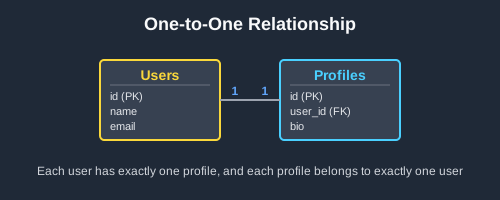
Real-World Example: Users and Profiles
Consider a user system where basic login information is stored separately from detailed profile information:
Sample Data:
Users Table:
| id | username | email |
|—-|———-|—————–|
| 1 | alice | alice@email.com |
| 2 | bob | bob@email.com |
| 3 | charlie | charlie@email.com |
Profiles Table:
| id | user_id | bio | avatar_url |
|—-|———|———————-|————|
| 1 | 1 | Software developer | alice.jpg |
| 2 | 2 | Marketing specialist | bob.jpg |
| 3 | 3 | Data analyst | charlie.jpg |
SQL Implementation
-- Create the main table
CREATE TABLE users (
    id SERIAL PRIMARY KEY,
    username VARCHAR(50) UNIQUE NOT NULL,
    email VARCHAR(100) UNIQUE NOT NULL,
    created_at TIMESTAMP DEFAULT CURRENT_TIMESTAMP
);

-- Create the related table with foreign key
CREATE TABLE profiles (
    id SERIAL PRIMARY KEY,
    user_id INTEGER UNIQUE NOT NULL,
    bio TEXT,
    avatar_url VARCHAR(255),
    birth_date DATE,
    FOREIGN KEY (user_id) REFERENCES users(id) ON DELETE CASCADE
);

-- The foreign key links each profile to exactly one user

-- Query related data
SELECT u.username, u.email, p.bio
FROM users u
LEFT JOIN profiles p ON u.id = p.user_id;
Try it yourself:
[[ testData.title ]]
Query the countries and capitals tables to show each country with its capital city. Use a LEFT JOIN to include all countries, even if they don’t have a capital listed yet.
[[ col ]]
| [[ col ]] |
|---|
| [[ formatCell(cell) ]] |
[[ i18n.your_results ]]
| [[ col ]] |
|---|
| [[ formatCell(cell) ]] |
[[ i18n.expected_results ]]
| [[ col ]] |
|---|
| [[ formatCell(cell) ]] |
| [[ col ]] |
|---|
| [[ formatCell(cell) ]] |
[[ testData.solution ]]
Tablas Disponibles
[[ table.name ]]
| [[ col ]] |
|---|
| [[ formatCell(cell) ]] |
When to Use One-to-One
- Split large tables - Separate frequently accessed from rarely accessed columns
- Optional information - Store details that not all records need
- Security concerns - Keep sensitive data in separate, restricted tables
- Performance optimization - Improve query speed by splitting wide tables
👉 Learn more in our detailed One-to-One Relationship Guide
One-to-Many Relationships
A one-to-many relationship is where one record in Table A can relate to multiple records in Table B, but each record in Table B relates to only one record in Table A. This is the most common relationship type.
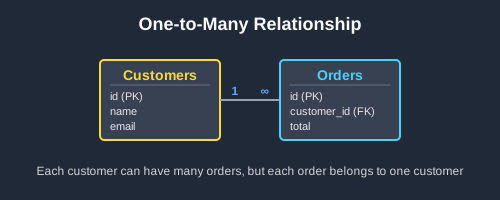
Real-World Example: Customers and Orders
An e-commerce system where customers can place multiple orders:
Sample Data:
Customers Table:
| id | name | email |
|—-|———–|——————-|
| 1 | Alice | alice@email.com |
| 2 | Bob | bob@email.com |
| 3 | Charlie | charlie@email.com |
Orders Table:
| id | customer_id | total | order_date |
|—-|————-|——-|————|
| 1 | 1 | 99.99 | 2024-01-15 |
| 2 | 1 | 149.50| 2024-02-01 |
| 3 | 2 | 75.25 | 2024-01-20 |
| 4 | 1 | 200.00| 2024-02-15 |
Notice how Alice (customer_id = 1) has three orders, Bob has one, and Charlie has none.
SQL Implementation
-- Create the parent table
CREATE TABLE customers (
    id SERIAL PRIMARY KEY,
    name VARCHAR(100) NOT NULL,
    email VARCHAR(100) UNIQUE NOT NULL,
    created_at TIMESTAMP DEFAULT CURRENT_TIMESTAMP
);

-- Create the child table with foreign key
CREATE TABLE orders (
    id SERIAL PRIMARY KEY,
    customer_id INTEGER NOT NULL,
    total DECIMAL(10,2) NOT NULL,
    order_date DATE NOT NULL,
    status VARCHAR(20) DEFAULT 'pending',
    FOREIGN KEY (customer_id) REFERENCES customers(id) ON DELETE CASCADE
);

-- The foreign key customer_id links each order to one customer

-- Query examples
-- Get all orders with customer information
SELECT c.name, c.email, o.total, o.order_date
FROM customers c
INNER JOIN orders o ON c.id = o.customer_id
ORDER BY c.name, o.order_date;

-- Count orders per customer
SELECT c.name, COUNT(o.id) as order_count
FROM customers c
LEFT JOIN orders o ON c.id = o.customer_id
GROUP BY c.id, c.name;
Try it yourself:
[[ testData.title ]]
Query the teachers and classes tables to show all teachers with their class subjects. Include all teachers even if they don’t teach any classes yet. Show teacher name and subject.
[[ col ]]
| [[ col ]] |
|---|
| [[ formatCell(cell) ]] |
[[ i18n.your_results ]]
| [[ col ]] |
|---|
| [[ formatCell(cell) ]] |
[[ i18n.expected_results ]]
| [[ col ]] |
|---|
| [[ formatCell(cell) ]] |
| [[ col ]] |
|---|
| [[ formatCell(cell) ]] |
[[ testData.solution ]]
Tablas Disponibles
[[ table.name ]]
| [[ col ]] |
|---|
| [[ formatCell(cell) ]] |
When to Use One-to-Many
- Hierarchical data - Categories → Products, Departments → Employees
- Ownership relationships - Users → Posts, Authors → Books
- Time-series data - Customers → Orders, Sensors → Readings
- Classification - Types → Items, Statuses → Records
👉 Learn more in our detailed One-to-Many Relationship Guide
Many-to-Many Relationships
A many-to-many relationship exists when multiple records in Table A can relate to multiple records in Table B. This requires a junction table (also called a bridge or linking table) to implement properly.
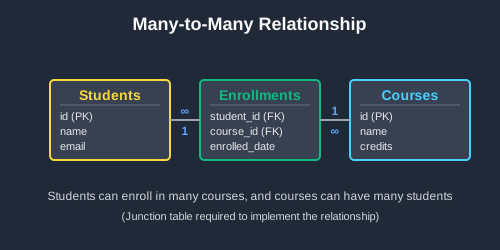
Real-World Example: Students and Courses
A university system where students can enroll in multiple courses, and courses can have multiple students:
Sample Data:
Students Table:
| id | name | email |
|—-|———|——————-|
| 1 | Alice | alice@uni.edu |
| 2 | Bob | bob@uni.edu |
| 3 | Charlie | charlie@uni.edu |
Courses Table:
| id | name | credits |
|—-|—————-|———|
| 1 | Database Design| 3 |
| 2 | Web Development| 4 |
| 3 | Data Analysis | 3 |
Enrollments Table (Junction):
| student_id | course_id | enrolled_date | grade |
|————|———–|—————|——-|
| 1 | 1 | 2024-01-15 | A |
| 1 | 2 | 2024-01-15 | B+ |
| 2 | 1 | 2024-01-16 | A- |
| 2 | 3 | 2024-01-16 | B |
| 3 | 2 | 2024-01-17 | A |
| 3 | 3 | 2024-01-17 | A- |
SQL Implementation
-- Create the first entity table
CREATE TABLE students (
    id SERIAL PRIMARY KEY,
    name VARCHAR(100) NOT NULL,
    email VARCHAR(100) UNIQUE NOT NULL,
    created_at TIMESTAMP DEFAULT CURRENT_TIMESTAMP
);

-- Create the second entity table
CREATE TABLE courses (
    id SERIAL PRIMARY KEY,
    name VARCHAR(100) NOT NULL,
    credits INTEGER NOT NULL,
    description TEXT
);

-- Create the junction table
CREATE TABLE enrollments (
    student_id INTEGER NOT NULL,
    course_id INTEGER NOT NULL,
    enrolled_date DATE NOT NULL,
    grade VARCHAR(5),
    PRIMARY KEY (student_id, course_id),
    FOREIGN KEY (student_id) REFERENCES students(id) ON DELETE CASCADE,
    FOREIGN KEY (course_id) REFERENCES courses(id) ON DELETE CASCADE
);

-- The junction table connects students to courses with a many-to-many relationship

-- Query examples
-- Get all students with their enrolled courses
SELECT s.name as student_name,
       c.name as course_name,
       c.credits,
       e.grade
FROM students s
INNER JOIN enrollments e ON s.id = e.student_id
INNER JOIN courses c ON e.course_id = c.id
ORDER BY s.name, c.name;

-- Count students per course
SELECT c.name as course_name, COUNT(e.student_id) as enrollment_count
FROM courses c
LEFT JOIN enrollments e ON c.id = e.course_id
GROUP BY c.id, c.name;
Try it yourself:
[[ testData.title ]]
Query the actors, movies, and roles tables to show which actors appeared in which movies. Show actor name, movie title, and character name.
[[ col ]]
| [[ col ]] |
|---|
| [[ formatCell(cell) ]] |
[[ i18n.your_results ]]
| [[ col ]] |
|---|
| [[ formatCell(cell) ]] |
[[ i18n.expected_results ]]
| [[ col ]] |
|---|
| [[ formatCell(cell) ]] |
| [[ col ]] |
|---|
| [[ formatCell(cell) ]] |
[[ testData.solution ]]
Tablas Disponibles
[[ table.name ]]
| [[ col ]] |
|---|
| [[ formatCell(cell) ]] |
When to Use Many-to-Many
- Multiple associations - Students ↔ Courses, Authors ↔ Books, Users ↔ Roles
- Tagging systems - Posts ↔ Tags, Products ↔ Categories
- Social networks - Users ↔ Friends, Groups ↔ Members
- Complex workflows - Projects ↔ Team Members, Skills ↔ Employees
👉 Learn more in our detailed Many-to-Many Relationship Guide
Implementation Best Practices
1. Choose Appropriate Data Types
-- Use consistent, appropriate data types for foreign keys
-- If your primary key is INTEGER, foreign key should be INTEGER
CREATE TABLE orders (
    id SERIAL PRIMARY KEY,
    customer_id INTEGER NOT NULL,  -- Matches customers.id type
    FOREIGN KEY (customer_id) REFERENCES customers(id)
);
2. Always Define Foreign Key Constraints
-- Good: Explicit foreign key with referential actions
FOREIGN KEY (customer_id) REFERENCES customers(id)
ON DELETE CASCADE ON UPDATE RESTRICT

-- Bad: No constraint (data integrity issues)
customer_id INTEGER NOT NULL
3. Index Foreign Key Columns
-- Foreign key columns should almost always be indexed
CREATE INDEX idx_orders_customer_id ON orders(customer_id);
CREATE INDEX idx_enrollments_student_id ON enrollments(student_id);
CREATE INDEX idx_enrollments_course_id ON enrollments(course_id);
4. Use Meaningful Naming Conventions
-- Good: Clear, consistent naming
users, user_profiles, user_orders
customer_id, order_items, item_categories

-- Bad: Inconsistent or unclear naming
usr, userprofile, order_stuff
cust_id, orderitems, item_cats
Common Pitfalls to Avoid
1. Circular References
Avoid tables that reference each other directly:
-- Problematic design
CREATE TABLE employees (
    id SERIAL PRIMARY KEY,
    manager_id INTEGER REFERENCES employees(id)  -- Self-reference is OK
);

-- But avoid this:
CREATE TABLE authors (
    favorite_book_id INTEGER REFERENCES books(id)
);
CREATE TABLE books (
    author_id INTEGER REFERENCES authors(id)  -- Circular!
);
2. Missing Junction Tables
Don’t try to implement many-to-many with comma-separated values:
-- Wrong: Storing multiple IDs as text
CREATE TABLE students (
    id SERIAL PRIMARY KEY,
    course_ids TEXT  -- "1,3,5" - Don't do this!
);

-- Right: Use a proper junction table
CREATE TABLE enrollments (
    student_id INTEGER REFERENCES students(id),
    course_id INTEGER REFERENCES courses(id)
);
3. Over-Normalizing
Not every relationship needs to be split into separate tables:
-- Sometimes it's OK to denormalize for performance
CREATE TABLE orders (
    id SERIAL PRIMARY KEY,
    customer_name VARCHAR(100),  -- OK to duplicate if read-heavy
    customer_email VARCHAR(100), -- and updates are rare
    total DECIMAL(10,2)
);
Relationships and SQL Joins
Understanding database relationships is crucial for writing effective SQL joins. Each relationship type corresponds to specific join patterns:
-
One-to-One: Usually
LEFT JOINto include records even without related data -
One-to-Many: Often
INNER JOINfor parent-child data,LEFT JOINfor optional relationships - Many-to-Many: Requires joining through the junction table
👉 Master SQL JOINs with our comprehensive visual guide - Learn how to query across related tables with diagrams and examples.
Try it yourself:
[[ testData.title ]]
Query the customers and orders tables to find customers who have never placed an order. Use a LEFT JOIN and filter for NULL order IDs.
[[ col ]]
| [[ col ]] |
|---|
| [[ formatCell(cell) ]] |
[[ i18n.your_results ]]
| [[ col ]] |
|---|
| [[ formatCell(cell) ]] |
[[ i18n.expected_results ]]
| [[ col ]] |
|---|
| [[ formatCell(cell) ]] |
| [[ col ]] |
|---|
| [[ formatCell(cell) ]] |
[[ testData.solution ]]
Tablas Disponibles
[[ table.name ]]
| [[ col ]] |
|---|
| [[ formatCell(cell) ]] |
Practice with Real Data
The best way to master database relationships is through hands-on practice. Try building these example systems:
- Blog System: Authors → Posts → Comments (one-to-many chains)
- E-commerce: Categories ↔ Products ↔ Orders (mixed relationships)
- Social Network: Users ↔ Friends, Users → Posts → Likes (complex relationships)
Use Beekeeper Studio to visualize your table relationships and test your queries. The visual table explorer makes it easy to understand how your relationships connect.
Summary
Database relationships are the foundation of effective relational database design:
- One-to-One: Split large tables or store optional data separately
- One-to-Many: The most common pattern for hierarchical or ownership relationships
- Many-to-Many: Use junction tables for complex associations
Key takeaways:
- Always use foreign key constraints for data integrity
- Index your foreign key columns for performance
- Choose the right relationship type based on your data’s natural structure
- Understand how relationships enable powerful SQL joins
With these fundamentals mastered, you’ll be able to design efficient databases and write complex queries that extract meaningful insights from your data.
Next Steps:
- Read our detailed guides for each relationship type (linked above)
- Learn how to write effective SQL joins
- Practice with your own data using Beekeeper Studio
 Beekeeper Studio Es Una GUI de Base de Datos Gratuita y de Código Abierto
La mejor herramienta de consultas y editor SQL que he usado. Proporciona todo lo que necesito para gestionar mi base de datos. - ⭐⭐⭐⭐⭐ Mit
Beekeeper Studio es rápido, intuitivo y fácil de usar. Beekeeper soporta muchas bases de datos y funciona muy bien en Windows, Mac y Linux.
Lo Que Dicen Los Usuarios Sobre Beekeeper Studio
"Beekeeper Studio reemplazó por completo mi antiguo flujo de trabajo con SQL. Es rápido, intuitivo y hace que trabajar con bases de datos sea agradable de nuevo."
"He probado muchas GUIs de bases de datos, pero Beekeeper logra el equilibrio perfecto entre características y simplicidad. Simplemente funciona."