
La CLI di Redis va benissimo per ricerche veloci, ma quando devi scavare in un keyspace di produzione con 50.000 chiavi o capire perché a un certo hash manca un campo, una GUI ti fa risparmiare tempo vero. Ecco cinque client GUI gratuiti per Redis da conoscere nel 2026.
Beekeeper Studio
Disponibile per Windows, macOS e Linux - scaricalo qui
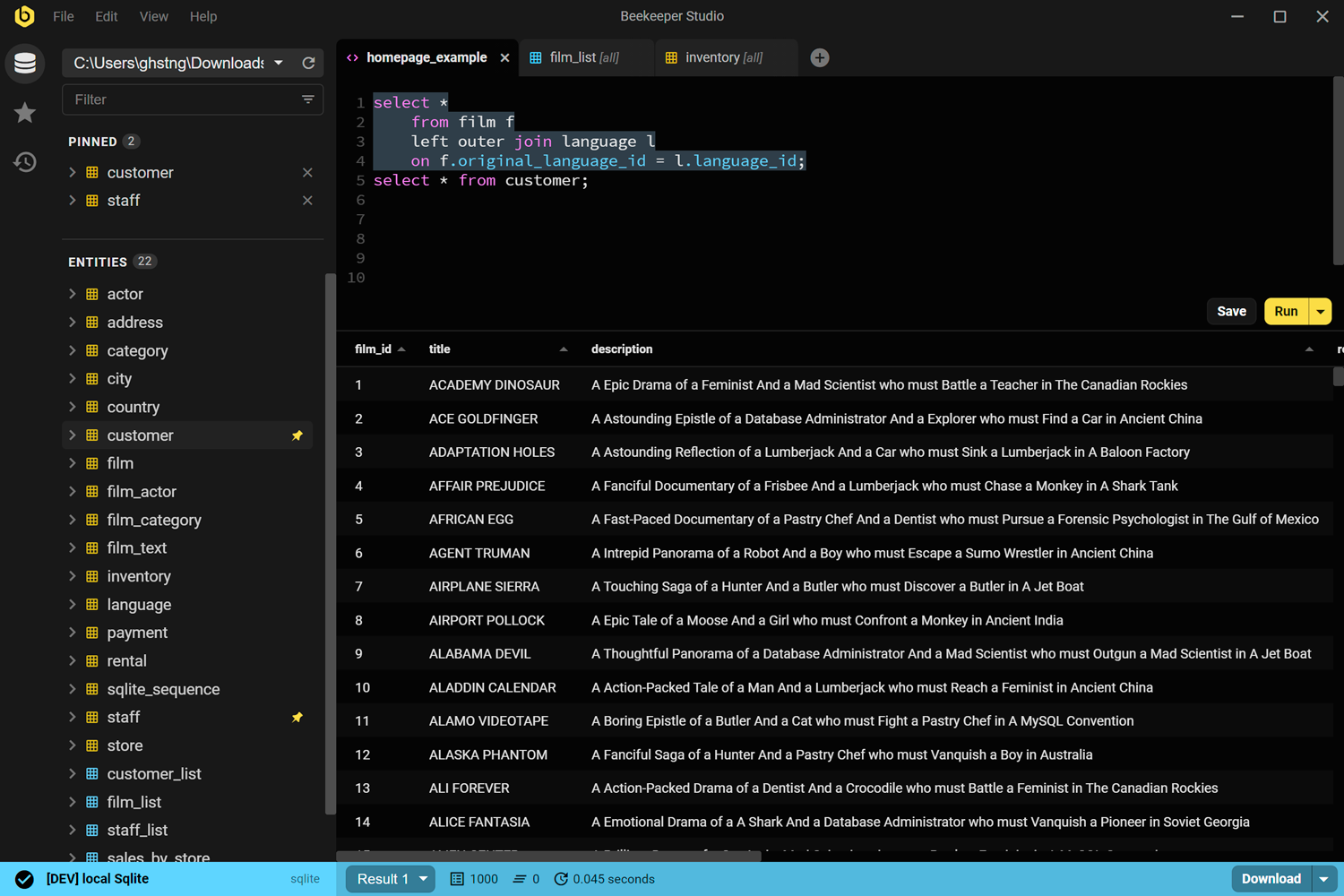
Trasparenza totale: Beekeeper Studio lo sviluppiamo noi, quindi tienine conto. Detto questo, il supporto a Redis è gratuito in ogni piano (Community Edition inclusa) da quando l'abbiamo rilasciato nella 5.4.
Come GUI per Redis, Beekeeper ti offre un runner di comandi con autocompletamento e cronologia salvata, un browser delle chiavi in stile foglio di calcolo per scorrere i keyspace, visualizzazione e modifica del TTL per ogni chiave, e flussi di rinomina/eliminazione che non ti obbligano a ricordare la sintassi esatta dei comandi. Gestisce stringhe, hash, liste, set, sorted set, stream e JSON (tramite moduli).
Il vantaggio più ampio è che si tratta della stessa app che usi per le connessioni a Postgres, MySQL e SQLite. Se la usi già per i database SQL, non ti serve uno strumento separato solo per Redis.
Beekeeper Studio è un prodotto piacevole da usare grazie alla sua interfaccia e user experience pulite. La navigazione è facile, le connessioni sono semplici e adoro che supporti anche Redis gratuitamente. - Aniket Dutta
Link di Beekeeper Studio
RedisInsight
Disponibile per Windows, macOS e Linux - redis.io/redis-insight
RedisInsight è la GUI ufficiale di Redis Ltd. (l'azienda dietro Redis). È gratuita da scaricare e usare, senza limitazioni significative per il lavoro di tutti i giorni.
Copre tutto ciò che ti aspetti da uno strumento ufficiale: un browser integrato per esplorare le chiavi per pattern, un workbench per eseguire comandi con evidenziazione della sintassi e viste per ispezionare strutture dati specifiche. Include anche alcune funzionalità specifiche di Redis che non trovi nelle GUI multi-database: un visualizzatore dello slow log, l'analisi della memoria per capire dove cresce il keyspace e un profiler che mostra i comandi eseguiti in tempo reale.
RedisInsight supporta anche Redis Cluster e Redis Sentinel di serie, cosa importante se gestisci un ambiente di produzione e non una singola istanza locale.
Il limite principale è che funziona solo con Redis. Se lavori con più tipi di database, ti servirà un altro strumento per tutto il resto.
Link di RedisInsight
Another Redis Desktop Manager (ARDM)
Disponibile per Windows, macOS e Linux - github.com/qishibo/AnotherRedisDesktopManager
ARDM è nato come alternativa open source dopo che l'originale Redis Desktop Manager (RDM) è diventato commerciale. Ha licenza MIT, è mantenuto attivamente su GitHub e ha conquistato una vasta base di utenti tra gli sviluppatori che non vogliono pagare per una GUI per Redis.
Quanto a funzionalità, è un'app desktop solida: browser delle chiavi con vista ad albero organizzata per prefisso, console dei comandi, supporto a cluster e Sentinel, supporto ai tunnel SSH e un tema scuro che non sembra disegnato nel 2011. Gestisce più connessioni e schede.
L'interfaccia risulta familiare a chiunque abbia usato il vecchio RDM. Non è rifinita come gli strumenti commerciali, ma per una GUI open source gratuita per Redis è ben mantenuta e fa il suo lavoro.
Link di ARDM
Redis Commander
Web (Node.js) - github.com/joeferner/redis-commander
Redis Commander è uno strumento diverso: una UI web che esegui in locale o ospiti su un server, non un'app desktop. È sviluppato in Node.js e ha licenza MIT.
Installalo con npm (npm install -g redis-commander) e poi aprilo nel browser. Ti offre un browser delle chiavi, l'esecuzione di comandi e la modifica di base tramite un'interfaccia web. Questo lo rende una scelta sensata negli ambienti dove non puoi installare un'app desktop: un container di CI, un server condiviso o un setup Docker in cui la tua istanza Redis convive con altri servizi.
Il compromesso è che la UI è minimale e il progetto non evolve rapidamente. Per un'esplorazione occasionale va bene. Per l'uso interattivo quotidiano, un'app desktop nativa risulterà più veloce e completa.
Link di Redis Commander
TablePlus
Disponibile per Windows, macOS e Linux - tableplus.com
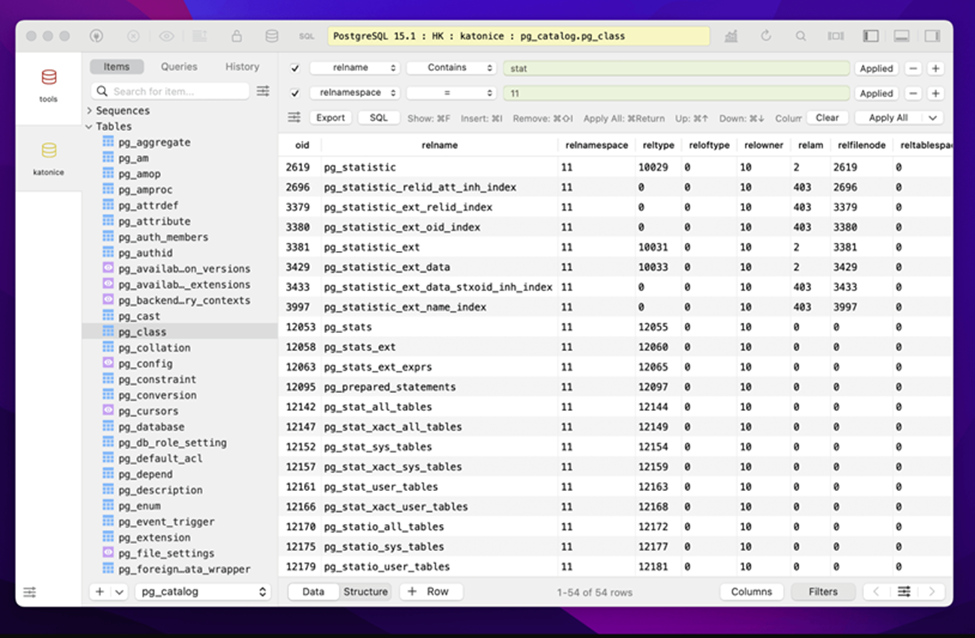
TablePlus è una GUI multi-database che include Redis accanto al supporto per i database SQL. Se lo usi già per Postgres o MySQL, accedere a Redis senza installare un altro strumento è davvero comodo.
Il supporto a Redis in TablePlus comprende la navigazione delle chiavi, la modifica dei valori e l'esecuzione di comandi di base. Non è focalizzato su Redis quanto RedisInsight, ma è un'app nativa pulita e veloce, più che sufficiente per ispezionare e modificare le chiavi.
Un'avvertenza: TablePlus ha un piano gratuito limitato e l'accesso completo richiede una licenza a pagamento. La versione gratuita funziona per un uso occasionale, ma se ne raggiungi spesso i limiti diventa una scelta a pagamento. Inoltre non è open source.
Link di TablePlus
Quale GUI per Redis dovresti usare?
Per la maggior parte degli sviluppatori, la scelta dipende da cosa usi già e da cosa ti serve fare con Redis:
- Se lavori con più database: Beekeeper Studio gestisce Redis insieme ai tuoi database SQL ed è gratuito per le funzionalità Redis. TablePlus fa lo stesso, ma il piano gratuito è più limitato.
- Se Redis è il tuo database principale: RedisInsight è pensato apposta e ha il set di funzionalità più completo (slow log, analisi della memoria, supporto a cluster/sentinel). Difficile da battere per carichi di lavoro incentrati su Redis.
- Se vuoi un open source senza vincoli: ARDM è l'opzione desktop gratuita meglio mantenuta e l'erede naturale del vecchio RDM.
- Se lavori in un ambiente containerizzato: Redis Commander gira nel browser e non richiede installazioni desktop locali.
La CLI di Redis sarà sempre lì quando devi lanciare un comando veloce, ma per tutto ciò che riguarda navigare, fare debug o modificare i keyspace, una GUI si ripaga in fretta. E visto che sono tutti gratuiti, non c'è motivo per non provarne qualcuno.
Scarica Beekeeper Studio gratis
Articoli correlati
 Beekeeper Studio è una GUI per database gratuita & open source
Il miglior strumento per query & editor SQL che abbia mai usato. Offre tutto ciò che mi serve per gestire il mio database. - ⭐⭐⭐⭐⭐ Mit
Beekeeper Studio è veloce, intuitivo e facile da usare. Beekeeper supporta tantissimi database e funziona alla grande su Windows, Mac e Linux.
Cosa dicono gli utenti di Beekeeper Studio
"Beekeeper Studio ha sostituito completamente il mio vecchio workflow SQL. È veloce, intuitivo e rende di nuovo piacevole lavorare con i database."
"Ho provato molte GUI per database, ma Beekeeper trova l'equilibrio perfetto tra funzionalità e semplicità. Funziona e basta."