
Einführung
Einen Primärschlüssel zu einer bestehenden Tabelle in PostgreSQL hinzuzufügen, ist eine Aufgabe, mit der Datenbankadministratoren und Entwickler die Datenintegrität sicherstellen und die Performance der Datenbank optimieren. Dieses Tutorial führt dich Schritt für Schritt durch das Hinzufügen eines Primärschlüssels zu einer bestehenden Tabelle in PostgreSQL und erklärt die nötigen SQL-Befehle und worauf du achten solltest.
Voraussetzungen
- Zugriff auf eine PostgreSQL-Datenbank
- Ausreichende Rechte, um Tabellenstrukturen zu ändern
- Grundkenntnisse in SQL und Datenbankkonzepten
Primärschlüssel verstehen
Ein Primärschlüssel ist eine Spalte oder eine Gruppe von Spalten, mit der jede Zeile einer Tabelle eindeutig identifiziert wird. Er muss eindeutige Werte enthalten und darf keine NULL-Werte enthalten. Eine Tabelle kann nur einen Primärschlüssel haben.
Schritt 1: Die aktuelle Tabellenstruktur prüfen
Bevor du einen Primärschlüssel hinzufügst, prüfe die bestehende Tabellenstruktur, um sicherzugehen, dass es noch keinen gibt, und um zu entscheiden, welche Spalte(n) als Schlüssel infrage kommen.
Das geht auf zwei Arten – über die Kommandozeile oder visuell in Beekeeper Studio.
Option 1 – Mit psql
-- Replace 'your_table' with your table name
\d your_table
Damit werden die Spalten, Indizes und Constraints der Tabelle direkt in psql angezeigt.
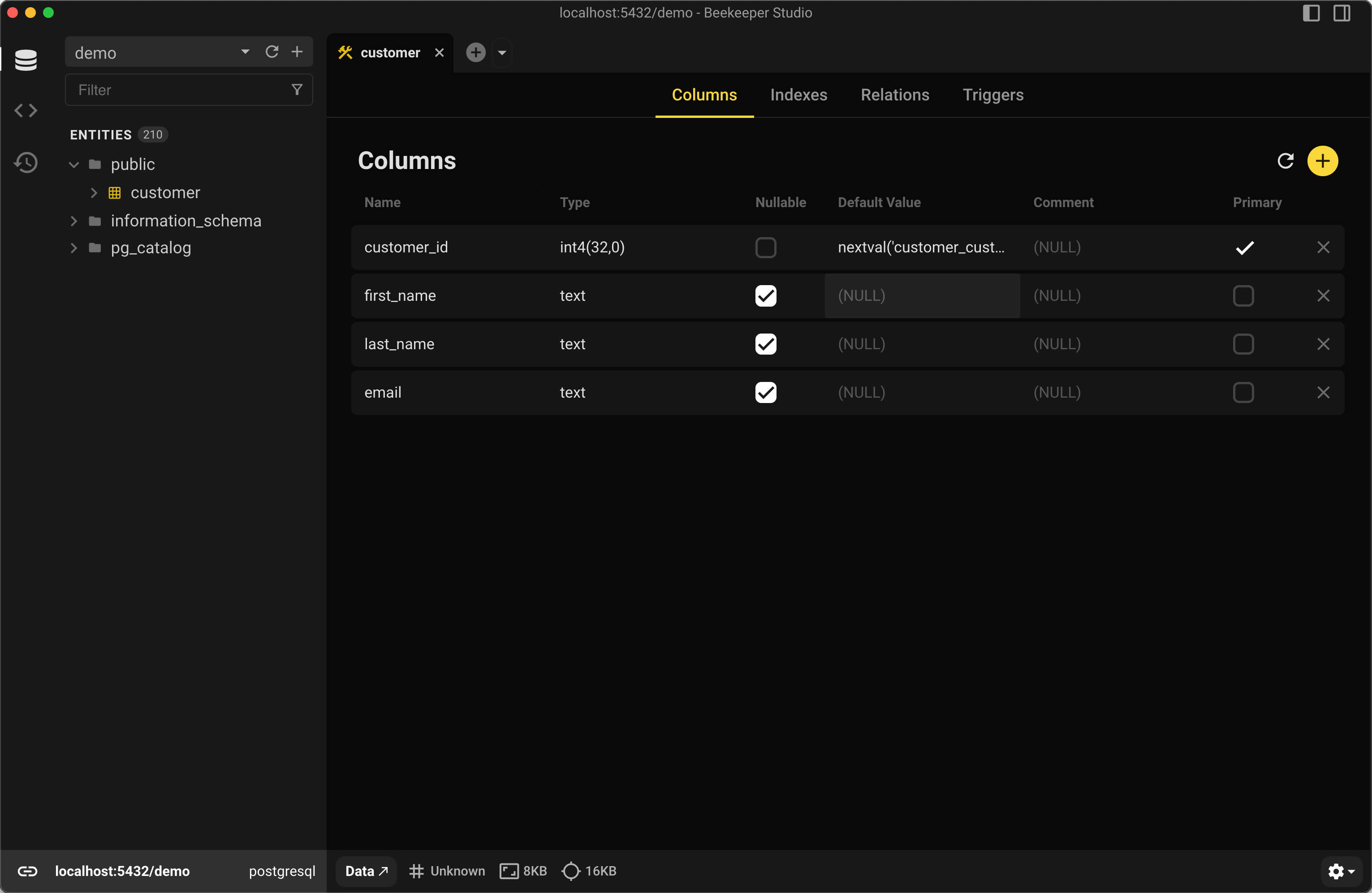
Option 2 – Mit Beekeeper Studio
Klick in Beekeeper Studio mit der rechten Maustaste auf deine Tabelle und wähle View Structure, um alle Spalten, Indizes und Constraints visuell zu sehen.
Schritt 2: Die passende Spalte wählen
Wähle eine Spalte, die garantiert für jede Zeile eindeutig ist. Gibt es keine solche Spalte, musst du eventuell eine neue Spalte anlegen oder eine Kombination aus Spalten als zusammengesetzten Schlüssel verwenden.
Schritt 3: Einen Primärschlüssel hinzufügen
Primärschlüssel aus einer Spalte
Wenn du dich für eine einzelne Spalte entscheidest, die jede Zeile eindeutig identifiziert, kannst du – vorausgesetzt, du bist mit der richtigen Datenbank verbunden – folgende SQL-Syntax verwenden:
-- Replace 'your_table' and 'column_name' with your actual table name and column name
ALTER TABLE your_table
ADD PRIMARY KEY (column_name);
Wenn du zum Beispiel einen Primärschlüssel zu einer Tabelle namens customer mit den Spalten customer_id, first_name und last_name hinzufügen möchtest, kannst du folgenden ALTER-TABLE-Befehl verwenden:
ALTER TABLE customer ADD PRIMARY KEY (customer_id);
Damit wird ein Primärschlüssel auf der Spalte customer_id erstellt.
Einen zusammengesetzten Primärschlüssel zu einer bestehenden Tabelle hinzufügen
Alternativ kannst du einen zusammengesetzten Primärschlüssel aus mehreren Spalten erstellen, etwa so:
ALTER TABLE customer ADD PRIMARY KEY (first_name, last_name);
Damit wird ein Primärschlüssel erstellt, der aus den Spalten first_name und last_name besteht.
Schritt 4: Den neuen Primärschlüssel prüfen
Nachdem du den Primärschlüssel hinzugefügt hast, solltest du prüfen, ob er korrekt auf die Tabelle angewendet wurde.
-- Check the constraints on the table to confirm the primary key exists
SELECT conname, contype
FROM pg_constraint
WHERE conrelid = 'your_table'::regclass;
Wenn du lieber eine GUI nutzt: Beekeeper Studio zeigt im Tab Structure automatisch ein Schlüsselsymbol neben der Primärspalte an, sobald der Constraint hinzugefügt wurde.
Erwartete Ausgabe mit customer
           conname            | contype
------------------------------+---------
 customer_pkey                | p
 customer_support_rep_id_fkey | f
contype p steht für einen Primärschlüssel-Constraint.
Worauf du beim Hinzufügen eines Primärschlüssels achten solltest
- Eindeutigkeit der Daten: Stell sicher, dass die Spalte(n), die du zum Primärschlüssel machst, in allen Zeilen eindeutige Daten enthalten.
- Performance: Einen Primärschlüssel zu großen Tabellen hinzuzufügen, kann ressourcenintensiv und zeitaufwendig sein. Plane bei großen Tabellen Wartungsfenster ein.
- Datenintegrität: Sobald ein Primärschlüssel-Constraint hinzugefügt ist, führt jede Insert- oder Update-Operation, die doppelte Einträge erzeugen würde, zu einem Fehler.
Zusammenfassung
Ein Primärschlüssel in einer bestehenden PostgreSQL-Tabelle hilft dabei, die Datenintegrität zu wahren und die Performance zu verbessern.
Egal, ob du SQL auf der Kommandozeile oder einen visuellen Workflow bevorzugst – Tools wie Beekeeper Studio machen es leicht, dein Schema zu inspizieren, neue Constraints zu prüfen und Fehler zu vermeiden.
Willst du deine SQL-Syntax vor dem Ausführen prüfen? Probier unseren kostenlosen SQL Syntax Checker – und wenn du bereit bist, die Änderungen anzuwenden, öffne deine Datenbank in Beekeeper Studio und sieh dir die Ergebnisse sofort an.
Beekeeper Studio herunterladen →
 Beekeeper Studio ist eine kostenlose & quelloffene Datenbank-GUI
Das beste SQL-Abfrage- & Editor-Tool, das ich je benutzt habe. Es bietet alles, was ich zum Verwalten meiner Datenbank brauche. - ⭐⭐⭐⭐⭐ Mit
Beekeeper Studio ist schnell, intuitiv und einfach zu bedienen. Beekeeper unterstützt jede Menge Datenbanken und läuft hervorragend auf Windows, Mac und Linux.
Was Nutzer über Beekeeper Studio sagen
„Beekeeper Studio hat meinen alten SQL-Workflow komplett ersetzt. Es ist schnell, intuitiv und macht die Arbeit mit Datenbanken wieder zum Vergnügen.“
„Ich habe viele Datenbank-GUIs ausprobiert, aber Beekeeper trifft die perfekte Balance zwischen Funktionsumfang und Einfachheit. Es funktioniert einfach.“