
はじめに
PostgreSQLで既存のテーブルに主キーを追加する作業は、データの整合性を確保し、データベースのパフォーマンスを最適化するためにデータベース管理者や開発者が行うものです。このチュートリアルでは、PostgreSQLの既存のテーブルに主キーを追加する手順を、必要なSQLコマンドや注意点とあわせて解説します。
前提条件
- PostgreSQLデータベースへのアクセス
- テーブル構造を変更するための十分な権限
- SQLとデータベースの基本的な知識
主キーとは
主キーとは、テーブル内の各行を一意に識別するために使用される列、または列の組み合わせです。主キーには一意の値が必要で、NULL値を含めることはできません。1つのテーブルに設定できる主キーは1つだけです。
ステップ1: 現在のテーブル構造を確認する
主キーを追加する前に、既存のテーブル構造を確認し、主キーがまだ設定されていないことを確かめたうえで、どの列をキーにできるかを決めます。
確認方法は2つあります。コマンドラインを使う方法と、Beekeeper Studioで視覚的に確認する方法です。
方法1 — psqlを使う
-- Replace 'your_table' with your table name
\d your_table
psql上でテーブルの列、インデックス、制約が直接表示されます。
方法2 — Beekeeper Studioを使う
Beekeeper Studioでテーブルを右クリックし、View Structureを選択すると、すべての列、インデックス、制約を視覚的に確認できます。
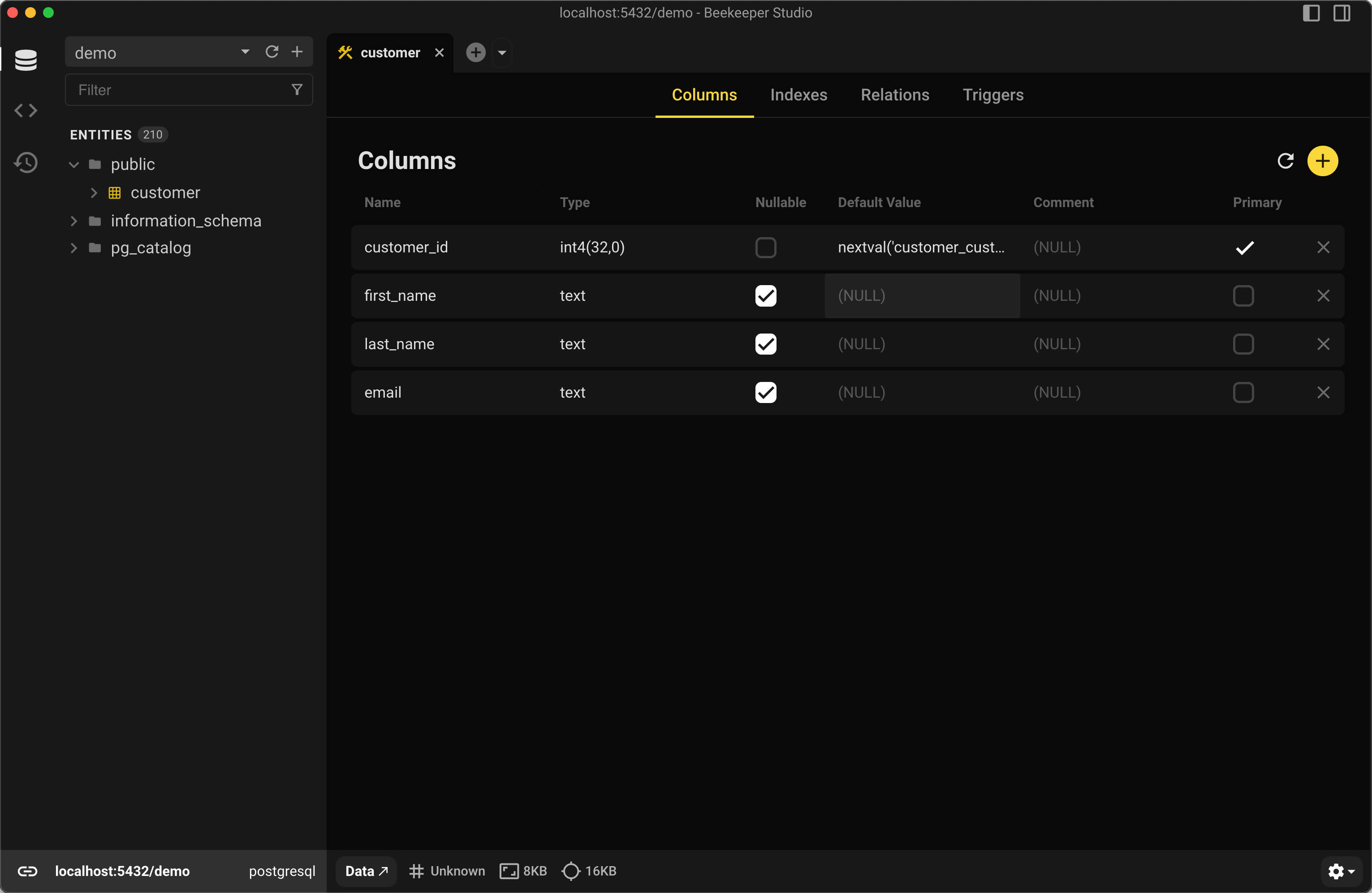
ステップ2: 適切な列を選ぶ
各行で一意であることが保証されている列を選びます。そのような列が存在しない場合は、新しい列を作成するか、複数の列を組み合わせて複合キーを作る必要があります。
ステップ3: 主キーを追加する
単一列の主キー
各行を一意に識別できる単一の列を決めたら、正しいデータベースに接続していることを前提に、次のSQL構文を使用できます。
-- Replace 'your_table' and 'column_name' with your actual table name and column name
ALTER TABLE your_table
ADD PRIMARY KEY (column_name);
たとえば、customer_id、first_name、last_nameという列を持つcustomerテーブルに主キーを追加する場合は、次のALTER TABLEコマンドを使用します。
ALTER TABLE customer ADD PRIMARY KEY (customer_id);
これにより、customer_id列に主キーが作成されます。
既存のテーブルに複合主キーを追加する
また、次のように複数の列で構成される複合主キーを作成することもできます。
ALTER TABLE customer ADD PRIMARY KEY (first_name, last_name);
これにより、first_name列とlast_name列の両方で構成される主キーが作成されます。
ステップ4: 新しい主キーを確認する
主キーを追加したら、テーブルに正しく適用されているかを確認することが重要です。
-- Check the constraints on the table to confirm the primary key exists
SELECT conname, contype
FROM pg_constraint
WHERE conrelid = 'your_table'::regclass;
GUIを使いたい場合は、Beekeeper Studioなら制約の追加後、Structureタブで主キー列の横に鍵アイコンが自動的に表示されます。
customerでの出力例
           conname            | contype
------------------------------+---------
 customer_pkey                | p
 customer_support_rep_id_fkey | f
contypeがpの場合、主キー制約であることを示します。
主キーを追加する際の注意点
- データの一意性: 主キーにする列のデータが、すべての行で一意であることを確認してください。
- パフォーマンス: 大規模なテーブルへの主キーの追加は、リソースを大量に消費し、時間がかかる場合があります。大規模なテーブルではメンテナンス時間帯での実施を検討してください。
- データの整合性: 主キー制約を追加すると、重複したエントリを発生させるINSERTやUPDATE操作はエラーになります。
まとめ
PostgreSQLで既存のテーブルに主キーを追加すると、データの整合性を維持し、パフォーマンスを向上させることができます。
コマンドラインでSQLを書く場合でも、視覚的に作業する場合でも、Beekeeper Studioのようなツールを使えば、スキーマの確認や新しい制約の検証が簡単になり、ミスを防げます。
実行前にSQL構文を確認したいですか?無料のSQL構文チェッカーをお試しください。変更を適用する準備ができたら、Beekeeper Studioでデータベースを開けば結果をすぐに確認できます。
 Beekeeper Studioは無料のオープンソースのデータベースGUIです
これまで使った中で最高のSQLクエリ&エディタツールです。データベースの管理に必要なものがすべて揃っています。 - ⭐⭐⭐⭐⭐ Mit
Beekeeper Studioは高速で直感的、そして使いやすいツールです。多数のデータベースに対応し、Windows、Mac、Linuxで快適に動作します。
Beekeeper Studio 利用者の声
「Beekeeper Studioで以前のSQLワークフローを完全に置き換えました。高速で直感的、データベース作業がまた楽しくなりました。」
「多くのデータベースGUIを試してきましたが、Beekeeperは機能とシンプルさのバランスが絶妙です。とにかくちゃんと動きます。」