
複数の MySQL テーブルからデータを取得しようとして途方に暮れた経験があるなら、それはあなただけではありません。JOIN は最初は難しそうに見えますが、コツをつかめば非常に強力な武器になる概念のひとつです。
JOIN とは、MySQL に「このテーブルとあのテーブルからデータを取りたい。ただし、特定の条件が一致するものだけ」と伝える方法だと考えてください。基本的なパターンを理解すれば、プロのようにデータを組み合わせられるようになります。
🔖 クイックリファレンス: すぐに確認したいときは、すべての JOIN の種類、図解、コード例を1か所にまとめた SQL JOIN チートシートをご覧ください。
JOIN の家系図
JOIN の本質は、共通点を持つ異なるテーブルの行を結合することです。共通の知り合いがいる2つの友人グループを引き合わせるようなものです。
この記事で扱う JOIN の種類は次のとおりです:
- INNER JOIN - 両方のテーブルに存在するレコードだけを表示
- LEFT JOIN - 左テーブルのすべてと、右テーブルの一致する行を表示
- RIGHT JOIN - LEFT JOIN の逆(とはいえ、実際にはほとんどの人がテーブルの順番を入れ替えて済ませます)
- FULL JOIN - 両方のテーブルのすべて(MySQL では少し工夫が必要です)
- CROSS JOIN - 考えられるすべての組み合わせ(使用には注意!)
- SELF JOIN - テーブルが自分自身と対話する必要があるとき
INNER JOIN - 完璧主義者
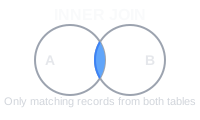
INNER JOIN はえり好みします。両方のテーブルに一致するデータがある行だけを返します。ベン図の重なり部分だと考えてください。
例:
employees と departments という2つのシンプルなテーブルを使ってみましょう:
-- Employees Table
+----+----------+-------------+
| id | name     | department_id|
+----+----------+-------------+
| 1  | Alice    | 1           |
| 2  | Bob      | 2           |
| 3  | Charlie  | NULL        |
+----+----------+-------------+

-- Departments Table
+----+-------------+
| id | department  |
+----+-------------+
| 1  | HR          |
| 2  | IT          |
+----+-------------+
INNER JOIN クエリ:
SELECT employees.name, departments.department
FROM employees
INNER JOIN departments ON employees.department_id = departments.id;
結果:
+-------+------------+
| name  | department |
+-------+------------+
| Alice | HR         |
| Bob   | IT         |
+-------+------------+
LEFT JOIN - 包容力のあるタイプ
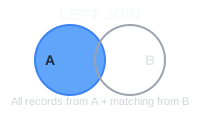
LEFT JOIN は INNER JOIN より寛大です。「左テーブルのものはすべて欲しい。右テーブルに一致するものがあれば最高!なければ NULL を入れておくよ」というわけです。
今回は、部署に所属していない Charlie も表示されている点に注目してください:
LEFT JOIN クエリ:
SELECT employees.name, departments.department
FROM employees
LEFT JOIN departments ON employees.department_id = departments.id;
結果:
+---------+------------+
| name    | department |
+---------+------------+
| Alice   | HR         |
| Bob     | IT         |
| Charlie | NULL       |
+---------+------------+
RIGHT JOIN - 裏返し
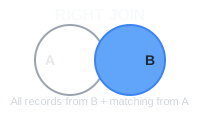
RIGHT JOIN は、テーブルを入れ替えた LEFT JOIN にすぎません。ほとんどの開発者は RIGHT JOIN を避け、代わりに FROM 句を並べ替えます。そのほうが混乱しにくいからです。
RIGHT JOIN クエリ:
SELECT employees.name, departments.department
FROM employees
RIGHT JOIN departments ON employees.department_id = departments.id;
結果:
+-------+------------+
| name  | department |
+-------+------------+
| Alice | HR         |
| Bob   | IT         |
+-------+------------+
FULL JOIN - 何でも全部入り
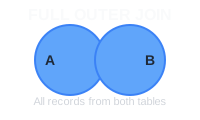
ここで MySQL の少し困った点があります。FULL JOIN が組み込まれていないのです。ただし、UNION を使ったテクニックで代用できます:
FULL JOIN の再現:
SELECT employees.name, departments.department
FROM employees
LEFT JOIN departments ON employees.department_id = departments.id
UNION
SELECT employees.name, departments.department
FROM employees
RIGHT JOIN departments ON employees.department_id = departments.id;
結果:
+---------+------------+
| name    | department |
+---------+------------+
| Alice   | HR         |
| Bob     | IT         |
| Charlie | NULL       |
+---------+------------+
CROSS JOIN - カオスの生みの親
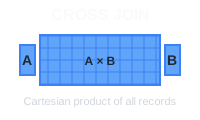
CROSS JOIN は、パーティーで全員を全員に紹介しようとする友人のようなものです。最初のテーブルのすべての行を、2番目のテーブルのすべての行と組み合わせます。従業員が3人、部署が2つなら、6通りの組み合わせになります:
CROSS JOIN クエリ:
SELECT employees.name, departments.department
FROM employees
CROSS JOIN departments;
結果:
+-------+------------+
| name  | department |
+-------+------------+
| Alice | HR         |
| Alice | IT         |
| Bob   | HR         |
| Bob   | IT         |
| Charlie | HR       |
| Charlie | IT       |
+-------+------------+
SELF JOIN - 内省的なタイプ
SELF JOIN は、テーブルが自分自身を参照するときに使います。典型的な例は、一部の従業員が他の従業員を管理している従業員テーブルです。
例:
次の managers テーブルでは、mgr_id が同じテーブル内の別の行を指しています:
-- Managers Table
+----+----------+--------+
| id | name     | mgr_id |
+----+----------+--------+
| 1  | Tom      | NULL   |
| 2  | Jerry    | 1      |
| 3  | Spike    | 1      |
+----+----------+--------+
SELF JOIN クエリ:
SELECT m1.name AS manager, m2.name AS employee
FROM managers m1
LEFT JOIN managers m2 ON m1.id = m2.mgr_id;
結果:
+---------+----------+
| manager | employee |
+---------+----------+
| Tom     | Jerry    |
| Tom     | Spike    |
| Jerry   | NULL     |
| Spike   | NULL     |
+---------+----------+
まとめ
JOIN は最初は圧倒されるかもしれませんが、実際には「これらのルールで複数のテーブルからデータを表示して」と伝えるさまざまな方法にすぎません。まずは INNER JOIN と LEFT JOIN から始めましょう。必要な作業の90%はこれでカバーできます。
JOIN に慣れる一番の方法は、自分のデータで練習することです。テスト用のテーブルを作り、サンプルデータを入れて、いろいろ試してみてください。すぐに LEFT も RIGHT も自在にテーブルを結合できるようになるはずです。
そして覚えておいてください。JOIN が予想よりはるかに多くの行を返している場合、うっかり CROSS JOIN をしてしまった可能性が高いです。誰もが一度は通る道です!
 Beekeeper Studioは無料のオープンソースのデータベースGUIです
これまで使った中で最高のSQLクエリ&エディタツールです。データベースの管理に必要なものがすべて揃っています。 - ⭐⭐⭐⭐⭐ Mit
Beekeeper Studioは高速で直感的、そして使いやすいツールです。多数のデータベースに対応し、Windows、Mac、Linuxで快適に動作します。
Beekeeper Studio 利用者の声
「Beekeeper Studio は、以前の SQL ワークフローを完全に置き換えてくれました。高速で直感的、データベース作業がまた楽しくなりました。」
「多くのデータベース GUI を試してきましたが、Beekeeper は機能とシンプルさのバランスが絶妙です。とにかくちゃんと動きます。」