
If you’ve ever tried to pull data from multiple MySQL tables and felt lost, you’re not alone. Joins are one of those concepts that seem intimidating at first but become incredibly powerful once you get the hang of them.
Think of joins as a way to tell MySQL “hey, I want to grab data from this table AND that table, but only where certain conditions match up.” Once you understand the basic patterns, you’ll be combining data like a pro.
🔖 Quick Reference: Need a quick lookup? Check out our SQL JOIN Cheat Sheet with all JOIN types, visual diagrams, and code examples in one place.
The Join Family Tree
At its core, a join lets you combine rows from different tables when they share something in common. It’s like introducing two groups of friends who have mutual connections.
Here’s the lineup of join types we’ll cover:
- INNER JOIN - Only show me records that exist in both tables
- LEFT JOIN - Show me everything from the left table, plus matches from the right
- RIGHT JOIN - The opposite of LEFT JOIN (though honestly, most people just flip their tables around instead)
- FULL JOIN - Everything from both tables (MySQL makes us work a bit for this one)
- CROSS JOIN - Every possible combination (use with caution!)
- SELF JOIN - When a table needs to talk to itself
INNER JOIN - The Perfectionist
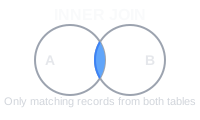
INNER JOIN is picky. It only gives you rows where both tables have matching data. Think of it as the intersection in a Venn diagram.
Example:
Let’s work with two simple tables - employees and departments:
-- Employees Table
+----+----------+-------------+
| id | name     | department_id|
+----+----------+-------------+
| 1  | Alice    | 1           |
| 2  | Bob      | 2           |
| 3  | Charlie  | NULL        |
+----+----------+-------------+

-- Departments Table
+----+-------------+
| id | department  |
+----+-------------+
| 1  | HR          |
| 2  | IT          |
+----+-------------+
INNER JOIN Query:
SELECT employees.name, departments.department
FROM employees
INNER JOIN departments ON employees.department_id = departments.id;
Result:
+-------+------------+
| name  | department |
+-------+------------+
| Alice | HR         |
| Bob   | IT         |
+-------+------------+
LEFT JOIN - The Inclusive One
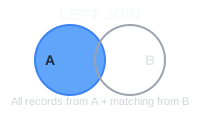
LEFT JOIN is more generous than INNER JOIN. It says “I want everything from the left table, and if there’s matching stuff in the right table, great! If not, I’ll just put NULL there.”
Notice how Charlie shows up this time, even though he doesn’t have a department:
LEFT JOIN Query:
SELECT employees.name, departments.department
FROM employees
LEFT JOIN departments ON employees.department_id = departments.id;
Result:
+---------+------------+
| name    | department |
+---------+------------+
| Alice   | HR         |
| Bob     | IT         |
| Charlie | NULL       |
+---------+------------+
RIGHT JOIN - The Flip Side
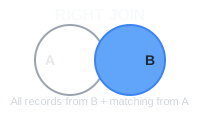
RIGHT JOIN is just LEFT JOIN with the tables flipped. Most developers avoid it and just rearrange their FROM clause instead - it’s less confusing that way.
RIGHT JOIN Query:
SELECT employees.name, departments.department
FROM employees
RIGHT JOIN departments ON employees.department_id = departments.id;
Result:
+-------+------------+
| name  | department |
+-------+------------+
| Alice | HR         |
| Bob   | IT         |
+-------+------------+
FULL JOIN - The Kitchen Sink Approach
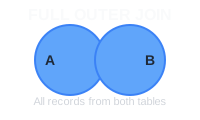
Here’s where MySQL gets a bit annoying - it doesn’t have a built-in FULL JOIN. But we can fake it with a UNION trick:
FULL JOIN Simulation:
SELECT employees.name, departments.department
FROM employees
LEFT JOIN departments ON employees.department_id = departments.id
UNION
SELECT employees.name, departments.department
FROM employees
RIGHT JOIN departments ON employees.department_id = departments.id;
Result:
+---------+------------+
| name    | department |
+---------+------------+
| Alice   | HR         |
| Bob     | IT         |
| Charlie | NULL       |
+---------+------------+
CROSS JOIN - The Chaos Creator
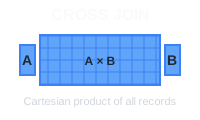
CROSS JOIN is like that friend who invites everyone to meet everyone else at a party. It pairs every single row from the first table with every single row from the second table. With 3 employees and 2 departments, we get 6 combinations:
CROSS JOIN Query:
SELECT employees.name, departments.department
FROM employees
CROSS JOIN departments;
Result:
+-------+------------+
| name  | department |
+-------+------------+
| Alice | HR         |
| Alice | IT         |
| Bob   | HR         |
| Bob   | IT         |
| Charlie | HR       |
| Charlie | IT       |
+-------+------------+
SELF JOIN - The Introspective One
Self joins happen when a table references itself. The classic example is an employee table where some employees manage other employees.
Example:
Here’s a managers table where the mgr_id points back to another row in the same table:
-- Managers Table
+----+----------+--------+
| id | name     | mgr_id |
+----+----------+--------+
| 1  | Tom      | NULL   |
| 2  | Jerry    | 1      |
| 3  | Spike    | 1      |
+----+----------+--------+
SELF JOIN Query:
SELECT m1.name AS manager, m2.name AS employee
FROM managers m1
LEFT JOIN managers m2 ON m1.id = m2.mgr_id;
Result:
+---------+----------+
| manager | employee |
+---------+----------+
| Tom     | Jerry    |
| Tom     | Spike    |
| Jerry   | NULL     |
| Spike   | NULL     |
+---------+----------+
Wrapping Up
Joins might seem overwhelming at first, but they’re really just different ways of saying “show me data from multiple tables with these rules.” Start with INNER and LEFT joins - they’ll handle 90% of what you need to do.
The best way to get comfortable with joins is to practice with your own data. Create some test tables, throw in some sample data, and start experimenting. Pretty soon you’ll be joining tables left and right (pun intended).
And remember: if your join is returning way more rows than you expected, you probably did a CROSS JOIN by accident. We’ve all been there!
 Beekeeper Studio Is A Free & Open Source Database GUI
Best SQL query & editor tool I have ever used. It provides everything I need to manage my database. - ⭐⭐⭐⭐⭐ Mit
Beekeeper Studio is fast, intuitive, and easy to use. Beekeeper supports loads of databases, and works great on Windows, Mac and Linux.
What Users Say About Beekeeper Studio
"Beekeeper Studio completely replaced my old SQL workflow. It's fast, intuitive, and makes database work enjoyable again."
"I've tried many database GUIs, but Beekeeper strikes the perfect balance between features and simplicity. It just works."