
Renaming columns in a database table is a common task that database administrators perform.
Tip: If you prefer working visually, you can also rename columns directly in Beekeeper Studio without writing any SQL. We’ll show you how later in this post.
In this blog post, we will learn how to rename a column in an Oracle database. Renaming a column can be a bit tricky, but with the right steps, it’s a straightforward process.
Prerequisites
Before we dive into the process of renaming a column, there are a few things that you need to be aware of:
- You must have the
ALTER TABLEprivilege to rename a column in an Oracle database. - Renaming a column affects all the data stored in the table, so make sure to take a backup of your data before making any changes.
- You must have a basic understanding of SQL syntax to follow along with this tutorial.
Renaming a Column
To rename a column in an Oracle database, use the ALTER TABLE command. The basic syntax for renaming a column in Oracle is:
ALTER TABLE table_name
RENAME COLUMN old_column_name TO new_column_name;
Let’s consider an example to understand the process of renaming a column in an Oracle database.
Suppose, you have a table named customers with the following structure:
| Name | Null? | Type |
|---|---|---|
| CUSTOMER_ID | NOT NULL | NUMBER(10) |
| CUSTOMER_NAME | NOT NULL | VARCHAR2(50) |
| CUSTOMER_ADDRESS | NOT NULL | VARCHAR2(100) |
| CUSTOMER_PHONE_NO | NOT NULL | VARCHAR2(15) |
Now, let’s say you want to change the name of the CUSTOMER_PHONE_NO column to PHONE_NUMBER. To do that, you need to run the following SQL statement:
ALTER TABLE customers
RENAME COLUMN CUSTOMER_PHONE_NO TO PHONE_NUMBER;
And that’s it! The column CUSTOMER_PHONE_NO has been successfully renamed to PHONE_NUMBER.
Renaming a Column In Beekeeper Studio
When you’re working with production tables or unfamiliar schemas, it’s often faster — and safer — to make structural changes visually. Beekeeper Studio lets you rename columns with a couple of clicks while showing you exactly what’s changing under the hood.
Here’s how to do it:
- Open your Oracle database in Beekeeper Studio.
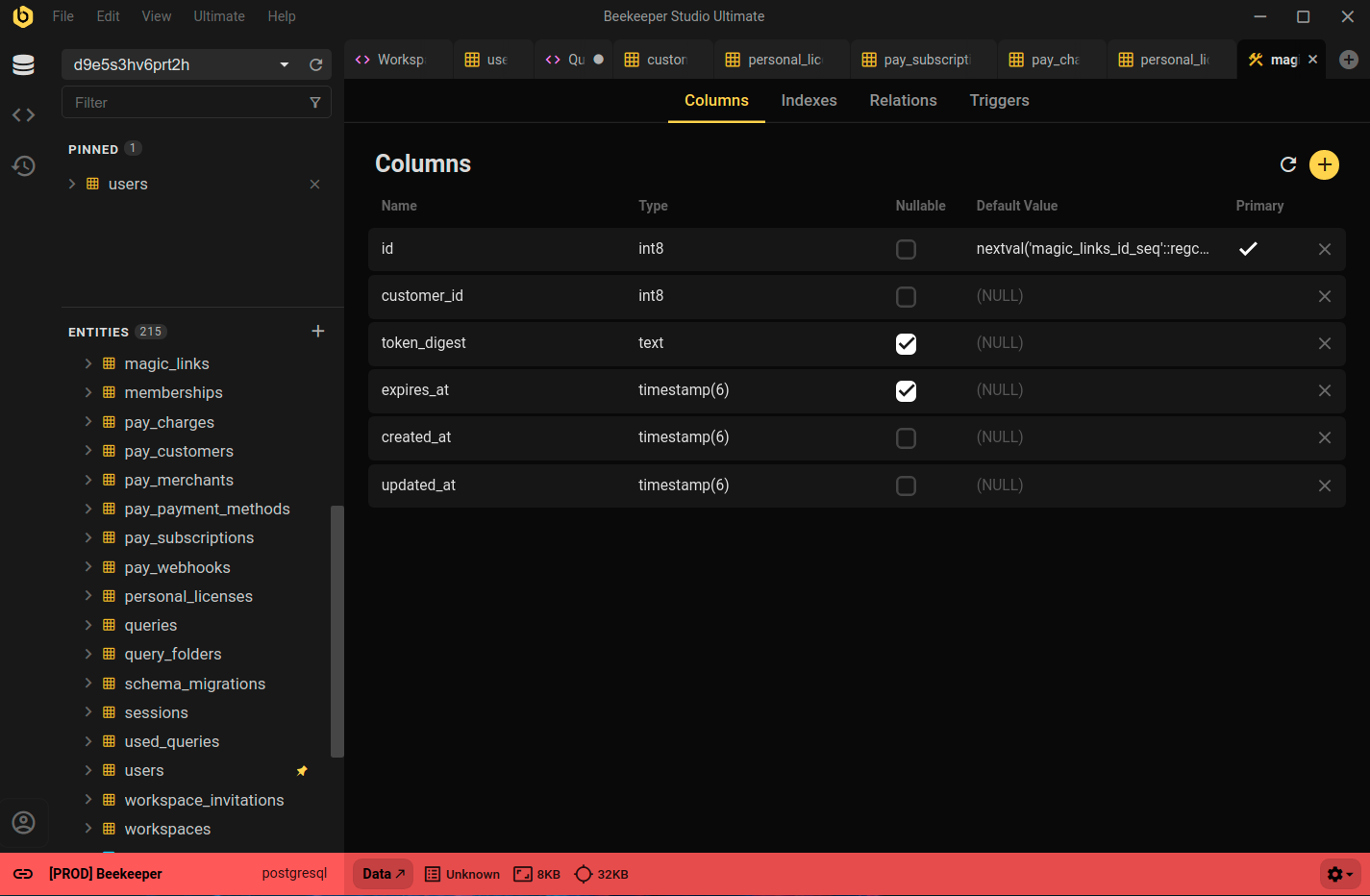
- In the sidebar, right-click the table you want to modify and choose View Structure.
- Edit the column name directly in the Structure view and click Save Changes.
Conclusion
Renaming a column in Oracle is straightforward once you know the syntax but the real challenge is doing it confidently, especially on live schemas.
Tools like Beekeeper Studio make it easy to see exactly how your tables are structured, verify the impact of your changes, and apply them safely — all without leaving your workflow.
Need to double-check your SQL before running it? Try our free SQL Syntax Checker.
And when you’re ready to make changes, open your database in Beekeeper Studio to confirm everything looks right.
 Beekeeper Studio Adalah GUI Database Gratis & Open Source
Alat query SQL & editor terbaik yang pernah saya gunakan. Menyediakan semua yang saya butuhkan untuk mengelola database saya. - ⭐⭐⭐⭐⭐ Mit
Beekeeper Studio cepat, intuitif, dan mudah digunakan. Beekeeper mendukung banyak database dan berfungsi dengan baik di Windows, Mac, dan Linux.
Apa Kata Pengguna Tentang Beekeeper Studio
"Beekeeper Studio sepenuhnya menggantikan alur kerja Oracle lama saya. Cepat, intuitif, dan membuat pekerjaan database menyenangkan lagi."
"Saya sudah mencoba banyak GUI database, tapi Beekeeper menemukan keseimbangan sempurna antara fitur dan kesederhanaan. Langsung berfungsi."