
As a database administrator, you may have come across a situation where you need to perform a certain task repeatedly and want to encapsulate that logic into a function. In PostgreSQL, functions are an essential tool that allow you to create custom logic in the form of stored procedures. In this blog post, we’ll learn how to create custom functions in PostgreSQL.
What is a PostgreSQL Function?
A function in PostgreSQL is a named block of code that accepts arguments, performs a set of operations, and returns a result. Functions are similar to procedures in other relational database management systems, but they have some unique features in PostgreSQL. Functions can return either a single value or multiple values, they can be used in SQL statements and they can be nested, which means you can call one function from within another function.
How to Create a Function in PostgreSQL
To create a function in PostgreSQL, you need to use the CREATE FUNCTION statement. Here’s the basic syntax for creating a function:
CREATE FUNCTION function_name(argument_1 data_type, argument_2 data_type, ...)
RETURNS return_data_type AS $$
BEGIN
    -- function body
END; $$
LANGUAGE language;
Let’s create a simple function that takes two numbers as input and returns the sum of those numbers. Here’s the code:
CREATE FUNCTION add_numbers(a integer, b integer)
RETURNS integer AS $$
BEGIN
    RETURN a + b;
END; $$
LANGUAGE plpgsql;
Here’s what’s happening in the code:
-
CREATE FUNCTION add_numbers(a integer, b integer)declares the function name and the arguments it accepts. -
RETURNS integerspecifies the data type of the returned value. In this case, it’s an integer. -
AS $$is the start of the function body. The function body is enclosed in two$$markers. -
BEGINandEND;define the start and end of the function body. -
RETURN a + b;is the logic of the function, which returns the sum of the two input arguments. -
LANGUAGE plpgsql;specifies the language in which the function is written. In this case, it’splpgsql.
How to Use a Function in PostgreSQL
Once you have created a function, you can use it in a SQL statement. Here’s how to use the add_numbers function we created above:
SELECT add_numbers(5, 7);
The output will be:
 add_numbers
-------------
           12
(1 row)
And that’s it! You have successfully created and used a custom function in PostgreSQL.
Custom Functions in Beekeeper Studio
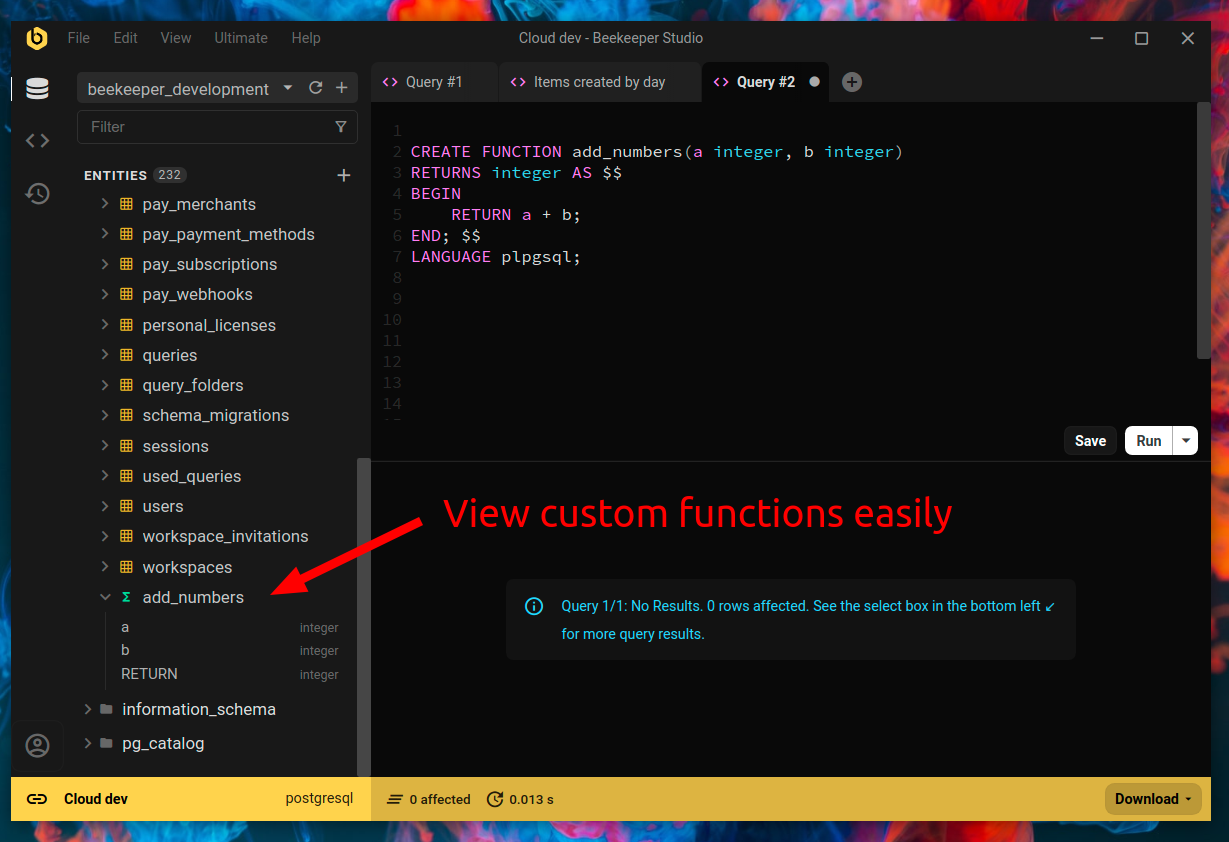
If you are using Beekeeper Studio you can see your custom functions in the left sidebar alongside all of your other entity data.
Conclusion
In this blog post, we learned how to create custom functions in PostgreSQL and how to use them in SQL statements. Functions are a powerful tool that can help you encapsulate complex logic and reuse it multiple times. By using functions, you can make your database code more organized and maintainable. So, go ahead and start creating your own functions in PostgreSQL today!
 Beekeeper Studio는 무료 & 오픈 소스 데이터베이스 GUI입니다
제가 사용해 본 최고의 SQL 쿼리 & 편집기 도구입니다. 데이터베이스 관리에 필요한 모든 것을 제공합니다. - ⭐⭐⭐⭐⭐ Mit
Beekeeper Studio는 빠르고 직관적이며 사용하기 쉽습니다. Beekeeper는 많은 데이터베이스를 지원하며 Windows, Mac, Linux에서 훌륭하게 작동합니다.
사용자들이 Beekeeper Studio에 대해 말하는 것
"Beekeeper Studio는 제 예전 SQL 워크플로를 완전히 대체했습니다. 빠르고 직관적이며 데이터베이스 작업을 다시 즐겁게 만들어 줍니다."
"많은 데이터베이스 GUI를 사용해 봤지만, Beekeeper는 기능과 단순함 사이의 완벽한 균형을 찾았습니다. 그냥 작동합니다."