
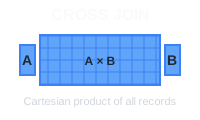
Un CROSS JOIN en PostgreSQL combina cada fila de una tabla con cada fila de otra, generando un producto cartesiano. Es útil para generar combinaciones, crear datos de prueba o emparejar elementos de dos conjuntos de datos.
🔖 Referencia rápida: ¿Necesitas consultar rápido todos los tipos de JOIN? Échale un ojo a nuestra guía rápida de SQL JOIN con diagramas visuales y ejemplos de código.
Sintaxis básica
SELECT column1, column2
FROM table1
CROSS JOIN table2;
También puedes usar la sintaxis implícita:
SELECT column1, column2
FROM table1, table2;
Ejemplo: combinaciones de productos y colores
Veamos dos tablas sencillas, products y colors, para mostrar cómo funciona un CROSS JOIN.
Tabla products:
| product_id | product_name |
|---|---|
| 1 | Playera |
| 2 | Jeans |
Tabla colors:
| color_id | color_name |
|---|---|
| 1 | Rojo |
| 2 | Azul |
Para generar todas las combinaciones posibles de productos y colores:
SELECT product_name, color_name
FROM products
CROSS JOIN colors;
Resultado esperado:
| product_name | color_name |
|---|---|
| Playera | Rojo |
| Playera | Azul |
| Jeans | Rojo |
| Jeans | Azul |
El CROSS JOIN combina cada producto con cada color, dando un total de 2 productos × 2 colores = 4 combinaciones.
Casos de uso comunes
Generar todas las combinaciones: crea variantes de productos combinando tallas y colores:
SELECT size, color
FROM sizes CROSS JOIN colors;
Crear datos de prueba: genera datos de ejemplo para pruebas combinando distintos parámetros:
SELECT strategy, scenario
FROM strategies CROSS JOIN scenarios;
Plantillas de reportes: crea filas de relleno para todas las combinaciones posibles en tus reportes.
Consideraciones importantes
Rendimiento: CROSS JOIN puede generar conjuntos de resultados muy grandes. Una tabla de 1,000 filas cruzada con otra de 1,000 filas produce 1,000,000 de filas.
Filtrado: usa cláusulas WHERE para limitar los resultados:
SELECT product_name, color_name
FROM products CROSS JOIN colors
WHERE product_name = 'T-Shirt';
Conclusión
CROSS JOIN es útil para generar combinaciones y datos de prueba, pero úsalo con cuidado en tablas grandes para evitar problemas de rendimiento. Siempre considera el tamaño de tu conjunto de resultados antes de ejecutar la consulta.
 Beekeeper Studio es un cliente de bases de datos gratuito y de código abierto
La mejor herramienta de consultas y edición de SQL que he usado. Tiene todo lo que necesito para administrar mi base de datos. - ⭐⭐⭐⭐⭐ Mit
Beekeeper Studio es rápido, intuitivo y fácil de usar. Es compatible con muchísimas bases de datos y funciona de maravilla en Windows, Mac y Linux.
Lo que dicen los usuarios de Beekeeper Studio
"Beekeeper Studio reemplazó por completo mi antiguo flujo de trabajo con SQL. Es rápido, intuitivo y hace que trabajar con bases de datos vuelva a ser divertido."
"He probado muchas GUI de bases de datos, pero Beekeeper logra el equilibrio perfecto entre funciones y simplicidad. Simplemente funciona."