
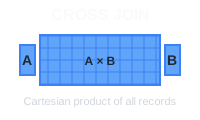
A CROSS JOIN in PostgreSQL combines every row from one table with every row from another table, creating a Cartesian product. This is useful for generating combinations, creating test data, or pairing elements from two datasets.
🔖 Quick Reference: Need a quick lookup for all JOIN types? Check out our SQL JOIN Cheat Sheet with visual diagrams and code examples.
Basic Syntax
SELECT column1, column2
FROM table1
CROSS JOIN table2;
You can also use the implicit syntax:
SELECT column1, column2
FROM table1, table2;
Example: Product and Color Combinations
Let’s consider two simple tables, products and colors, to demonstrate how a CROSS JOIN works.
products table:
| product_id | product_name |
|---|---|
| 1 | T-Shirt |
| 2 | Jeans |
colors table:
| color_id | color_name |
|---|---|
| 1 | Red |
| 2 | Blue |
To generate all possible combinations of products and colors:
SELECT product_name, color_name
FROM products
CROSS JOIN colors;
Expected Output:
| product_name | color_name |
|---|---|
| T-Shirt | Red |
| T-Shirt | Blue |
| Jeans | Red |
| Jeans | Blue |
The CROSS JOIN combines every product with every color, yielding a total of 2 products × 2 colors = 4 combinations.
Common Use Cases
Generating all combinations: Create product variants by combining sizes and colors:
SELECT size, color
FROM sizes CROSS JOIN colors;
Creating test data: Generate sample data for testing by combining different parameters:
SELECT strategy, scenario
FROM strategies CROSS JOIN scenarios;
Report templates: Create placeholder rows for all possible combinations in reports.
Important Considerations
Performance: CROSS JOIN can generate very large result sets. A table with 1,000 rows crossed with another 1,000-row table produces 1,000,000 rows.
Filtering: Use WHERE clauses to limit results:
SELECT product_name, color_name
FROM products CROSS JOIN colors
WHERE product_name = 'T-Shirt';
Conclusion
CROSS JOIN is useful for generating combinations and test data, but use it carefully with large tables to avoid performance issues. Always consider the size of your result set before running the query.
 Beekeeper Studio는 무료 & 오픈 소스 데이터베이스 GUI입니다
제가 사용해 본 최고의 SQL 쿼리 & 편집기 도구입니다. 데이터베이스 관리에 필요한 모든 것을 제공합니다. - ⭐⭐⭐⭐⭐ Mit
Beekeeper Studio는 빠르고 직관적이며 사용하기 쉽습니다. Beekeeper는 많은 데이터베이스를 지원하며 Windows, Mac, Linux에서 훌륭하게 작동합니다.
사용자들이 Beekeeper Studio에 대해 말하는 것
"Beekeeper Studio는 제 예전 SQL 워크플로를 완전히 대체했습니다. 빠르고 직관적이며 데이터베이스 작업을 다시 즐겁게 만들어 줍니다."
"많은 데이터베이스 GUI를 사용해 봤지만, Beekeeper는 기능과 단순함 사이의 완벽한 균형을 찾았습니다. 그냥 작동합니다."