
A CONSTRAINT is a rule that is used to limit the type of data that can be inserted into a table. In PostgreSQL, constraints are used to specify rules for the data in a table.
To add a CONSTRAINT to a table in PostgreSQL, follow these steps:
First, use the ALTER TABLE statement to specify the table that you want to add the constraint to.
ALTER TABLE table_name
Then use the ADD keyword to specify that you want to add a new constraint.
ADD CONSTRAINT constraint_name
Specify the type of constraint that you want to add. There are several types of constraints available in PostgreSQL, including:
-
UNIQUE: This constraint ensures that all values in a column are unique. -
NOT NULL: This constraint ensures that a column cannot have aNULLvalue. -
CHECK: This constraint allows you to specify a condition that must be met by the data in a column. -
FOREIGN KEY: This constraint is used to enforce a link between the data in two tables.
Finally provide any additional details or options for the constraint, as needed. For example, if you are adding a UNIQUE constraint, you may need to specify the columns that the constraint applies to.
ADD CONSTRAINT constraint_name UNIQUE (column1, column2)
Foreign key constraints
Use the ADD keyword and the FOREIGN KEY constraint to specify the link between the two tables.
ADD CONSTRAINT constraint_name FOREIGN KEY (column1) REFERENCES other_table (column2)
Check constraints
Use the CHECK constraint to specify a condition that the data in a column must meet.
ADD CONSTRAINT constraint_name CHECK (column1 > 0)
Null check constraints
Use the NOT NULL constraint to specify that a column cannot have a NULL value.
ADD CONSTRAINT constraint_name NOT NULL
Unique constraint
Use the ALTER TABLE statement to add the constraint to the table.
ALTER TABLE table_name ADD CONSTRAINT constraint_name UNIQUE (column1, column2);
In this example, we are adding a UNIQUE constraint to the table_name table, on the column1 and column2 columns.
After you have added the constraint, you can use the \d command in the psql terminal to view the details of the table and see the constraints that have been added.
\d table_name
This will display the structure of the table, including the constraints that have been added.
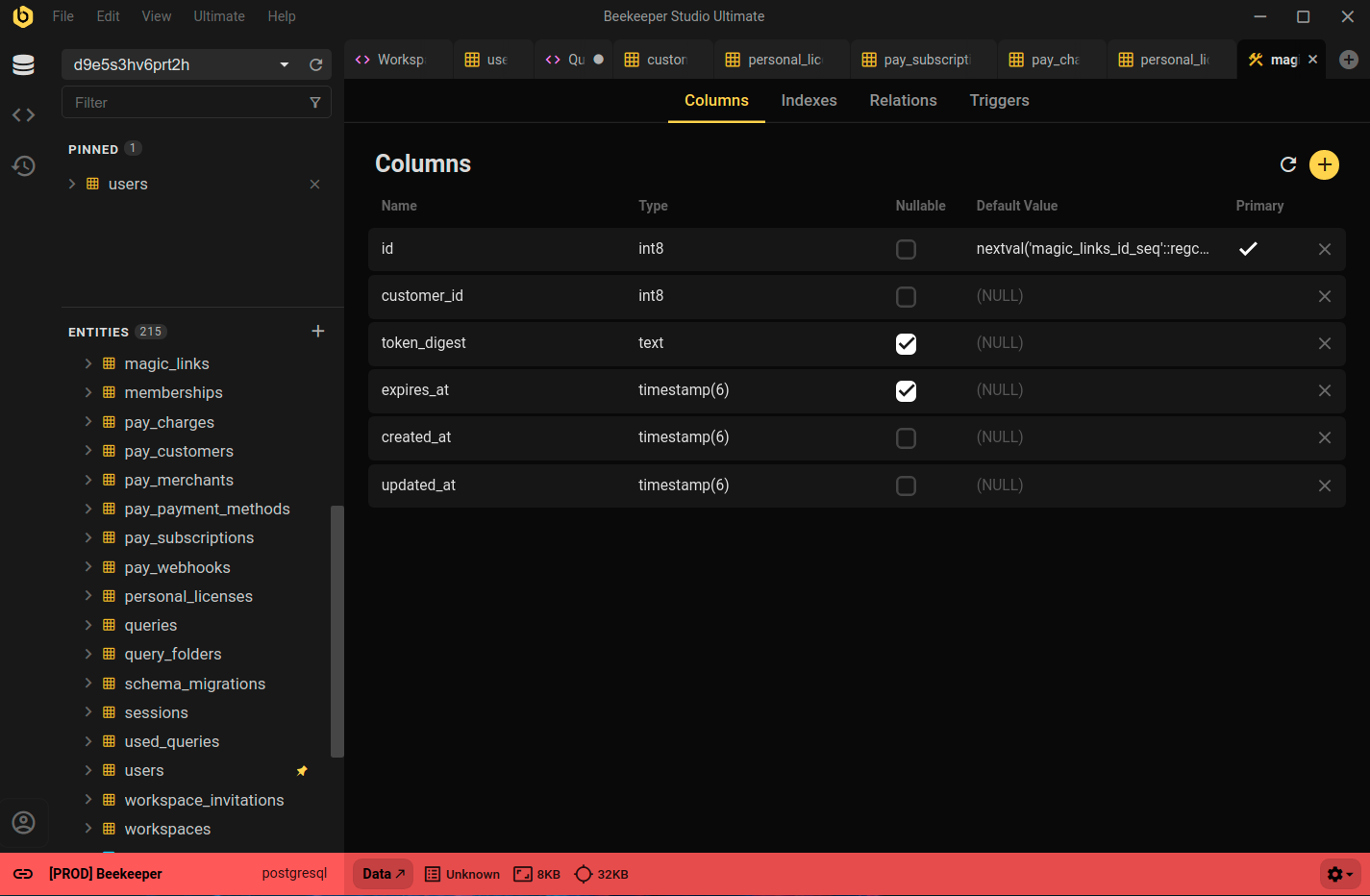
Constraints are Easy in Beekeeper Studio
You can easily view, crate, and modify constraints using Beekeeper Studio, by right clicking a table and selecting View Structure.
Summary
In summary, to add a CONSTRAINT to a table in PostgreSQL, use the ALTER TABLE statement, followed by the ADD keyword and the CONSTRAINT keyword. Then specify the type of constraint that you want to add, and provide any additional details or options.
 Beekeeper Studio는 무료 & 오픈 소스 데이터베이스 GUI입니다
제가 사용해 본 최고의 SQL 쿼리 & 편집기 도구입니다. 데이터베이스 관리에 필요한 모든 것을 제공합니다. - ⭐⭐⭐⭐⭐ Mit
Beekeeper Studio는 빠르고 직관적이며 사용하기 쉽습니다. Beekeeper는 많은 데이터베이스를 지원하며 Windows, Mac, Linux에서 훌륭하게 작동합니다.
사용자들이 Beekeeper Studio에 대해 말하는 것
"Beekeeper Studio는 제 예전 PostgreSQL 워크플로를 완전히 대체했습니다. 빠르고 직관적이며 데이터베이스 작업을 다시 즐겁게 만들어 줍니다."
"많은 데이터베이스 GUI를 사용해 봤지만, Beekeeper는 기능과 단순함 사이의 완벽한 균형을 찾았습니다. 그냥 작동합니다."