
Otro mes, otro lanzamiento increíble de Beekeeper Studio.
Lo más destacado de esta versión:
- Soporte para Snowflake, con todos los métodos comunes de autenticación empresarial
- Soporte de Kerberos para SQL Server, totalmente multiplataforma mediante el driver ODBC de MSSQL.
- Mejoras de compatibilidad del modo automático de SSH con la configuración de SSH
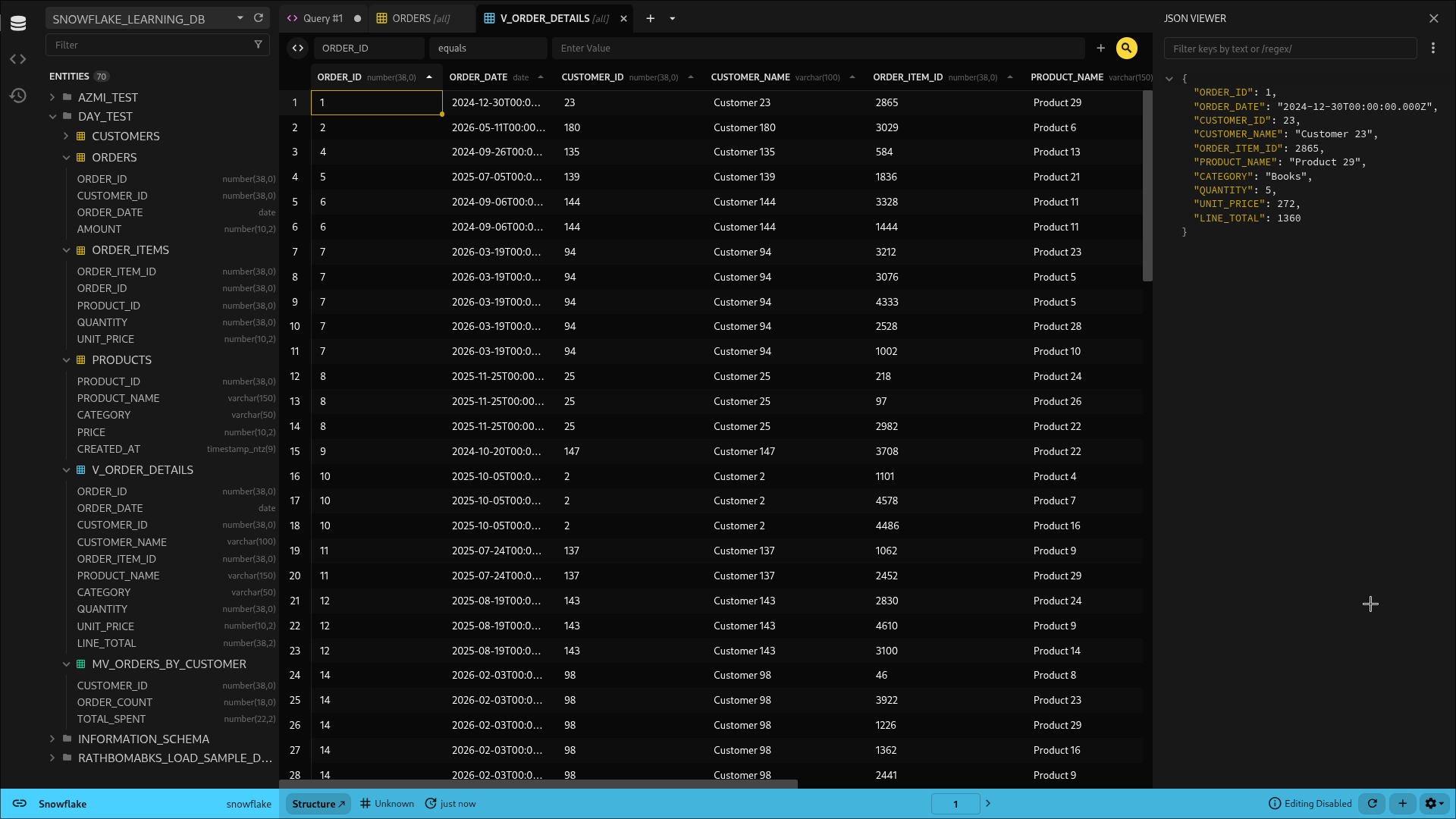
Soporte para Snowflake
Snowflake es un almacén de analítica empresarial de ‘Big Data’ (léase: caro). Usa un formato de almacenamiento columnar para que las consultas analíticas dispersas sean muy rápidas, incluso si tienes petabytes de datos.
Este tipo de bases de datos no es el fuerte de Beekeeper Studio, pero Snowflake es muy popular y era una de nuestras funciones más solicitadas.
Autenticación empresarial incluida
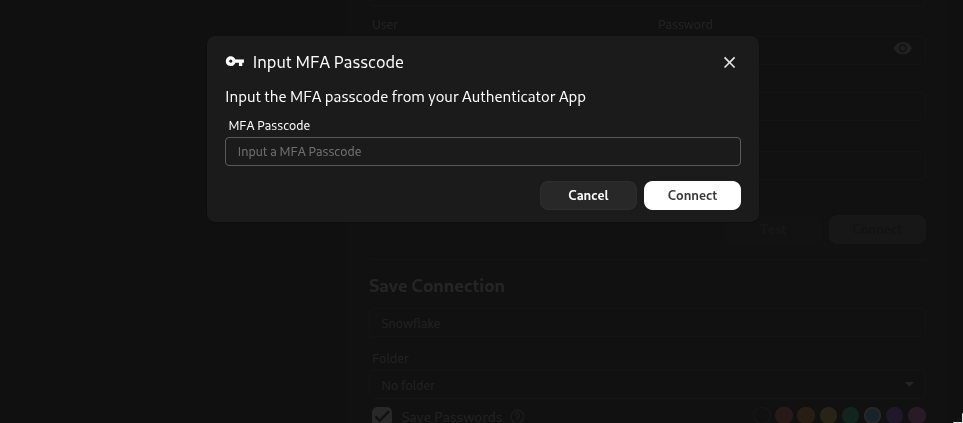
Además del inicio de sesión con usuario y contraseña, Beekeeper Studio soporta de fábrica autenticación SSO serverless y autenticación MFA (código o Duo), para que cumplas fácilmente con las políticas de seguridad de la información de tu organización.
Kerberos para SQL Server
Aunque ya soportábamos SQL Server, la v5.9 agrega soporte tanto para Kerberos como para la autenticación integrada de Windows (NTLM).
Después vamos a agregar soporte de Kerberos para otras bases de datos, porque los devs de grandes empresas también merecen una GUI de bases de datos rápida, moderna y fácil de usar. :-).
Mejoras del modo automático de SSH
Uf, te tengo que contar que integrarnos bien con los archivos ssh-config fue más difícil de lo esperado.
La buena noticia es que la v5.9 corrige un montón de problemas que teníamos con el modo automático de SSH:
- La app ahora sigue la misma lógica de resolución que usa openssh para decidir qué llave usar (cuando hay varias en el ssh-agent y en ssh-config)
- Beekeeper ahora omite correctamente las llaves que aparecen en ssh-config pero que no existen en el disco
- La app ahora evalúa los bloques Match/exec de la configuración de SSH para encontrar hosts, pero incluye una opción de seguridad para desactivarlo (ver disableSshConfigMatchExec)
También en esta versión
-
Pega datos como filas nuevas. Copia un bloque de datos de donde sea y pégalo en una tabla como filas nuevas en lugar de sobrescribir las celdas que seleccionaste: la forma rápida de pasar un bloque de datos entre tablas sin armar una importación completa. Hay un atajo dedicado, y la tecla de retroceso ahora borra un rango seleccionado, como esperarías.
-
Elige valores enum desde un menú desplegable. Las columnas enum ahora muestran sus valores válidos en un desplegable directamente en las tablas y en las cuadrículas de resultados, para que no tengas que recordarlos ni volver a escribirlos. Funciona en PostgreSQL, CockroachDB, MySQL/MariaDB, DuckDB y ClickHouse.
-
Un solo diálogo de mover para todo. El modal de mover ahora maneja consultas guardadas y (sub)carpetas además de conexiones, así que puedes reorganizar toda la barra lateral desde un diálogo consistente en lugar de varias opciones dispersas en menús contextuales.
-
Renombra directo en la barra lateral. Cambia el nombre de consultas, conexiones y carpetas ahí mismo, donde están.
-
Atajos de teclado para plugins. Ahora puedes asignar atajos de teclado personalizados a los elementos de menú de los plugins desde el archivo de configuración.
-
Nueva query magic de “unix timestamp”. Convierte un timestamp Unix (segundos, milisegundos, microsegundos o nanosegundos) en una fecha legible, con opciones de zona horaria y formato ISO; por ejemplo,
columnname__format__unixtime__ms__utc. -
Túneles SSH para más motores. Corregimos los túneles SSH para ClickHouse y Firebird, y agregamos soporte de bastion/jump host para MongoDB (forzando
directConnectionpara que de verdad funcione). -
Certificados SSL personalizados en ClickHouse. Las conexiones de ClickHouse ahora soportan certificados SSL personalizados para conexiones cifradas. ¡Gracias, @mastercactapus!
-
La barra lateral recuerda dónde te quedaste. La última pestaña abierta de la barra lateral se conserva entre reinicios, y la pestaña predeterminada se puede configurar.
Lista completa de cambios
Nuevas funciones
- Driver de Snowflake: conexiones, exploración de esquemas, vistas/vistas materializadas, llaves, índices, obtención de DDL, clonado de tablas, escrituras transaccionales, streaming y cancelación (#4323)
- Autenticación integrada (Windows/Kerberos) para SQL Server, con opción de Encrypt y sobrescritura opcional de SPN (#4416, #4430)
- Pega datos copiados como filas nuevas, con un atajo dedicado; la tecla de retroceso borra un rango seleccionado (#4450)
- Selecciona valores enum desde un desplegable: PostgreSQL, CockroachDB, MySQL/MariaDB, DuckDB, ClickHouse (#4444)
- Diálogo unificado de mover para conexiones, consultas guardadas y (sub)carpetas (#4448)
- Renombrado directo de consultas, conexiones y carpetas en la barra lateral (#4250)
- Los elementos de menú de plugins admiten atajos de teclado configurables (#3837)
- Nueva query magic de unix timestamp (#4401). ¡Gracias, @Squidysquid1!
- Soporte de certificados SSL personalizados en ClickHouse (#4343). ¡Gracias, @mastercactapus!
- Soporte beta para DynamoDB y documentación de conexión (#4298)
- Se conserva la última pestaña abierta de la barra lateral entre reinicios; selección predeterminada configurable (#4440, #4447)
Corrección de errores
- Restaurar el texto editado de una consulta guardada no funcionaba (#4443)
- El autorefresco ahora funciona al modificar tablas desde el editor de consultas (#4442)
- Los valores NUMERIC/BIGNUMERIC de BigQuery (y otros tipos personalizados) ahora se muestran correctamente (#4391)
- El autocompletado de SQL Server maneja correctamente los
[identifiers]entre corchetes (#4437) - Editar un arreglo de enums en PostgreSQL ya no lanza un error de JSON (#4238)
- Las columnas recién agregadas ya no se vuelven invisibles al arrastrarlas para reordenarlas (#4418). ¡Gracias, @aanthoonyy!
- Las subcarpetas de equipo muestran su propio nombre en lugar del de la carpeta padre (#4403)
- La importación de consultas limpia el ID de carpeta para ubicarlas correctamente en la carpeta personal (#4406)
- Se corrigieron dos errores de importación: un TypeError en
generateColumnTypesFromFiley un mensaje de error de CSV (#4244) - Pega un solo valor en todas las celdas seleccionadas (#3972). ¡Gracias, @anabdsantos!
- Escapado correcto de cadenas en las acciones de copiar de TableMenu (#4421). ¡Gracias, @Squidysquid1!
- Texto simplificado en la opción de eliminar del menú contextual (#4386)
- AppImage vuelve al runtime predeterminado por compatibilidad con AppImageLauncher
SSH
- La configuración de ssh inválida o no confiable y los archivos de identidad faltantes ahora se muestran como avisos no bloqueantes (#4378 y relacionados)
- Se usa el soporte nativo de
Match execde ssh-config en lugar de eliminar los bloques Match - Nueva opción
[security] allowSshConfigMatchExecpara controlar la ejecución de las directivasMatch exec - Se omiten las entradas de túnel SSH con un
IdentityFilefaltante (#4368) - Se corrigieron los túneles SSH para MongoDB, ClickHouse y Firebird (#4435)
Seguridad
- Se corrigió una vulnerabilidad de path traversal en el manifiesto de plugins (GHSA-3wfm-5rhc-mg5c) que podía provocar la eliminación recursiva arbitraria de directorios al desinstalar; ahora los IDs de plugin se validan y deben coincidir con su directorio de instalación (#4393)
- Correcciones varias de vulnerabilidades en dependencias (#4392)
Empaquetado y plataforma
- Se migraron los builds de Snap a la configuración nativa core24 de snapcraft de electron-builder para corregir builds de snap rotos (#4427)
- Se cambió la firma de código de Windows de Azure a Google Cloud KMS (#4424)
- Se actualizó electron-builder a 26.11.1 y se configuró el toolset de AppImage (#4315), con una limpieza posterior de la configuración del toolset (#4432)
- Se corrigió la asociación de ventanas con el entorno de escritorio en Linux (#4429)
Interno / Herramientas
- Se migró el editor de TableSchemaValidation al editor de texto compartido de UI Kit (#4327)
- Se actualizó Vite a v8 (#4394)
- Se actualizó la librería de ERD (#4364)
- Se actualizó la librería de cuadrícula de datos Tabulator (#4400)
- Clases y códigos de error estructurados para plugins, para un mejor diagnóstico (#3316)
- Se extrajo la lógica del árbol de carpetas a utilidades reutilizables (#4408)
- Test/CI: se fijó la imagen Docker de ClickHouse para evitar timeouts, fixture SSH ed25519 estático, harness ligero de túnel sin autenticación, stack dockerizado de Samba AD + SQL Server con Kerberos y pruebas de regresión para varios errores de utilidades
- Actualizaciones de dependencias: @babel/core, dompurify, fast-xml/builder, form-data, @grpc/grpc-js, protobufjs, qs, shell-quote, tmp, @tootallnate/once, typeorm, undici, vitest, ws
Nuevos colaboradores
- @mastercactapus hizo su primera contribución en https://github.com/beekeeper-studio/beekeeper-studio/pull/4343
- @anabdsantos hizo su primera contribución en https://github.com/beekeeper-studio/beekeeper-studio/pull/3972
- @SuperCowProducts hizo su primera contribución en https://github.com/beekeeper-studio/beekeeper-studio/pull/4409
- @aanthoonyy hizo su primera contribución en https://github.com/beekeeper-studio/beekeeper-studio/pull/4418
- @Squidysquid1 hizo su primera contribución en https://github.com/beekeeper-studio/beekeeper-studio/pull/4401
Changelog completo: https://github.com/beekeeper-studio/beekeeper-studio/compare/v5.8.1…v5.9.0
 Beekeeper Studio es un cliente de bases de datos gratuito y de código abierto
La mejor herramienta de consultas y edición de SQL que he usado. Tiene todo lo que necesito para administrar mi base de datos. - ⭐⭐⭐⭐⭐ Mit
Beekeeper Studio es rápido, intuitivo y fácil de usar. Es compatible con muchísimas bases de datos y funciona de maravilla en Windows, Mac y Linux.
Lo que dicen los usuarios de Beekeeper Studio
"Beekeeper Studio reemplazó por completo mi antiguo flujo de trabajo con SQL. Es rápido, intuitivo y hace que trabajar con bases de datos vuelva a ser agradable."
"He probado muchas GUI de bases de datos, pero Beekeeper logra el equilibrio perfecto entre funciones y simplicidad. Simplemente funciona."