
Understanding SQL is often about asking the right questions. When you’re dealing with data spread across multiple tables, the full outer join operation becomes undeniably handy. Though quite common in some database management systems, the concept of FULL OUTER JOIN is a little trickier in MySQL. Why? Because it is not inherently supported. Interesting, right? But wait, there’s a workaround!
In this tutorial, we’re taking a detailed exploration into implementing MySQL full outer join. Buckle up, folks. We’re about to dive into a pool of code samples.
🔖 Quick Reference: Need a quick lookup for all JOIN types? Check out our SQL JOIN Cheat Sheet with visual diagrams and code examples.
What is a Full Outer Join?
Before we start, let’s define what a FULL OUTER JOIN is. In SQL, a full outer join combines the effect of applying both left and right outer joins. In other words, it fetches the records having matching values in both tables, as well as all records from both the tables whose values do not appear in either of the tables.

Here’s an example. Let’s assume we have two tables, Employees and Departments.
Employees table:
| id | name |
|---|---|
| 1 | Alice |
| 2 | Bob |
| 3 | Charlie |
Departments table:
| id | department |
|---|---|
| 2 | HR |
| 3 | IT |
| 4 | Marketing |
Using the FULL OUTER JOIN query:
SELECT * FROM Employees
FULL OUTER JOIN Departments ON Employees.id = Departments.id;
The result set will be:
| Employees.id | Employees.name | Departments.id | Departments.department |
|---|---|---|---|
| 1 | Alice | NULL | NULL |
| 2 | Bob | 2 | HR |
| 3 | Charlie | 3 | IT |
| NULL | NULL | 4 | Marketing |
This output combines all records from both Employees and Departments. It includes:
- Records with matching
idvalues in both tables (Bob and Charlie). - Records from
Employeeswithout a corresponding record inDepartments(Alice). - Records from
Departmentswithout a corresponding record inEmployees(Marketing).
While very useful, this syntax is not directly supported in MySQL. So, what’s our way out? Let’s find out.
Simulating Full Outer Join in MySQL
As noted above, MySQL does not explicitly support the FULL OUTER JOIN keyword. However, we can still achieve the desired output by using a combination of LEFT JOIN and UNION
The idea behind simulating a full outer join in MySQL involves two steps:
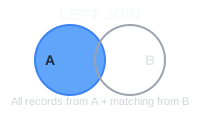
- Perform a
LEFT JOINfor the first table to get all records from the first table, along with matching records from the second table. - Use
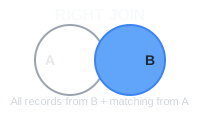
UNIONto combine the results with the outcome of aRIGHT JOINto get all records from the second table along with the matching records from the first table.
Here’s how each component works:
Left Join:
Right Join:
MySQL Full Outer Join Example
Here is an example of the workaround using the same data as before
SELECT
    Employees.id AS Employees_id,
    Employees.name,
    Departments.id AS Departments_id,
    Departments.department
FROM
    Employees
LEFT JOIN
    Departments ON Employees.id = Departments.id

UNION

SELECT
    Employees.id AS Employees_id,
    Employees.name,
    Departments.id AS Departments_id,
    Departments.department
FROM
    Departments
RIGHT JOIN
    Employees ON Departments.id = Employees.id;
This query consists of two parts:
- A
LEFT JOINto get all records from theEmployeestable and the matching records from theDepartmentstable. - A
RIGHT JOINto get all records from theDepartmentstable and the matching records from theEmployeestable.
The UNION combines the results of these two queries while eliminating duplicate rows.
Given the same example tables, the result set will be:
| Employees_id | name | Departments_id | department |
|---|---|---|---|
| 1 | Alice | NULL | NULL |
| 2 | Bob | 2 | HR |
| 3 | Charlie | 3 | IT |
| NULL | NULL | 4 | Marketing |
This output, like the FULL OUTER JOIN in SQL, combines all records from both Employees and Departments.
UNION Filters Duplicates Automatically
In the specific case of our example with the Employees and Departments tables, the UNION used in the MySQL workaround for a FULL OUTER JOIN will not result in duplicates. This is because the UNION operator automatically eliminates duplicate rows from its result set.
To clarify, let’s consider how the UNION works in this context:
-
The first part of the query (the
LEFT JOIN) fetches all records from the Employees table and the matching records from the Departments table. This includes rows with matching id values in both tables and rows from Employees with no match in Departments. -
The second part of the query (the
RIGHT JOIN) fetches all records from the Departments table and the matching records from the Employees table. This includes rows with matching id values in both tables and rows from Departments with no match in Employees.
Since the UNION removes duplicates, the rows with matching id values (those that would appear in both the LEFT JOIN and RIGHT JOIN results) will only appear once in the final result.
In summary, using UNION in this context ensures that each unique combination of Employees and Departments data appears only once in the result set, thereby mimicking the behavior of a FULL OUTER JOIN without duplicates.
Practice in Beekeeper Studio
I hope this MySQL full outer join tutorial has been helpful to you. In future posts, we’ll continue to explore other advanced MySQL features, sharing more code examples and diving deeper into why and how these features work. Until then, keep practicing your SQL skills, ideally by using Beekeeper Studio.
 Beekeeper Studio Adalah GUI Database Gratis & Open Source
Alat query SQL & editor terbaik yang pernah saya gunakan. Menyediakan semua yang saya butuhkan untuk mengelola database saya. - ⭐⭐⭐⭐⭐ Mit
Beekeeper Studio cepat, intuitif, dan mudah digunakan. Beekeeper mendukung banyak database dan berfungsi dengan baik di Windows, Mac, dan Linux.
Apa Kata Pengguna Tentang Beekeeper Studio
"Beekeeper Studio sepenuhnya menggantikan alur kerja SQL lama saya. Cepat, intuitif, dan membuat pekerjaan database menyenangkan lagi."
"Saya sudah mencoba banyak GUI database, tapi Beekeeper menemukan keseimbangan sempurna antara fitur dan kesederhanaan. Langsung berfungsi."