
Cassandra tidak mendapat perhatian GUI sebanyak Postgres atau MySQL. Sebagian karena cqlsh memang sudah cukup untuk banyak alur kerja, dan sebagian lagi karena Cassandra memang bukan target umum bagi tool database serbaguna. Saat Anda mencari GUI, pilihannya lebih sedikit dari yang Anda kira, dan lebih banyak yang berbayar dari yang Anda kira juga.
Kami mencari tool yang benar-benar mendukung Cassandra di 2026, diverifikasi dari dokumentasi masing-masing proyek, bukan dari materi pemasaran. Berikut ulasan jujurnya, termasuk mana yang gratis dan mana yang tidak, karena bagian itu lebih penting daripada yang diakui sebagian besar daftar “terbaik”.
Beekeeper Studio
Tersedia untuk Windows, macOS, dan Linux - unduh di sini
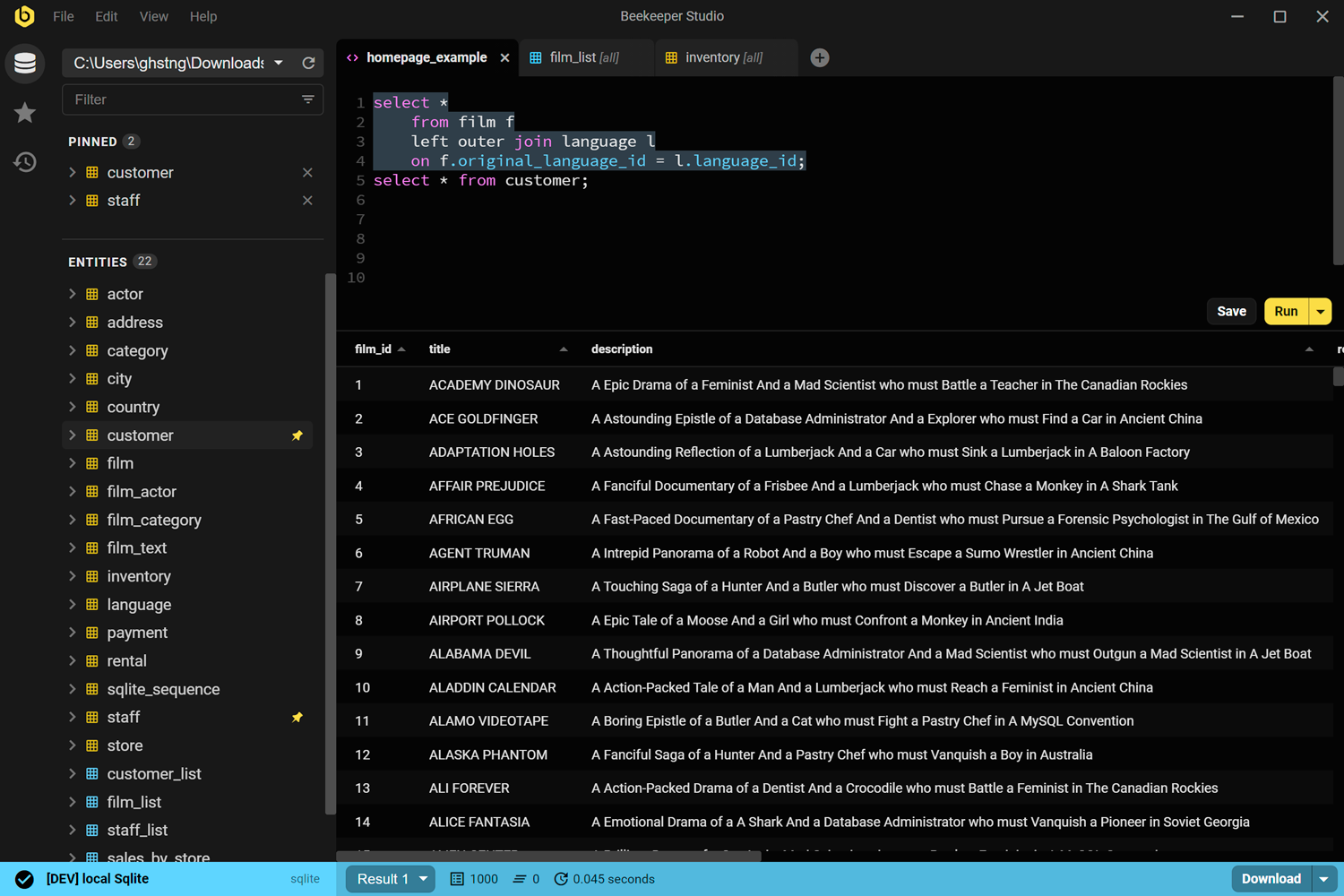
Terus terang saja: kami yang membuat Beekeeper Studio, jadi pertimbangkan hal itu. Berbeda dengan beberapa integrasi database kami yang lain, dukungan Cassandra tidak tersedia di edisi Community yang gratis. Fitur ini membutuhkan paket Indie atau lebih tinggi. Menurut kami harganya sepadan, tapi sebaiknya Anda tahu dari awal daripada berharap pada opsi gratis yang ternyata tidak gratis.
Apa yang Anda dapatkan: editor query CQL yang lengkap dengan autocomplete dan riwayat tersimpan, browser bergaya spreadsheet untuk menjelajahi keyspace dan tabel, serta GUI untuk membuat dan mengedit tabel dan kolom tanpa menulis DDL CQL secara manual. Pengeditan data dilakukan inline, jadi Anda bisa memperbaiki baris tanpa menyusun statement UPDATE. Ini aplikasi yang sama yang Anda pakai untuk Postgres, MySQL, atau database lain yang Anda jalankan, dan itulah nilai jual utamanya jika tim Anda tidak hanya memakai Cassandra: satu tool, bukan lima.
Saya harus memakai beberapa database (MySql, Postgre, dan MS SQL) dan Beekeper benar-benar menyenangkan! UI-nya bersih dan punya persis apa yang saya butuhkan.
Baca selengkapnya tentang dukungan Cassandra di Beekeeper Studio.
Tautan Beekeeper Studio
cassandra-web
Aplikasi web self-hosted (Docker) - github.com/orzhaha/cassandra-web
Inilah satu-satunya opsi yang benar-benar gratis dan open source di daftar ini yang dibuat khusus untuk Cassandra. Berlisensi MIT, tersedia sebagai image Docker, dan menyediakan UI berbasis browser untuk menjelajahi keyspace dan tabel, mengedit data, serta menjalankan CQL mentah.
Ada dua catatan yang perlu Anda ketahui sebelum memakainya. Pertama, README-nya sendiri menargetkan Cassandra 2.1.x hingga 3.x.x, dan tidak jelas apakah proyek ini sudah diuji terhadap CQL di Cassandra 4.x atau 5.x, jadi uji dulu dengan cluster Anda sebelum mengandalkannya. Kedua, commit terakhir proyek ini pada pertengahan 2024, jadi anggap saja jarang dipelihara, bukan aktif dikembangkan. Tool ini masih berfungsi dan tetap menjadi opsi khusus gratis terbaik yang kami temukan, tapi jangan berharap respons cepat jika Anda melaporkan bug.
Tautan cassandra-web
TablePlus
Tersedia untuk Windows, macOS, dan Linux - tableplus.com
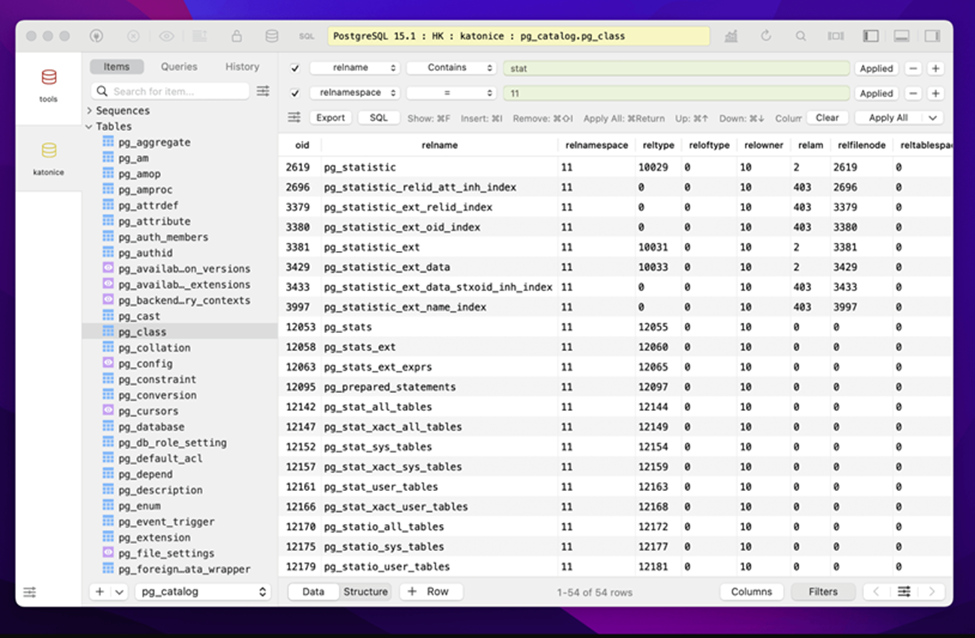
TablePlus sudah mendukung Cassandra sejak 2018, menjadikannya salah satu opsi paling lama di sini. Aplikasinya native dan cepat dengan editor query yang bersih serta browser data bergaya spreadsheet, dan jika Anda sudah memakainya untuk Postgres atau MySQL, menambahkan koneksi Cassandra tidak perlu belajar hal baru.
Kekurangannya sama dengan yang muncul di setiap ulasan TablePlus: tidak gratis dan tidak open source. Mode uji cobanya membatasi Anda pada 2 tab terbuka, 2 jendela terbuka, dan 2 filter lanjutan sekaligus, tanpa batas waktu tapi cukup merepotkan begitu Anda melakukan lebih dari sekadar browsing santai. Lisensi mulai dari $99 untuk satu perangkat, sudah termasuk pembaruan selama setahun.
Tautan TablePlus
DBeaver (hanya edisi berbayar)
Tersedia untuk Windows, macOS, dan Linux - dbeaver.io
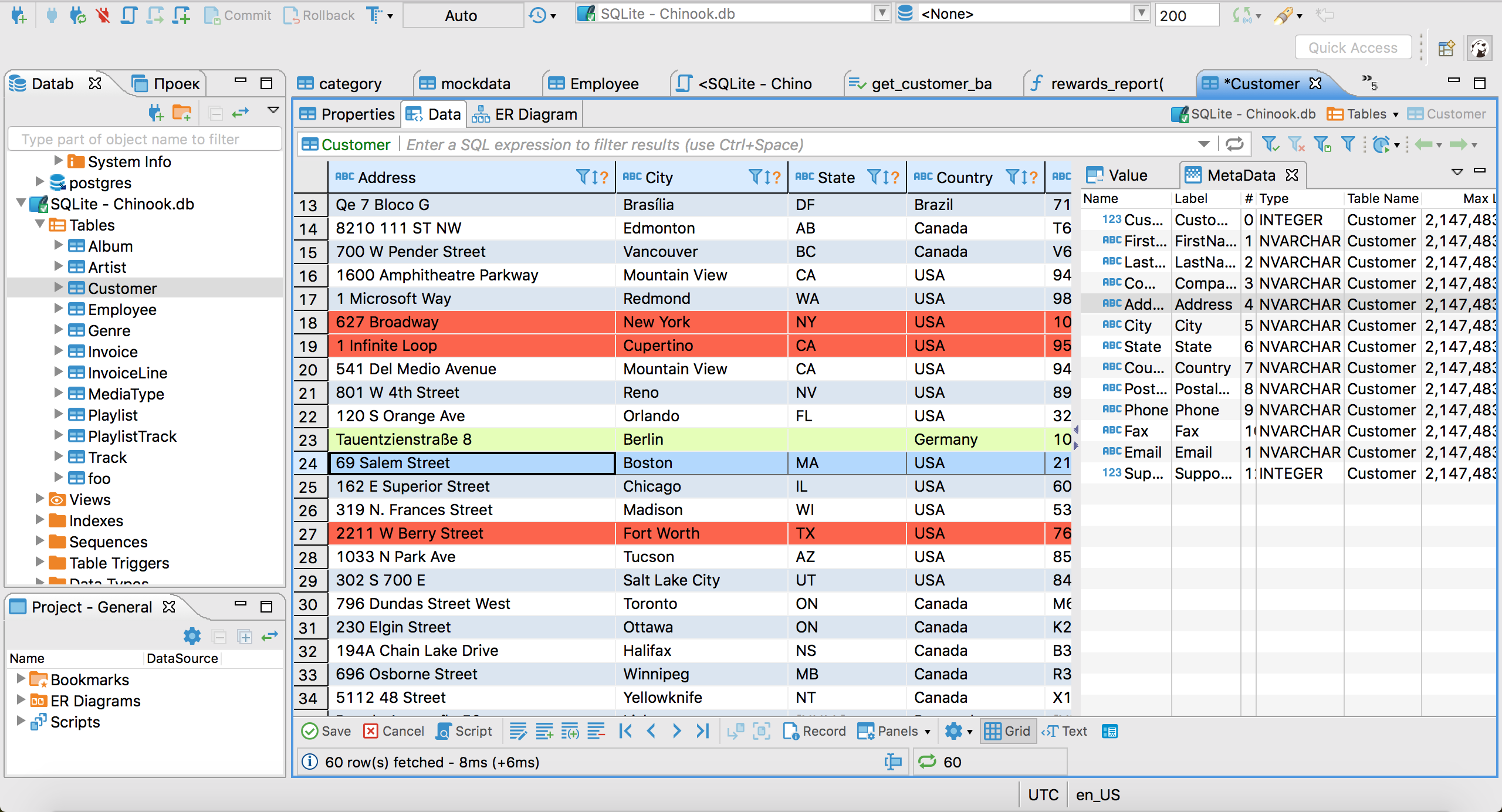
Bagian ini sering membuat orang bingung, jadi perlu kami tegaskan: DBeaver Community Edition, versi gratis dan open source yang biasanya dimaksud orang saat menyebut “DBeaver,” tidak mendukung Cassandra. Dokumentasi DBeaver sendiri menyebutkan driver Cassandra hanya tersedia di edisi berbayar Lite, Enterprise, dan Ultimate, dengan harga sekitar $113 hingga $510+ per tahun tergantung tingkatannya.
Jika Anda sudah punya lisensi DBeaver berbayar untuk database lain, dukungan Cassandra sudah termasuk dan bekerja kurang lebih sebaik integrasi database DBeaver lainnya: penjelajahan skema yang solid, editor SQL yang mumpuni, dan tool transfer data. Tapi jika Anda berharap menambahkan Cassandra ke instalasi DBeaver CE gratis, itu tidak mungkin tanpa solusi driver JDBC manual yang tidak didukung resmi.
Tautan DBeaver
- Dokumentasi driver Cassandra
- Perbandingan edisi dan harga
- Beekeeper Studio vs DBeaver
- Alternatif DBeaver
DataStax Astra DB CQL Console
Berbasis web, hanya untuk database yang di-host di Astra - astra.datastax.com
Jika Anda menjalankan Cassandra di Astra DB terkelola milik DataStax alih-alih self-hosting, ada opsi yang benar-benar gratis tanpa instalasi: Astra menyediakan konsol CQL bawaan di browser untuk setiap database Serverless, pada dasarnya cqlsh yang di-host dan bisa Anda akses tanpa membuka terminal.
Keterbatasannya sudah jelas dari namanya: ini hanya bekerja untuk database yang di-host di Astra. Jika Anda menjalankan cluster sendiri di hardware sendiri atau VM cloud biasa, opsi ini tidak bisa dipakai. Tool desktop lama DataStax, DevCenter, kami sebut hanya agar Anda tidak membuang waktu: tool ini sudah resmi diarsipkan dan ditandai “not supported” oleh DataStax, tanpa pengganti langsung.
Tautan Astra DB
Beberapa sebutan khusus
cqlsh adalah CLI yang disertakan di setiap instalasi Cassandra, dan memang di sinilah sebagian besar pekerjaan Cassandra dilakukan, bahkan oleh orang yang lebih suka GUI. Memang tidak grafis, tapi gratis, selalu tersedia, dan layak Anda kuasai sebelum memasang tool lain.
cassandra-admin dari IBM adalah tool web kecil yang aktif dipelihara dan berlisensi MIT, tapi memang dirancang read-only: tanpa pengeditan data, tanpa pencarian atau filter, dan dibuat untuk satu node, bukan cluster. Berguna untuk melihat sekilas isi keyspace, bukan untuk dipakai sehari-hari.
Jika Anda menjalankan ScyllaDB alih-alih Cassandra, kabar baiknya ScyllaDB memakai protokol wire CQL yang sama, jadi tool untuk Cassandra umumnya juga bisa dipakai. Kami belum memverifikasi setiap tool di halaman ini dengan cluster ScyllaDB sungguhan, jadi uji setup Anda sendiri, tapi ini asumsi awal yang masuk akal.
GUI Cassandra mana yang sebaiknya Anda pakai?
Jika Anda ingin satu tool yang menangani Cassandra bersama database lain dan tidak keberatan membayar, Beekeeper Studio atau TablePlus sama-sama pilihan yang solid dan matang. Jika Anda sudah membayar edisi DBeaver tingkat atas, dukungan Cassandra juga tersedia di sana.
Jika Anda ingin sesuatu yang gratis dan khusus untuk Cassandra, cassandra-web adalah opsi open source paling lengkap, dengan catatan bahwa proyek ini tidak aktif dipelihara dan Anda sebaiknya memastikan dulu kompatibilitasnya dengan versi Cassandra Anda. Dan jika Anda memakai DataStax Astra, konsol CQL bawaannya gratis dan tidak perlu instalasi.
Realistisnya, banyak pekerjaan Cassandra masih dilakukan di cqlsh, dan itu bukan hal yang memalukan. Tapi jika Anda cukup sering memakainya sampai butuh GUI, sekarang Anda tahu pilihan nyata yang tersedia dan berapa biaya masing-masing.
Artikel terkait
 Beekeeper Studio Adalah GUI Apache Cassandra Gratis & Open Source
Beekeeper Studio adalah client Apache Cassandra yang cepat, intuitif, dan mudah digunakan. Beekeeper Studio juga mendukung banyak database lain, dan berjalan mulus di Windows, Mac, dan Linux.
Kata Pengguna Apache Cassandra Tentang Beekeeper Studio
Wah, keren banget,
Hari ini saya mencoba AI-nya untuk berinteraksi dengan database saya, dan saya benar-benar terkesan.
Saya sungguh penasaran bagaimana kalian bisa membuatnya menghasilkan query secepat dan seakurat itu.
Saya sudah mengajukan beberapa pertanyaan yang cukup rumit, tapi tetap saja semuanya terjawab. Keren parah
Beekeeper Studio JAUH lebih mudah digunakan dibanding GUI database lainnya! Saya mulai memakainya setahun lalu dan sekarang seluruh tim kami membeli lisensi. Dukungan multi-database-nya luar biasa, karena saya rutin memakai 4 jenis database berbeda. Plus, berjalan di Windows dan Mac.