
A Postgres client for Ubuntu is either psql, the command line client you get with sudo apt install postgresql-client, or a desktop GUI like Beekeeper Studio, pgAdmin or DBeaver. Here are the ones worth installing in 2026, the commands to install each one, and how to connect them to the Postgres server on your own machine, which is where most Ubuntu users get stuck.
I’ve used Linux as my main desktop for nearly 20 years, and I built Beekeeper Studio on Ubuntu. Back in the day I used Sequel Pro on a Mac, and I spent years waiting for something that good to come to Ubuntu. It never did, so I made my own. So yes, we’re biased, and Beekeeper Studio is first on this list. We’ve tried to be fair to everything else.
Everything Beekeeper and Postgres in this post was installed and tested on Ubuntu 24.04 in October 2026, including the screenshots: that’s Beekeeper Studio 6.1, installed from our apt repository, connected to Ubuntu’s own PostgreSQL 16.
1. Beekeeper Studio
Linux (x86_64 and ARM64), Windows and macOS. Free.
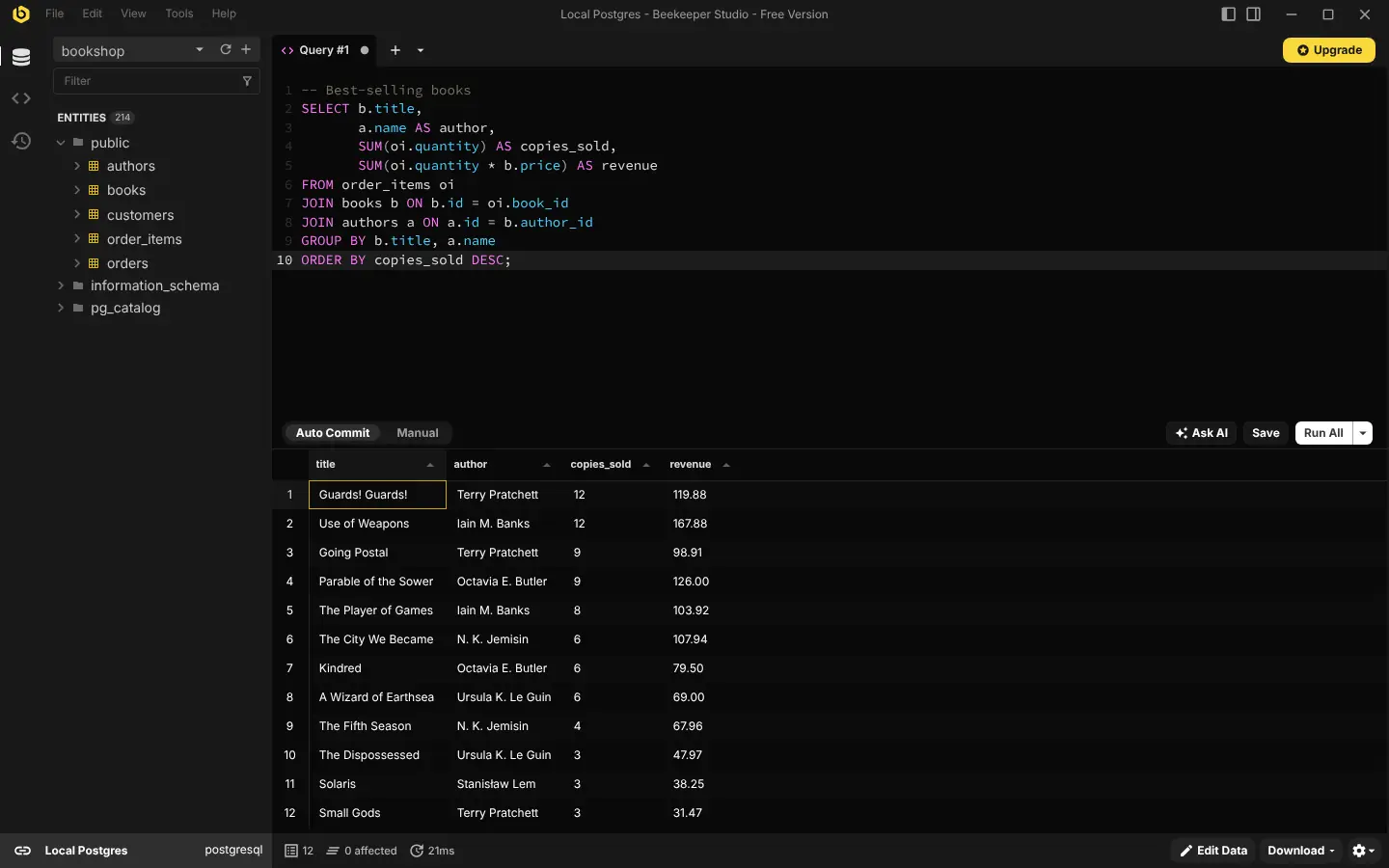
Beekeeper Studio is a fast, modern Postgres client for developers who want to write SQL and work with their data without fighting the tool. It’s open source, it starts quickly, and it also connects to MySQL, SQLite, SQL Server and lots more, so it’s the same app for every database you use.
Linux is a first-class citizen
A lot of database GUIs treat Linux as an afterthought: a Java app that looks like it’s from 2005, or a “Linux beta” that’s a few versions behind the Mac build. Beekeeper Studio is built by people who use Linux every day, and it shows:
- Every release ships for Linux on the same day as Windows and macOS, with the same features.
- Real packages, not just a tarball. Our apt and yum repositories update the app through your normal system updates. There’s also an AppImage, a Snap, Flatpak files and the AUR.
- ARM64 builds of everything, so it runs on ARM laptops, ARM cloud desktops and a Raspberry Pi.
- Wayland support, including fractional scaling on HiDPI screens.
- Unix socket connections, so you can connect to the Postgres on your laptop with no password at all (see connecting to Postgres on Ubuntu below).
That’s not just us saying it. Here’s how one Linux user put it:
Being a Linux user, you get your selection of DB client tools like DB Visualizer with cutting edge UI / UX experiences fresh from ’90s built on Java. With Beekeeper Studio, Linux is a first class citizen with a native app that is beautiful, lightweight, full featured and fast. Best DB tool on Linux by a country mile.
What you get for Postgres
Everything here is free, with no trial and no account to sign up for:
- A SQL editor with autocomplete for your tables and columns, query tabs, saved queries and query history
- A spreadsheet-style table editor that stages your changes so you can review them before they’re committed, plus filters, sorting and foreign key navigation
- Schema tools: create and alter tables, indexes, relations and triggers without writing DDL
- SSH tunnels, SSL, read-only mode for production connections, and color-coded connections so you know which database you’re in
- Manual transaction mode when you want to
BEGIN, check your work, andCOMMITyourself
How to install Beekeeper Studio on Ubuntu
The apt repository is the best option on Ubuntu 22.04 and newer, because the app then updates with the rest of your system. These are the exact commands we ran for this post:
# Add the Beekeeper Studio signing key and apt repository
curl -fsSL https://deb.beekeeperstudio.io/beekeeper.key | sudo gpg --dearmor --output /usr/share/keyrings/beekeeper.gpg \
  && sudo chmod go+r /usr/share/keyrings/beekeeper.gpg \
  && echo "deb [signed-by=/usr/share/keyrings/beekeeper.gpg] https://deb.beekeeperstudio.io stable main" \
  | sudo tee /etc/apt/sources.list.d/beekeeper-studio-app.list > /dev/null

# Install it
sudo apt update && sudo apt install beekeeper-studio -y
Downloading the .deb from our download page does the same thing: installing it adds the repository for you.
The other options:
-
AppImage: download it from the download page and run it, no root needed. On Ubuntu 22.04 and newer you need
sudo apt install libfuse2first. -
Snap:
sudo snap install beekeeper-studio. The Snap sandbox can’t reach your SSH agent, so if you connect through SSH tunnels with agent keys, use the apt repo or the AppImage instead.
The Linux installation docs cover Flatpak, the AUR, Fedora and turning on native Wayland mode.
The downsides
Beekeeper Studio isn’t an enterprise database administration suite. There’s no visual EXPLAIN plan viewer, server monitoring dashboard or replication setup wizard. If you’re a DBA who lives in pg_stat_activity and tunes servers all day, pgAdmin does more of that. Beekeeper is for developers who write queries and work with data.
Pick it if you want a clean, fast Postgres GUI that feels at home on Ubuntu, and works with your other databases too.
Beekeeper Studio links
- Download Beekeeper Studio (free, no account needed)
- Beekeeper Studio for PostgreSQL
- Source code on GitHub
2. pgAdmin 4
Linux (x86_64 only on Ubuntu), Windows and macOS, or in a browser. Free.
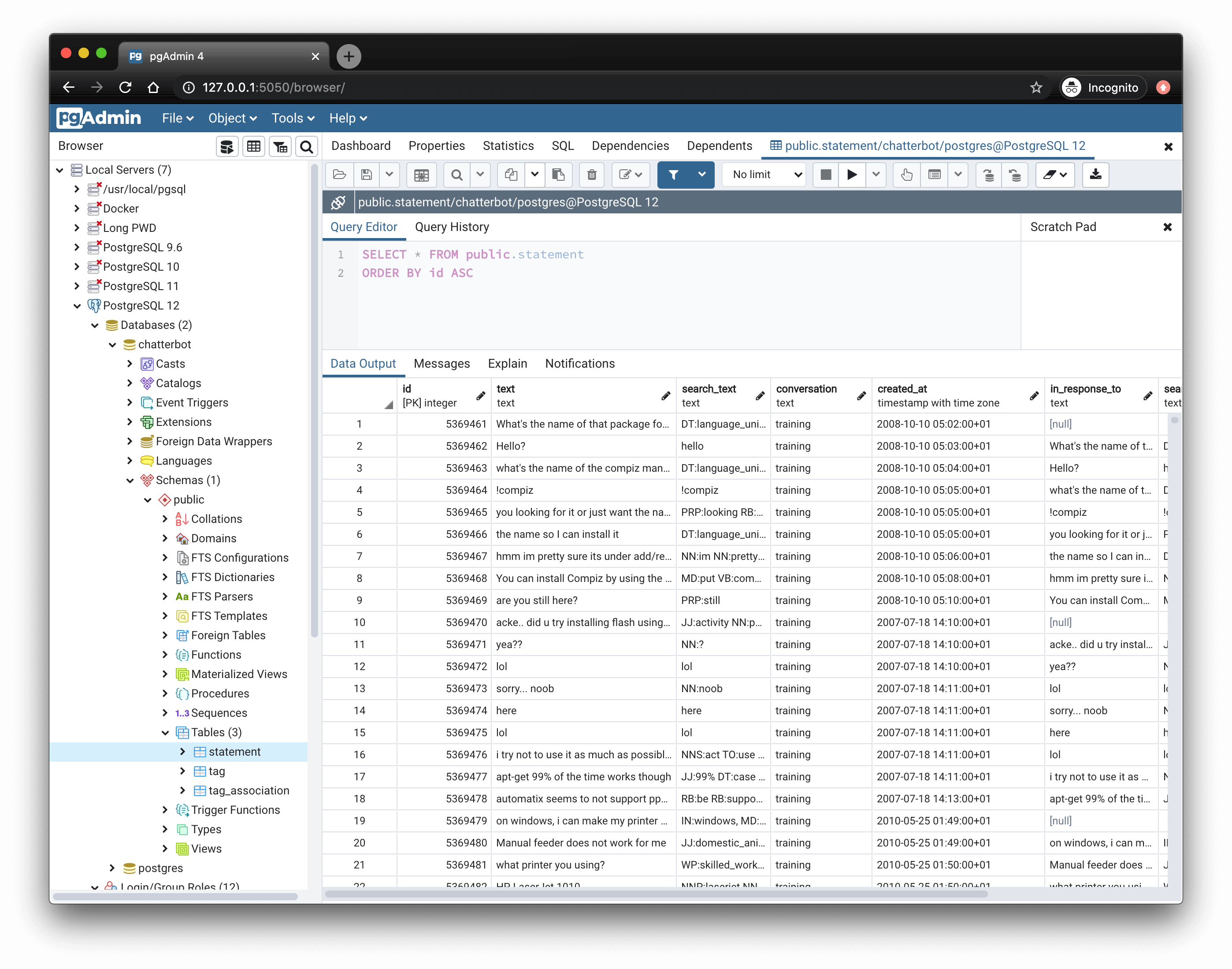
pgAdmin is the official PostgreSQL administration tool, maintained by the Postgres community. It’s free, it only does Postgres, and it does almost everything Postgres can do: roles and permissions, tablespaces, a graphical EXPLAIN viewer, a debugger for PL/pgSQL functions, server activity dashboards and backup jobs.
pgAdmin is a Python web application. The pgadmin4-desktop package wraps it in its own window, while pgadmin4-web runs it under Apache so you can reach it from a browser, which is useful on a headless Ubuntu server. Install it from pgAdmin’s apt repository (official instructions):
curl -fsS https://www.pgadmin.org/static/packages_pgadmin_org.pub | sudo gpg --dearmor -o /etc/apt/keyrings/packages-pgadmin-org.gpg
sudo sh -c 'echo "deb [signed-by=/etc/apt/keyrings/packages-pgadmin-org.gpg] https://ftp.postgresql.org/pub/pgadmin/pgadmin4/apt/$(lsb_release -cs) pgadmin4 main" > /etc/apt/sources.list.d/pgadmin4.list && apt update'
sudo apt install pgadmin4-desktop
The repository only has x86_64 packages, so on an ARM64 machine you’ll need to run pgAdmin in a container instead.
The downside is the day-to-day experience. pgAdmin’s interface is a deep tree of servers, databases, schemas and objects, the query tool is one tab among many, and it asks for a master password to unlock your saved connections. It’s a great admin console and a clunky place to write queries.
Pick it if you administer Postgres servers and want every Postgres-specific feature in one free tool. See Beekeeper Studio vs pgAdmin and our free pgAdmin alternatives if it isn’t for you.
3. DBeaver Community
Linux (x86_64 and ARM64), Windows and macOS. Free, with paid PRO editions.
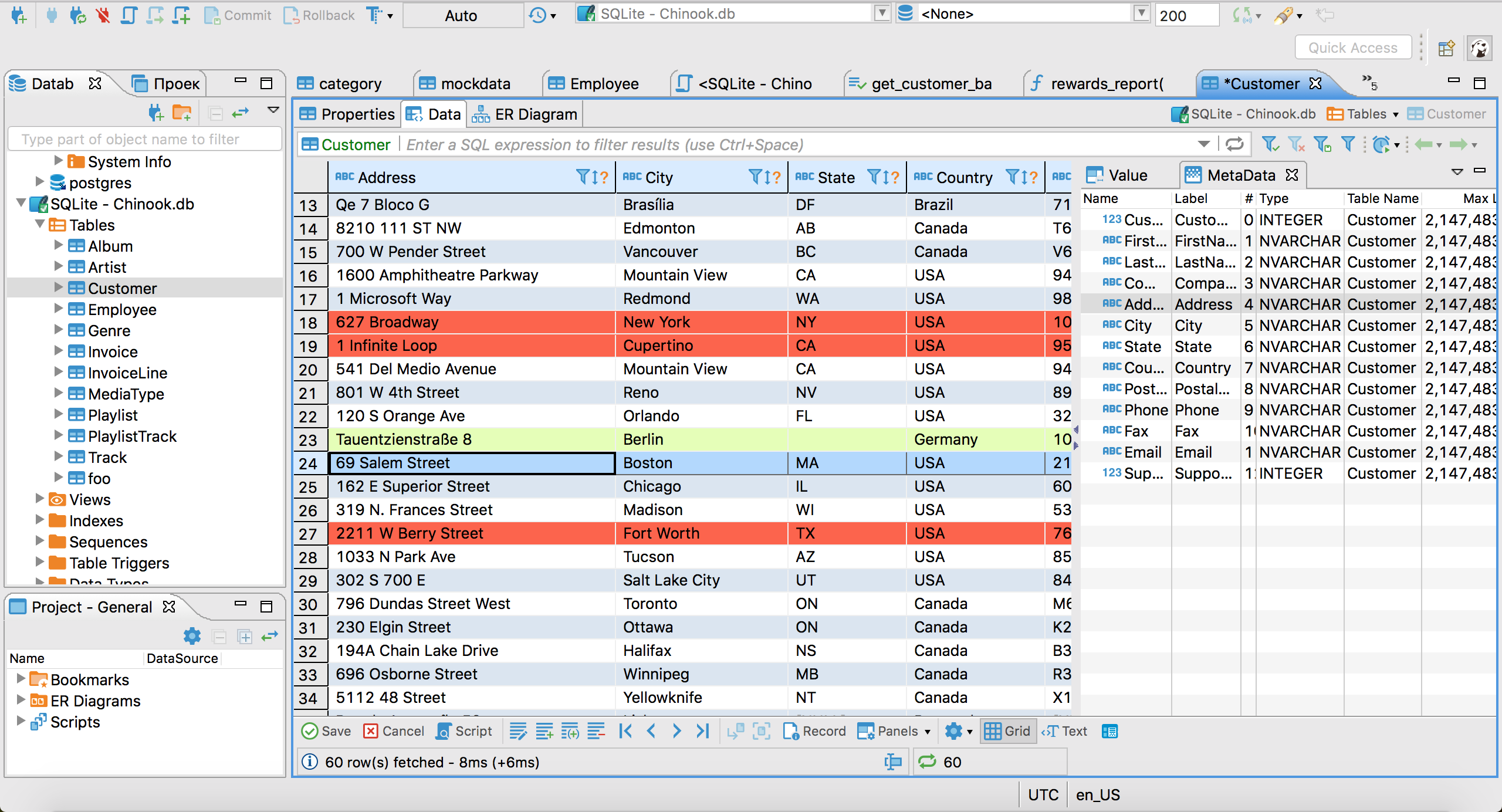
DBeaver Community is a free, open source database IDE that connects to nearly anything with a JDBC driver. For Postgres you get a SQL editor with autocomplete, execution plans, an ER diagram view, data editing, and import and export, all free.
It’s a Java app built on Eclipse, and it ships with its own Java runtime, so you don’t need to install one. On Ubuntu, install it from DBeaver’s apt repository, the ppa:serge-rider/dbeaver-ce PPA, Flathub, or with sudo snap install dbeaver-ce --classic.
The trade-off is the Eclipse interface: perspectives, panels and settings dialogs everywhere. It’s powerful, but it’s busy, and it takes noticeably longer to start and more memory to run than a lighter client.
Pick it if you need one free tool for a long list of databases and don’t mind an IDE-style interface. Our DBeaver alternatives and how to use DBeaver posts go deeper.
4. DataGrip
Linux, Windows and macOS. Free for non-commercial use, $109/year for one user otherwise.
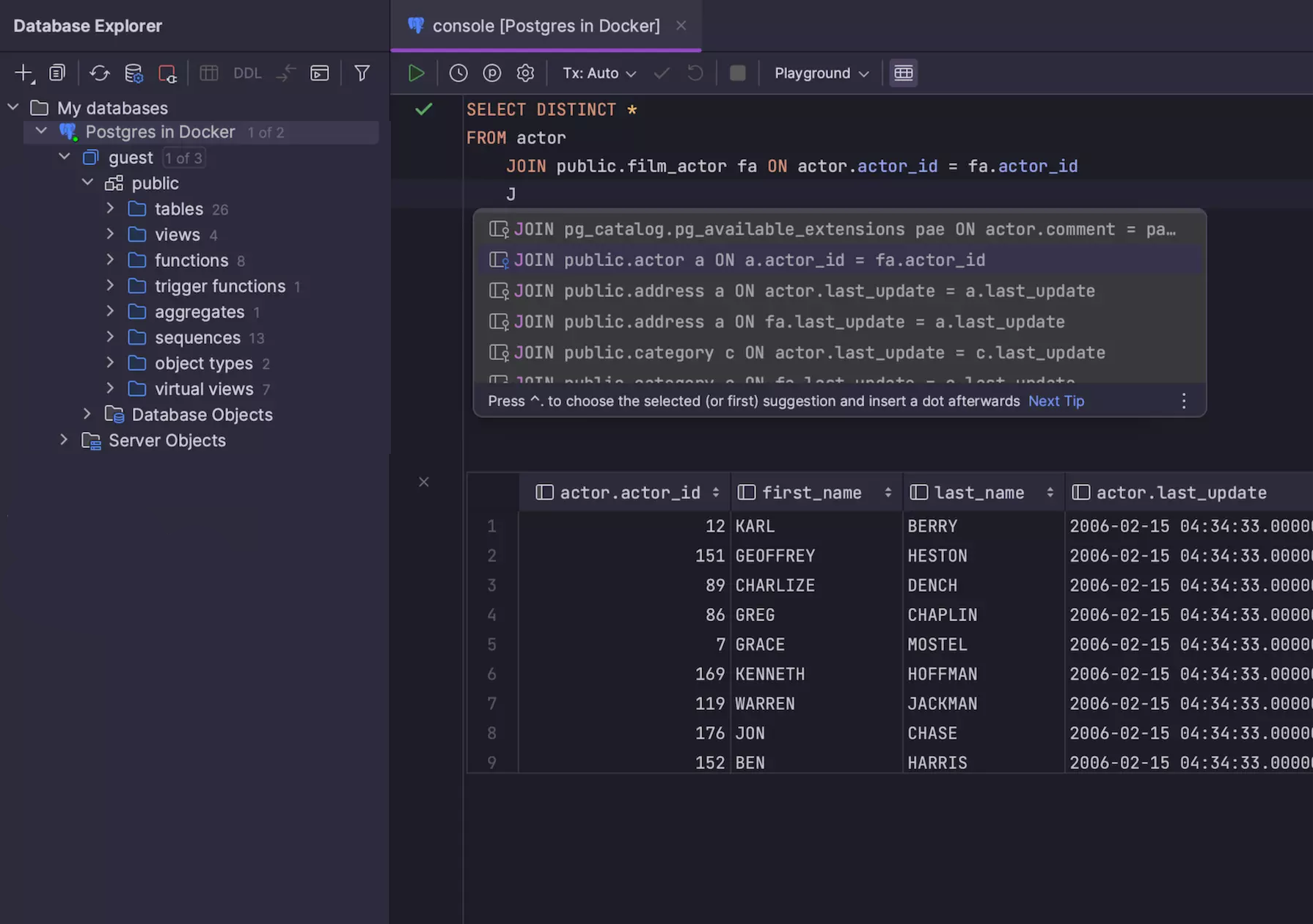
DataGrip is JetBrains’ database IDE, and it has the smartest SQL editor here: refactoring, code inspections and autocomplete that understands your whole schema. On Ubuntu, install it with sudo snap install datagrip --classic or through the JetBrains Toolbox app.
Since October 2025 it’s free for non-commercial use like learning and hobby projects. For work, it’s a paid subscription. Like DBeaver it’s a Java IDE, so expect a heavier app and a lot of settings.
Pick it if you already live in JetBrains IDEs and want the same editor for SQL. See Beekeeper Studio vs DataGrip and our DataGrip alternatives.
5. psql
Everywhere Postgres runs. Free.
psql is the official PostgreSQL command line client, and it’s the one people usually mean when they search for “postgresql-client ubuntu”. You don’t need the Postgres server to use it. To install only the client:
sudo apt install postgresql-client
psql --version
# psql (PostgreSQL) 16.15 (Ubuntu 16.15-0ubuntu0.24.04.1)
Then connect with a connection string or flags:
psql "postgresql://matthew@db.example.com:5432/bookshop"
# or
psql -h db.example.com -U matthew -d bookshop
postgresql-client installs the version that matches your Ubuntu release (PostgreSQL 16 on 24.04). For a newer psql, add the PostgreSQL project’s apt repository by following the instructions on postgresql.org, then install a specific version, such as postgresql-client-18.
psql is fast, scriptable and always there over SSH, and its backslash commands are worth learning: \l to list databases, \dt to show tables, \d books to describe a table. Where it falls down is browsing and editing data: wide results wrap into an unreadable mess, and changing one value means writing an UPDATE.
bookshop=> SELECT title, price FROM books ORDER BY price DESC LIMIT 3;
       title        | price
--------------------+-------
 The City We Became | 17.99
 The Fifth Season   | 16.99
 The Dispossessed   | 15.99
(3 rows)
Pick it if you’re on a server, writing scripts, or just need a quick query. Most developers use psql and a GUI side by side. See Beekeeper Studio vs psql for how they compare.
How to connect a GUI to Postgres on Ubuntu
If you installed Postgres on your Ubuntu machine with sudo apt install postgresql and tried to connect a GUI to it, you’ve probably seen this:
FATAL: password authentication failed for user "postgres"
This isn’t the GUI’s fault. Ubuntu’s Postgres package uses peer authentication for connections over the local Unix socket: you can log in as the database role that has the same name as your Linux user, with no password. That’s why sudo -u postgres psql works. But a GUI connecting to localhost:5432 uses TCP, where Ubuntu requires a password, and the postgres role doesn’t have one. You can see the rules in /etc/postgresql/16/main/pg_hba.conf (swap 16 for your version).
There are two ways to fix it. Don’t change pg_hba.conf to trust, which lets anyone on the machine in as any user.
Option 1: create a Postgres role for yourself
Make a role with your Linux username, give it a password, and create a database to work in:
sudo -u postgres createuser --superuser --pwprompt "$USER"
createdb "$USER"
Then connect your GUI to host localhost, port 5432, with your username and the password you just set. Superuser is fine on your own development machine. On a shared server, create a role with only the permissions it needs.
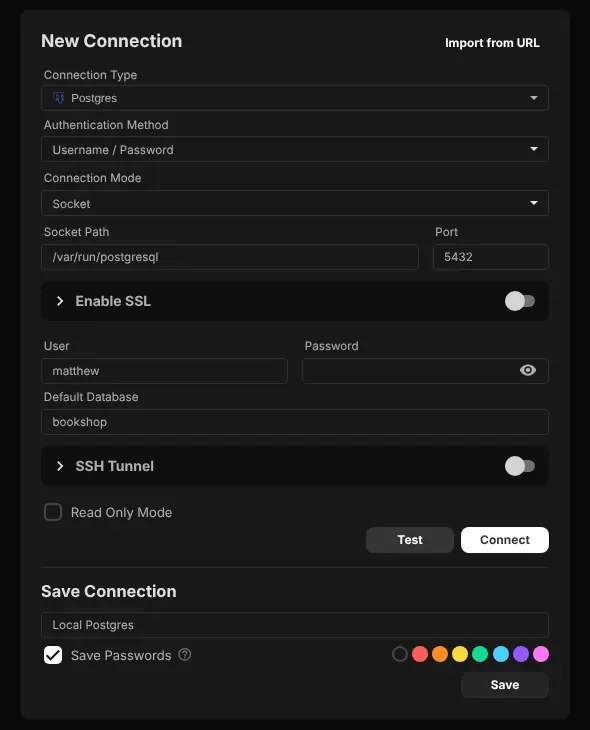
Option 2: connect over the Unix socket, with no password
Beekeeper Studio can connect over the Unix socket, which uses the same peer authentication as psql. Once the role from option 1 exists (it doesn’t need a password for this), choose Socket as the connection mode. The socket path is already /var/run/postgresql, which is where Ubuntu puts it. Enter your Linux username as the user, leave the password empty, and connect.
Connecting to Postgres on a remote Ubuntu server
For a Postgres server on another Ubuntu machine, such as a VPS, don’t open port 5432 to the internet. Postgres only listens on localhost by default, and that’s a good thing. Connect through an SSH tunnel instead: in Beekeeper Studio, turn on SSH Tunnel in the connection form, enter the server’s SSH host, user and key (or use your SSH agent), and enter the database details as the server sees them, usually host localhost.
If you can’t connect at all, check that the server is up first. Our guide on how to check if PostgreSQL is running covers systemctl, pg_isready and the rest. If you’d rather not install Postgres on your machine at all, run it in Docker and connect to localhost:5432 with the password you gave the container.
Postgres clients for Ubuntu compared
| Client | What it is | Install on Ubuntu | Price | Open source |
|---|---|---|---|---|
| Beekeeper Studio | Desktop SQL editor and database manager | apt repo, AppImage, Snap, Flatpak | Free | Yes (GPLv3) |
| pgAdmin 4 | Postgres admin tool, desktop or web | pgAdmin’s apt repo (x86_64 only) | Free | Yes |
| DBeaver Community | Java database IDE for almost any database | apt repo, PPA, Snap, Flatpak | Free | Yes (Apache 2.0) |
| DataGrip | JetBrains’ database IDE | Snap, Toolbox, tar.gz | Free for non-commercial use, $109/year | No |
| psql | The official command line client | apt install postgresql-client |
Free | Yes |
Prices are list prices for one user, checked in October 2026. Every client here works on Ubuntu 22.04, 24.04 and 26.04.
Which Postgres client should you use on Ubuntu?
- For everyday development, writing queries and editing data: Beekeeper Studio. It’s free, open source, made for Linux, and works with your other databases too.
- For administering Postgres servers: pgAdmin, which has every Postgres admin feature.
- For dozens of database types in one free tool: DBeaver Community.
- For JetBrains users: DataGrip.
-
On servers and in scripts:
psql, alongside whichever GUI you pick.
Ubuntu users have been writing to us for years about finally finding a database GUI that feels like it belongs on Linux:
Really pleased to find a solution that runs well on Ubuntu and allows me to replace my old, proprietary DB admin tool that I’ve used for 15+ years.
Related reading
- Best PostgreSQL GUI clients, free and paid
- 5 free pgAdmin alternatives
- Postgres in Docker: a practical guide
- How to check if PostgreSQL is running
 Beekeeper Studio Is A Free & Open Source PostgreSQL GUI
This is the PostgreSQL client I’ve been looking for! The UI is what sets it apart: Clean, intuitive, powerful. Goodbye clunky PGAdmin. - David Cyprian
Beekeeper Studio is a fast, intuitive and easy to use PostgreSQL client. It supports loads of other databases too, and works great on Windows, Mac and Linux.
What PostgreSQL Users Say About Beekeeper Studio
Unlike pgAdmin, Beekeeper is remarkably simple to use yet not lacking in features–and the price is right! The database backup feature is particularly useful. Just great software.
Fabulous tool, the most practical IDE I’ve found to date for Postgres and MySql db admin - it just works, no fuss :-)