
Make production visually distinct
Have you ever run a command in production thinking you were connected to staging or dev? I have, and I had to spend the rest of the day manually reassembling a dataset for some very annoyed customers.
The solution is to make it crystal clear when you’re connected to production.
An easy way to do this is by creating a different visual identity for your produciton database.
With Beekeeper Studio I like to make my production database red and staging database yellow. The Beekeeper statusbar adapts to the color choice, so it’s always clear when I’m connected to production.
Review changes before applying them
If you have two customers named Adam Smith it’s easy to give the wrong Adam a free subscription upgrade. Ask me how I know.
I’ve made this mistake a few times - sometimes through my own fault, but sometimes due to a confusing database GUI that auto-applied changes and made it hard to figure out what happened.
I’ve designed Beekeeper Studio to explicitly lay out pending changes, so you can see what’s going to happen before you click apply. Personally I like to use the Copy to SQL button so that I can run the SQL directly and check the result in a transaction before applying it (see below), another workflow built into Beekeeper Studio.
Run risky SQL in a transaction
I love database transactions. It’s like being given a big undo button to click whenever I make a mistake.
The weird thing is that I didn’t use transactions in database GUIs for YEARS. While I understood them, and used them frequently in my Ruby on Rails apps, I never found a UI that made it clear what state of a transaction I was in. I always felt like I was more likely to make a mistake, so I avoided them entirely.
This fear of the unknown is why we spent an obscene amount of time tweaking Beekeeper Studio’s transaction UI to make transactions clear, transparent, and easy to use. You can see from the video that it’s clear when you’re in manual transaction mode, and also what actions you can take to enter and leave it.
Don’t leave transactions open
Surprise! Didn’t I just tell you how great transactions are? Turns out they can be bad too. If you leave a transaction open it can lock up the whole database for everyone else. Opening a transaction then going home for the weekend is a not a good idea.
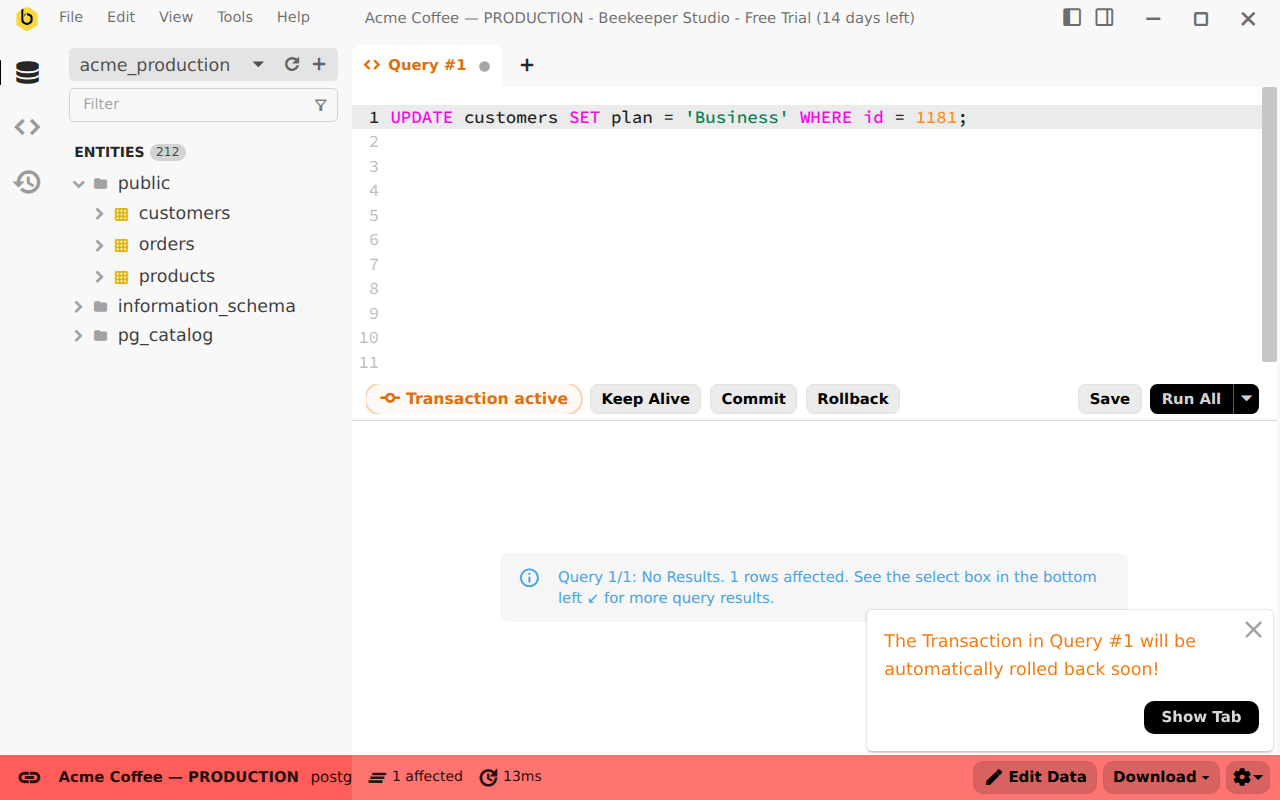
Let’s say you do use transactions, you make a change, then you go to lunch. Did you leave the transaction open? Hope not – you might have locked everyone out of the database while you finish your soup dumplings.
While leaving a transaction open doesn’t usually lock the whole database, it can still cause an outage if it blocks other production transactions.
I’ve seen the damage of this first hand, which is why Beekeeper Studio automatically rolls back transactions after a timeout, typically 10 minutes. You lose your changes, but you don’t cause an outage.
Use read-only mode to prevent mistakes
Sometimes oopsies are unavoidable. That’s why Beekeeper provides a Read Only mode - so even if your credentials have full access, Beekeeper will stop you from making changes.
This is straightforward - mark a connection as Read Only to prevent yourself from accidentally running a destructive query, dropping a table, or changing the name of every user to Test User.
If you want to make changes you have to explicitly exit read only mode.
Sensible safeguards for your production database
Even if you do everything correctly and de-risk your production work by using Beekeeper Studio it’s still sensible to have the following system level safeguards in place:
- Routine backups should be available in case you need to restore one
- You should practice backup restores routinely
- Standby secondary nodes should be available in case the primary node goes down
- Don’t share credentials across multiple people
- Scope database credentials aggressively
- Be organized and have a ticket process for making production changes
- Test all changes in Dev and Staging before running on Production (if possible)
Beekeeper is built for production
I hope this guide helps you to work more confidently in production.
Beekeeper’s hyper focus on usability extends beyond it’s good looks, we built our workflows to to give you confidence when you’re working in production and to help you avoid unprompted mistakes.
Please enjoy not accidentally dropping production as much as we do :-).
 Beekeeper Studio Is A Free & Open Source Database GUI
Best SQL query & editor tool I have ever used. It provides everything I need to manage my database. - ⭐⭐⭐⭐⭐ Mit
Beekeeper Studio is fast, intuitive, and easy to use. Beekeeper supports loads of databases, and works great on Windows, Mac and Linux.
What Users Say About Beekeeper Studio
"Beekeeper Studio completely replaced my old SQL workflow. It's fast, intuitive, and makes database work enjoyable again."
"I've tried many database GUIs, but Beekeeper strikes the perfect balance between features and simplicity. It just works."