
The more blocking happens on SQL Server the less concurrency the system. A certain amount of short blocks are unavoidable but too many blocks for longer periods of time can degrade performance and increase the chances of SQL Server deadlocks.
SQL Server blocking
SQL Server blocking occurs when one connection (user process or application process) places a lock on a table (or a number of rows) and a second connection attempts to read or modify the data under the lock. Depending on the type of the lock, this can cause the second connection to wait until the first connection releases its lock. A blocked connection waits indefinitely for the blocking connection to release its lock.
The more blocking happens on the server the less concurrency the system achieves. A certain amount of blocking is unavoidable but too many blocks for longer periods of time can degrade the performance of SQL Server.
SQL Server deadlocks
The combination of two blocked connections where the first is blocking the second and the second is blocking the first is called a deadlock. Since deadlocks are not naturally resolved with time, SQL Server automatically kills one of the connection (Deadlock victim) once it detects a deadlock. This allows the other connection to continue with its transaction.
Although deadlocks can be caused by two short blocks (Fraction of a second), it is often the long blocks that increase the chances of a deadlock to happen.
Blocks escalating to deadlocks
The following diagram shows the sequence of events leading to a deadlock. Consider two applications (A1, A2) accessing two different table (T1, T2):
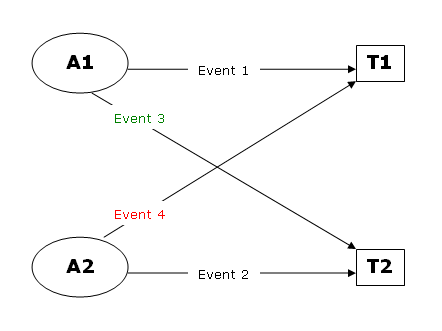
Event 1: A1 places a lock on T1 inside its transaction and continues to execute other statements
Event 2: A2 places a lock on T2 inside its transaction and continues to execute other statements
Event 3: A1 attempts to place a lock on T2 (Needs to access T2 before it can finish the transaction) but has to wait for A2 to release its lock
At this point, a block is created since A2 is blocking A1
Event 4: While A1 is waiting, A2 attempts to place a lock on T1 (Needs to access T1 before it can finish its own transaction)
A deadlock is created since two connections have blocked one another. SQL Server automatically resolves the deadlock by choosing one of the connections as a deadlock victim and killing it.
 Beekeeper Studio Is A Free & Open Source SQL Server GUI
I’ve upgraded from SQL Server and it was a smooth change — Beekeeper Studio enhanced my own workstream, offering a cleaner experience and better performance, as well as flexibility. - Aman Bhattarai
Beekeeper Studio is a fast, intuitive and easy to use SQL Server client. It supports loads of other databases too, and works great on Windows, Mac and Linux.
What SQL Server Users Say About Beekeeper Studio
So far the most comprehensive DB admin GUI out there. The only reason I haven’t given 5 stars is I cannot claim to have used it exhaustively only having discovered it two weeks ago. But so far, mySQL, MSSQL and Postgres in one tool is simply incredible.
Planning to purchase once pay day hits.
I had been using the free version of Beekeeper studio for a while, but when I needed to work with some MongoDB databases I upgraded to the paid version. And honestly, I was up and running in no time. Beekeeper is slick, fast, and it just works. Very intuitive, very easy to use. I work with MongoDB, Postgresql, SQL Server, and other databases in my job, and having one tool that can talk to them all is just wonderful.
Thank you, Matthew and team!