

Plot query results on an interactive map, right inside Beekeeper Studio. Point it at any result set with coordinates, geometry, or place names and pick how to draw it: dots, sized bubbles, numbered markers, clusters, heatmaps, paths, flow lines or filled regions.
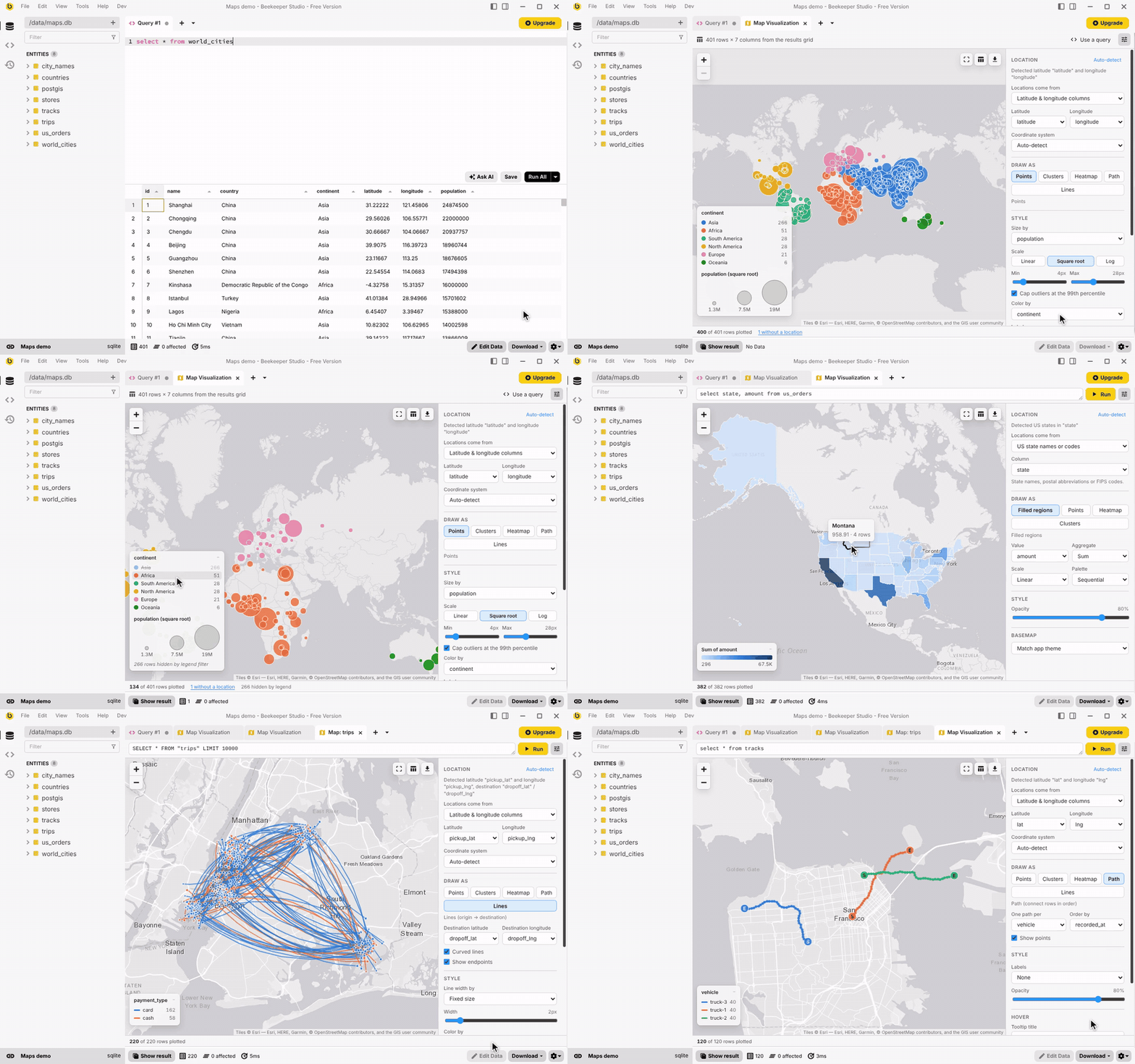
Sped up 1.6×. Watch the full-speed video.
Installing
Beekeeper Studio ships with community plugins switched off. Turn them on in user.config.ini
(~/.config/beekeeper-studio/ on Linux, ~/Library/Application Support/beekeeper-studio/ on macOS,
%APPDATA%\beekeeper-studio\ on Windows), then restart the app:
[pluginSystem]
disabled = false
communityDisabled = false
Once the plugin is listed in the plugin registry, install Map Visualization from Tools → Manage Plugins. Until then, build it and link it into the plugins folder as described under Development.
Opening a map
| Where | What happens |
|---|---|
| Right-click the top-left corner (or a column header) of a results grid or table view → Plot on Map | Maps the selected cells. No query is re-run. |
| Right-click in the query editor → Plot Query on Map | Runs the selected text (or the query under the cursor) and maps it. |
| Right-click a table in the sidebar → View on Map | Runs SELECT * … LIMIT 10000 against the table. |
| New tab dropdown or Tools → New Map | Opens a map tab with its own query box (Ctrl/Cmd+Enter runs it). |
Query results also show up in the tab’s bottom result table, so the raw rows are always one click away.
Where locations come from
Columns are detected automatically. The detection can be overridden in the Location panel.
| Data | Examples |
|---|---|
| Latitude / longitude columns | lat/lng, latitude/longitude, pickup_lat/pickup_lon, storeLat/storeLng; decimal degrees or DMS (40°42'46"N) |
| Web Mercator meters | x/y in EPSG:3857, converted automatically |
| Geometry columns | PostGIS EWKB hex, WKB, WKT / EWKT, GeoJSON (text or objects), MySQL / GeoPackage binary, {lat, lng} or {x, y} objects, Mongo GeoJSON points |
| Text coordinates | "40.7128, -74.0060", (40.7, -74.0), S33.92 E18.42 |
| Geohashes | dr5regw3p |
| Countries | names, aliases (UK, South Korea, Côte d'Ivoire), ISO alpha-2/3 or numeric codes |
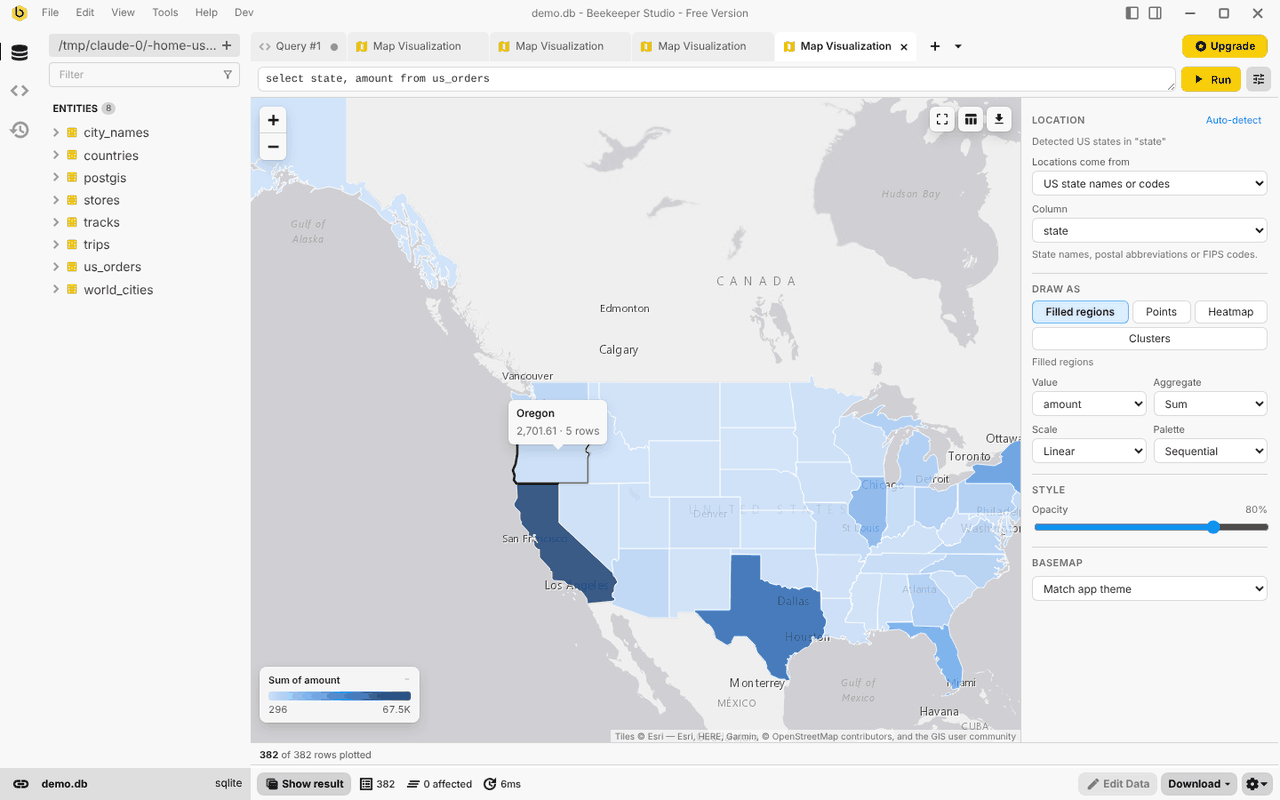
| US states | names, postal codes, FIPS codes |
| Cities | Paris, Paris, TX, London, Ontario, optionally narrowed by country / state columns; ~34k cities, offline |
| US ZIP codes | 02134, 02134-1234, or numbers with the leading zero lost |
Fuzzy inputs are handled conservatively: swapped lat/lng columns are flipped (with a warning), ambiguous city names resolve to the most populous match,
ZIP codes without an exact centroid (PO boxes) fall back to their 3-digit ZIP area, and anything that can’t be placed is counted.
Click “N without a location” in the status bar to see those rows in the table.
Projected geometries in other SRIDs are reported with a hint to ST_Transform(geom, 4326).
Ways to draw it
| Layer | Use it for | Options |
|---|---|---|
| Points | Dots, bubbles, numbered markers | Size by a column (linear, square root (area-true), or log), cap outliers at the 99th percentile, color by category or number (linear, log or quantile classes; sequential or diverging), labels (row number or a column), opacity |
| Clusters | Thousands of overlapping points | Counts per cluster, zoom in to split |
| Heatmap | Density, optionally weighted by a column | Radius, blur, weight scale. Intensity is normalized per zoom so hot spots stay visible at any scale |
| Path | GPS tracks, routes, ordered visits | One path per group column, ordered by any column (times, sequence numbers) or row order; start / end markers |
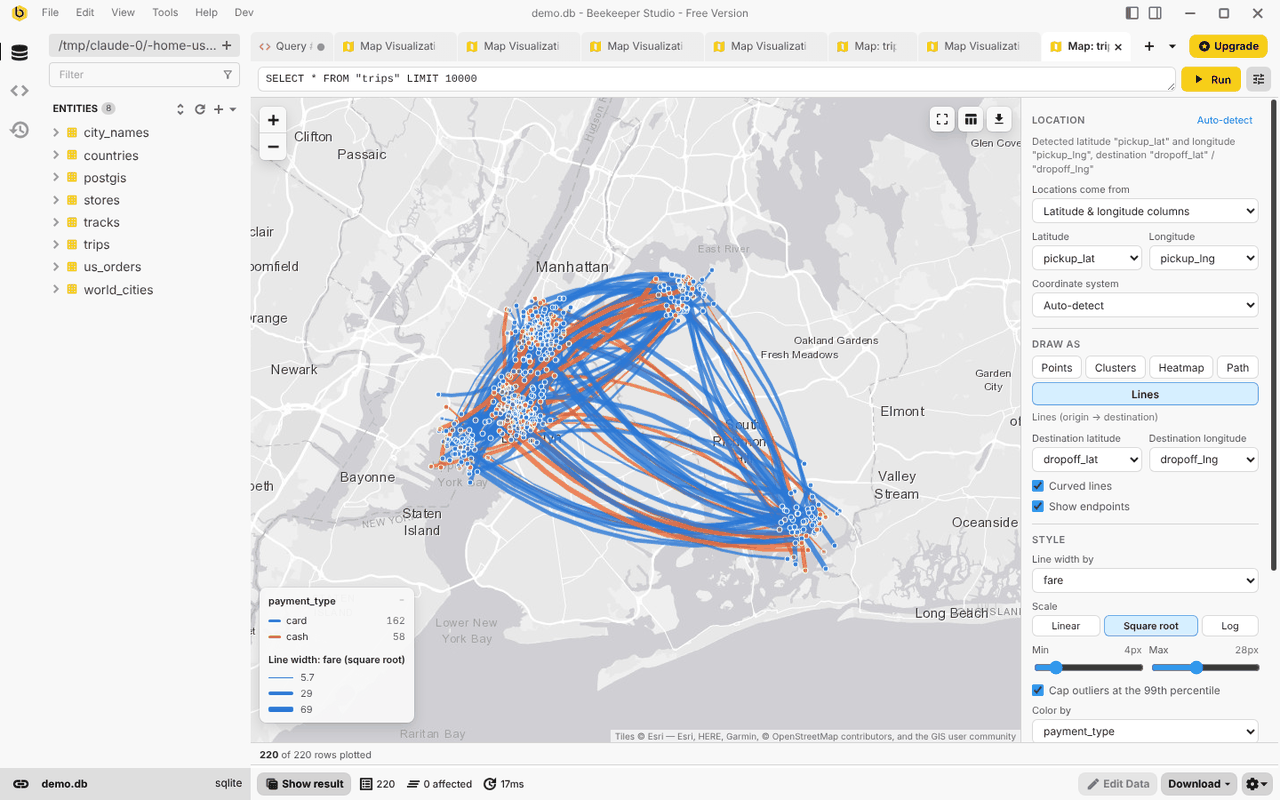
| Lines | Origin → destination flows (trips, shipments) | Destination columns, curved or straight, width and color by column |
| Filled regions | Choropleths of countries or US states | Count rows or sum / average / min / max a column; linear, log or quantile color scale |
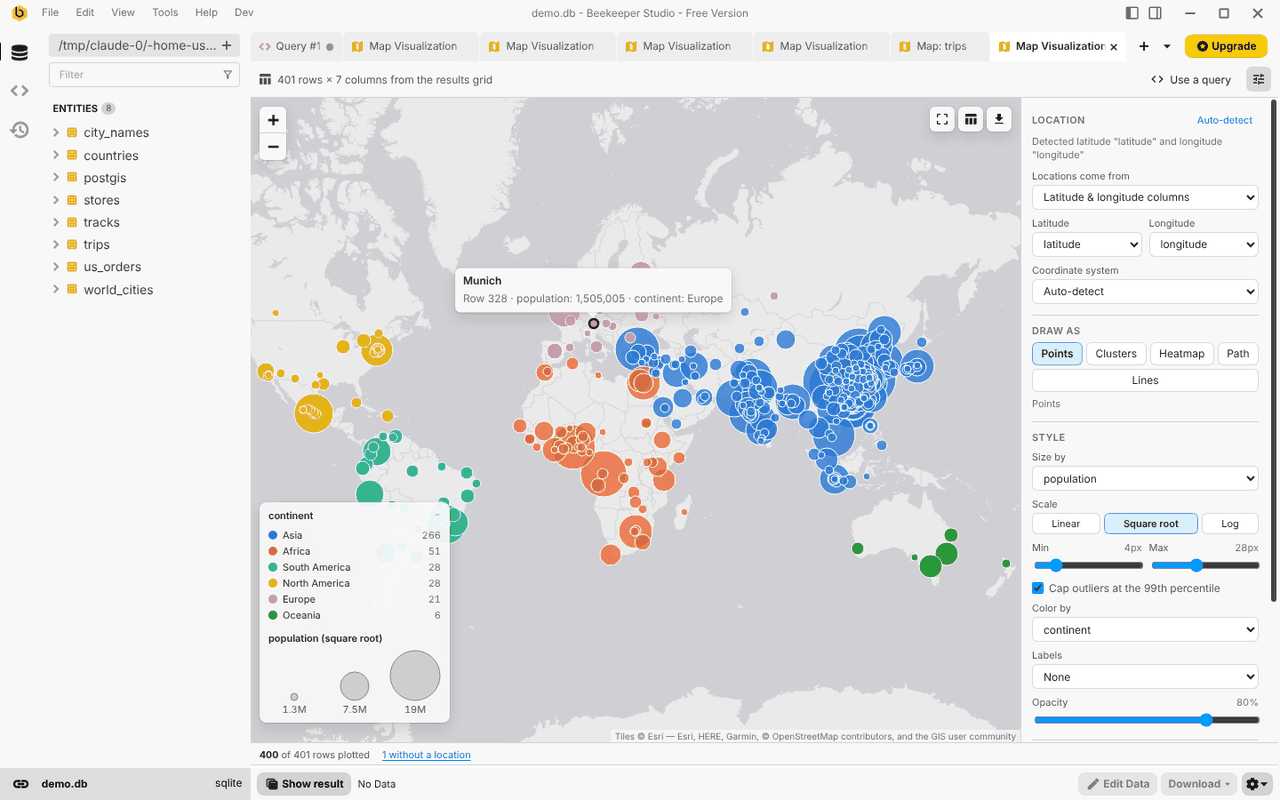
Hover a mark for a summary and click it for the full row, with Show in table and Copy as JSON. Legend categories can be clicked to hide them, or Alt-clicked to show only that category. The table button in the map toolbar sends every row in the current view to the result table below.
Basemaps and export
The plugin ships with an offline map: a 20 MB world map built from OpenStreetMap data, so maps draw without an internet connection or any third-party tile server. It has countries, regions, cities and major roads, which covers country to metro-area maps; zoomed in to street level it runs out of detail, and the status bar offers an online basemap instead.
The basemap list is split into Built in maps, which work offline, and Online maps, which download tiles from a tile server. The selected map is labelled Offline or Online, with the server it uses.
- Built in: Match app theme (default) uses the offline map in light or dark; Country outlines is the simplest map.
- Online: Esri streets, topographic and satellite imagery, OpenStreetMap, OpenTopoMap, or any custom
{z}/{x}/{y}tile URL. - Export as PNG (map and legend), copy the image to the clipboard, or save the plotted rows as GeoJSON.
More detailed offline maps
Detailed area → Load file… under Settings → Basemap adds a Protomaps basemap
.pmtiles file on top of the world map, such as a street-level extract of one city or country made with the
pmtiles CLI. Outside the file’s area the world map shows as usual.
# street detail for New York City (about 100 MB)
pmtiles extract https://build.protomaps.com/20261014.pmtiles nyc.pmtiles --bbox=-74.26,40.48,-73.69,40.92 --maxzoom=15
Use a recent build date. Files in other tile schemas (OpenMapTiles, raster) are rejected.
Settings, the query and the viewport are saved with the tab. A restored tab only re-runs its query automatically if
it ran before and is a single read-only SELECT.
Known issues
Three Beekeeper Studio bugs affect this plugin in 6.1.5 and earlier; fixes are pending upstream:
- In the Community edition, plugin tabs with a result panel (like this one) render only about 150px tall.
- Plot Query on Map in the query editor’s context menu does nothing (the host doesn’t pass the query text).
- Copy image fails with an error; Save as PNG… works.
The other entry points work in the meantime.
Development
Requirements: Beekeeper Studio 5.5+, Node.js 20.19+, Yarn 1.
yarn install
yarn dev        # links the plugin into Beekeeper Studio's plugins folder and hot-reloads
yarn test       # unit tests (vitest)
yarn build      # type-check + production build into dist/
yarn dev symlinks this folder into the plugins directory (~/.config/beekeeper-studio/plugins/bk-plugin-map-visualization
on Linux). The link name must match the id in manifest.json.
src/
  App.vue                 data sources, state, popups, export
  components/             settings panel, legend, icons
  lib/geo/                WKB / WKT / geohash / DMS parsing, regions, offline geocoding
  lib/detect.ts           column auto-detection
  lib/build.ts            rows -> plottable items (CRS, axis order, geocoding)
  lib/model.ts            sizes, colors, aggregates, legends
  lib/renderer.ts         Leaflet layers
  lib/pack.ts             offline map packs: validation, PMTiles source
  lib/offlineMap.ts       bundled world map + detailed area (IndexedDB), shared by all map tabs
  data/                   generated lookup tables (see below)
basemaps/world.pmtiles    the offline world map, bundled into dist/
The lookup tables in src/data/ are generated from public datasets:
# download cities15000.zip, countryInfo.txt and admin1CodesASCII.txt from https://download.geonames.org/export/dump/
# and 2023_Gaz_zcta_national.zip from the US Census gazetteer, unzip them into one folder, then:
yarn geodata /path/to/that/folder
The offline world map in basemaps/ is a Protomaps build cut to zoom 6, with the land use, land cover and POI layers
dropped (about half the size, and a data map doesn’t draw them):
pmtiles extract https://build.protomaps.com/<YYYYMMDD>.pmtiles world-z6.pmtiles --maxzoom=6
yarn basemap world-z6.pmtiles basemaps/world.pmtiles
--maxzoom=5 gives a 5 MB map with fewer towns and roads, if the plugin download needs to be smaller.
Releasing
Run bin/make-release.sh. It suggests the next version from the existing tags, sets version in manifest.json and
package.json, commits, and pushes a matching tag such as v1.0.0.
The release workflow tests, builds and creates a draft GitHub release with manifest.json and the plugin zip.
Data sources and licenses
- City data © GeoNames, CC BY 4.0.
- Country and state shapes from Natural Earth via
world-atlas, and US Census viaus-atlas(public domain). - ZIP code centroids from the US Census Bureau ZCTA gazetteer (public domain).
- The offline map is © OpenStreetMap contributors (ODbL) and Natural Earth, from a Protomaps basemap build, drawn with protomaps-leaflet (BSD-3-Clause).
- Map tiles are provided by their respective services (Esri, OpenStreetMap, OpenTopoMap) under their own terms; attribution is shown on the map.
- Built with Leaflet, Leaflet.markercluster and Leaflet.heat.
This plugin is licensed under the GPL-3.0. See LICENSE.