
SQL Server Management Studio is Windows only, which means if you run MacOS you’re out of luck. You cannot install SSMS on MacOS, period.
For a while Microsoft was pushing users to Azure Data Studio (another tool that they built and owned), but in early 2026 they decided to retire ADS entirely.
So, now what?
Recommended alternatives to SSMS for MacOS
Fear not, there are a number of other tools you can use instead of SSMS. Many of them free to use. Most of them better than SSMS in some meaningful ways.
Beekeeper Studio
MacOS, Windows, and Linux - Download for free
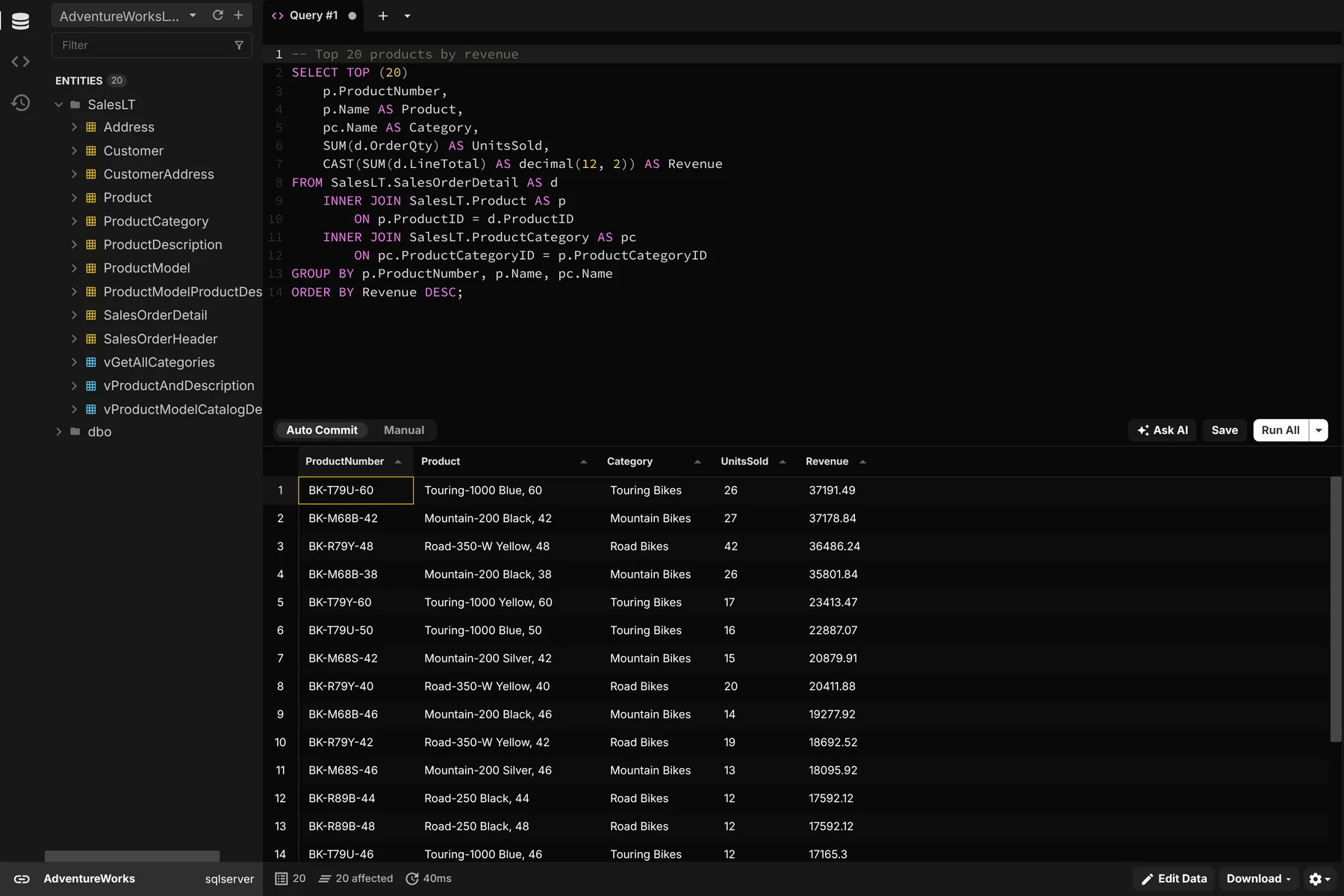
Beekeeper Studio is an open source database manager that is modern, fast, and easy to use. Beekeeper’s SQL Server integration is mature and supports Azure SQL, Entra ID, Windows auth, and Azure CLI based connections. Many Windows users even use Beekeeper Studio full time instead of SSMS, so you know it must be good. The best news is you can use the SQL Server integration for free.
I’ve upgraded from SQL Server and it was a smooth change — Beekeeper Studio enhanced my own workstream, offering a cleaner experience and better performance, as well as flexibility. - Aman Bhattarai, Technical Lead, Amnil Technologies
We’re obviously biased, but we built Beekeeper Studio because we were working with databases like SQL Server on MacOS and Linux and there wasn’t a desktop app that we liked and enjoyed using, so we built one. That was back in 2019, as I write this in 2026 we have over 3,000,000 downloads and a large and active user community.
Some key features include
- Top tier SQL editor with autocomplete.
- Excel-like table editing and navigation.
- JSON-view for large complex tables and embedded json data.
- AI integration if you need it (you can also turn it off entirely).
- Support for enterprise connection types for on-prem, Azure, and AWS deployments.
- Top tier support - reach a real product expert (no bots) whenever you need help. We respond fast and fix bugs even faster.
- Support for 20+ other databases including Redis and Postgres.
- Feature parity on MacOS, Linux, and Windows
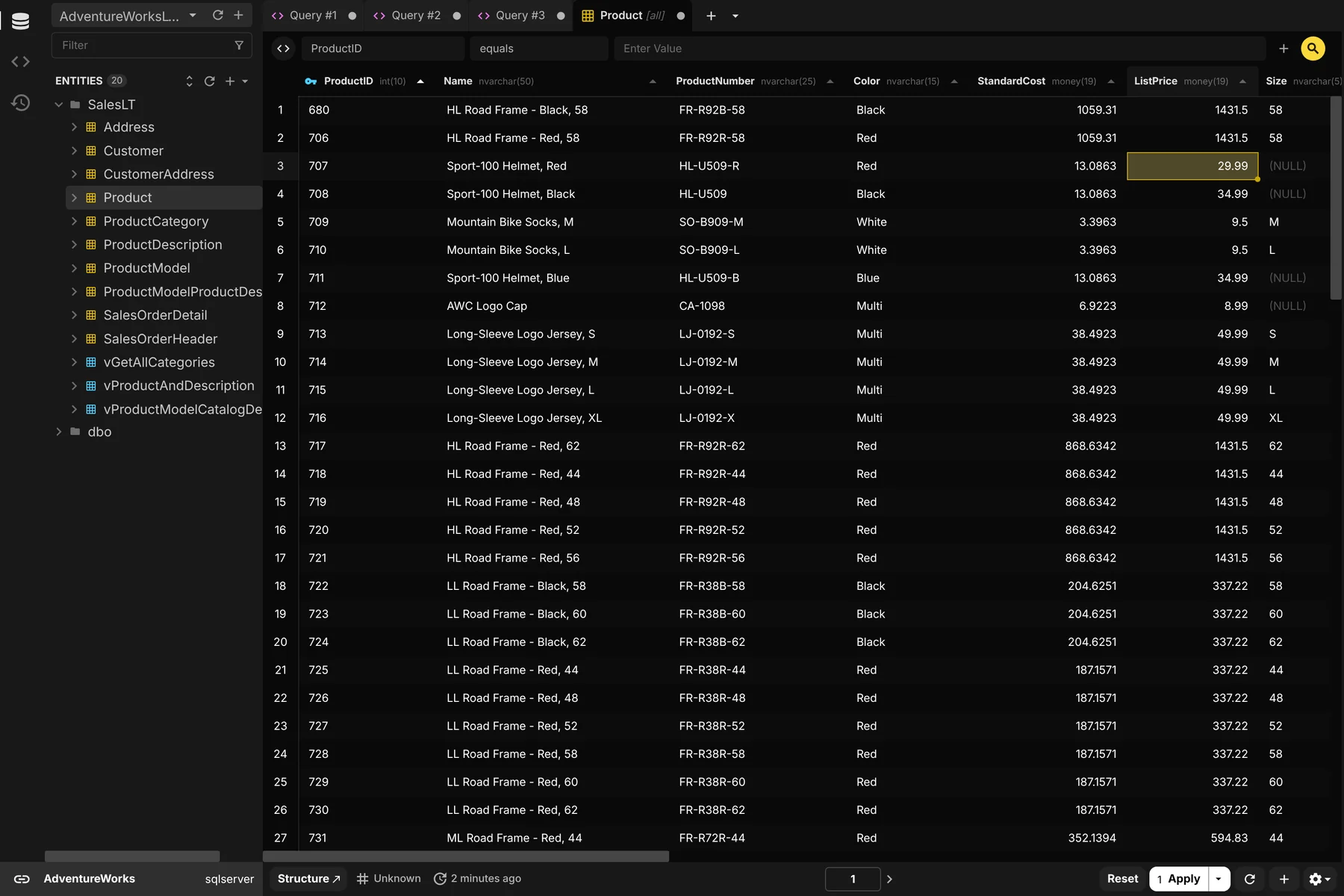
Download Beekeeper Studio for free
DBeaver
Windows, MacOS and Linux
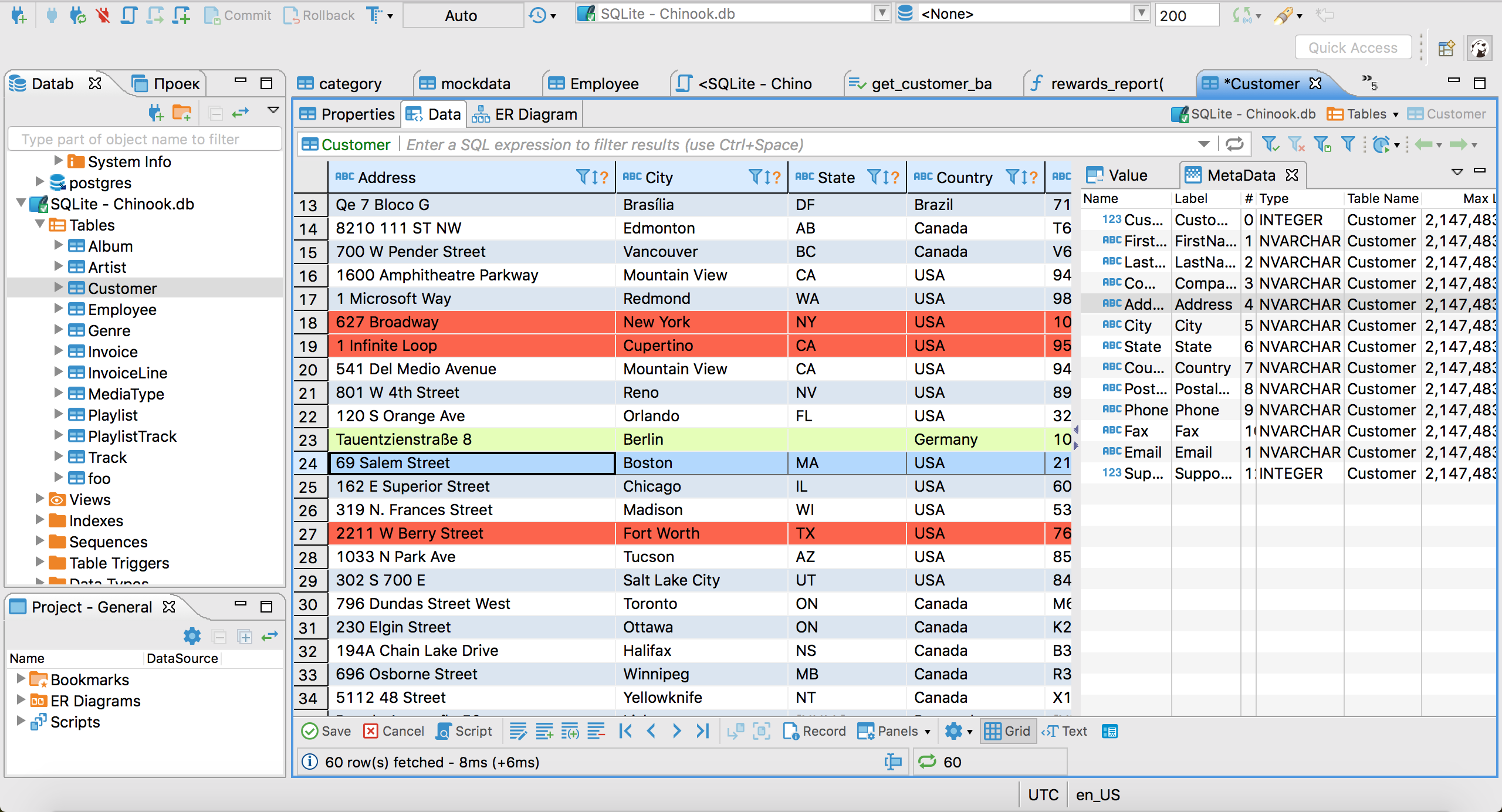
DBeaver is a fully open source database management app built on the Eclipse platform (if you remember Eclipse). It’s a tried and tested database client, and 100% free. Well sort-of, they also have a paid enterprise version that also has a free lite version, which is also free, but has different features from the open source free version. I dunno, it’s complicated.
DBeaver’s biggest positive is that it’s built in Java and so supports LOTS of databases thanks to JDBC. The negative is that it’s built on Java and looks and runs like an early 2000s Java app. That means it’s heavy on resources and heavy on the eyes, but if you can get over the UX it has a lot to offer (so long as you download the correct version).
If you really need something 100% free and open source then download the community edition. Just be prepared for a learning curve.
Download DBeaver Community Edition
Download DBeaver….other? edition
DataGrip
Windows, MacOS, and Linux
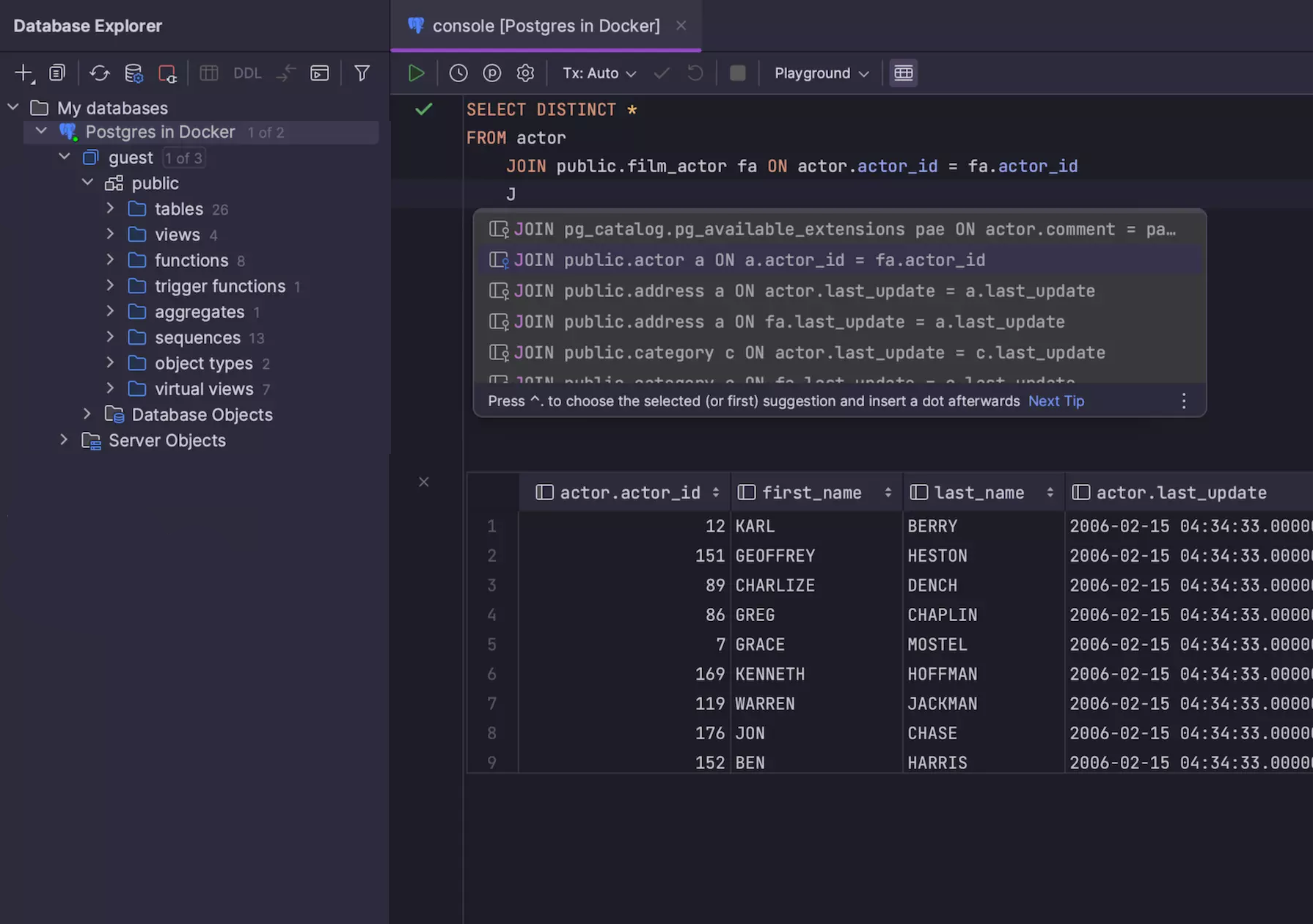
DataGrip is like DBeaver’s bigger and more expensive brother. Created by JetBrains, who also make IntelliJ IDEA, it’s possible you’re familiar with their style of app already.
Like DBeaver, DataGrip is a Java app, unlike DBeaver DataGrip has no free version and is built on JetBrains’ custom Java app platform.
Not going to lie - DataGrip is the most powerful product on this list, but the power comes with a trade-off. Like other expansive IDEs (IntelliJ, Visual Studio, Xcode) there are a lot of power features, but also a lot of buttons, and a lot of keyboard shortcuts. If you don’t need an IDE it can be a bit much.
JetBrains also seems to be a bit AI-pilled and their site is filled with non-stop marketing for their AI agent (I think called Air?), so I’d expect a fairly aggressive integration.
Download DataGrip
DataGrip pricing
Microsoft VSCode MSSQL Extension
Windows, MacOS, and Linux
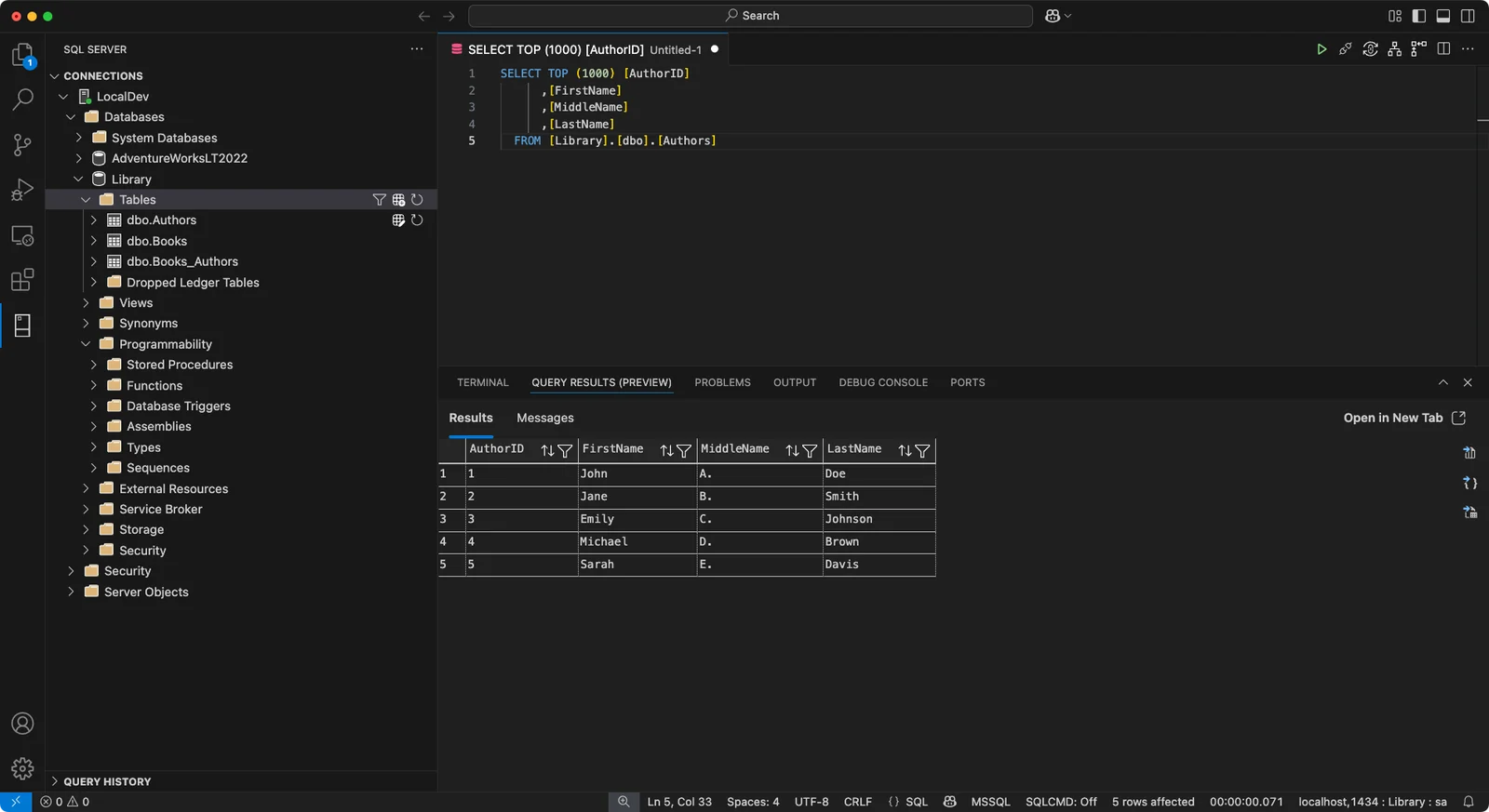
Screenshot: Microsoft Learn, CC BY 4.0, annotations removed.
With Azure Data Studio gone, the MSSQL extension for VSCode is now the closest thing to an official SSMS for Mac. It’s free, it’s open source, and it’s built by Microsoft, so it covers the SQL Server basics: an object explorer, a query editor with a results grid, a table designer, and inline data editing.
The problem is that it’s still VSCode. VSCode is a great code editor, but it makes a pretty bad interface for a database app. Your query results live in the same bottom panel as your terminal and your debug console, and everything else is a sidebar, a command palette entry, or a right-click menu. If you already spend all day in VSCode that might be fine, but if you just want to browse some tables and write a few queries, it’s a lot of editor to wade through.
It’s also stuffed with Copilot. There’s an @mssql chat participant, a “Chat with this database” option when you right-click a database, and an MSSQL Copilot menu in the query editor to explain, rewrite, or analyze your queries. Microsoft’s docs for the extension list 17 separate Copilot features, and all of them need a paid GitHub Copilot subscription.
Don’t expect much help from Microsoft if something goes wrong, either. According to the extension’s own README, “support for this extension is provided via GitHub issues”. So you’ll be filing a ticket on a public repo and hoping somebody picks it up.
Finally, hope you trust the other VSCode extensions you have installed. Extensions aren’t isolated from each other. In Microsoft’s words, “the extension host has the same permissions as VS Code itself”, so any extension can read your files, make network requests, and run other programs. Your saved SQL Server connections (servers, usernames, and databases) live in VSCode’s settings.json, with passwords in your OS keychain. And the extension marketplace has had a rough couple of years:
- In May 2026 a poisoned update to the popular Nx Console extension harvested tokens, SSH keys, and connection strings from developers’ machines, and led to a breach of GitHub’s own internal repositories.
- In January 2026, two fake AI coding assistants with 1.5 million combined installs were caught sending every file their users opened to servers in China.
- In October 2025, Wiz found over 100 leaked marketplace publishing tokens, which would have let an attacker push malware to every user of the affected extensions through an automatic update.
None of this is the MSSQL extension’s fault, but it’s the neighborhood it lives in.
Install the MSSQL extension
MSSQL extension docs
SQLPro for MSSQL
MacOS, Windows, iOS, and Android
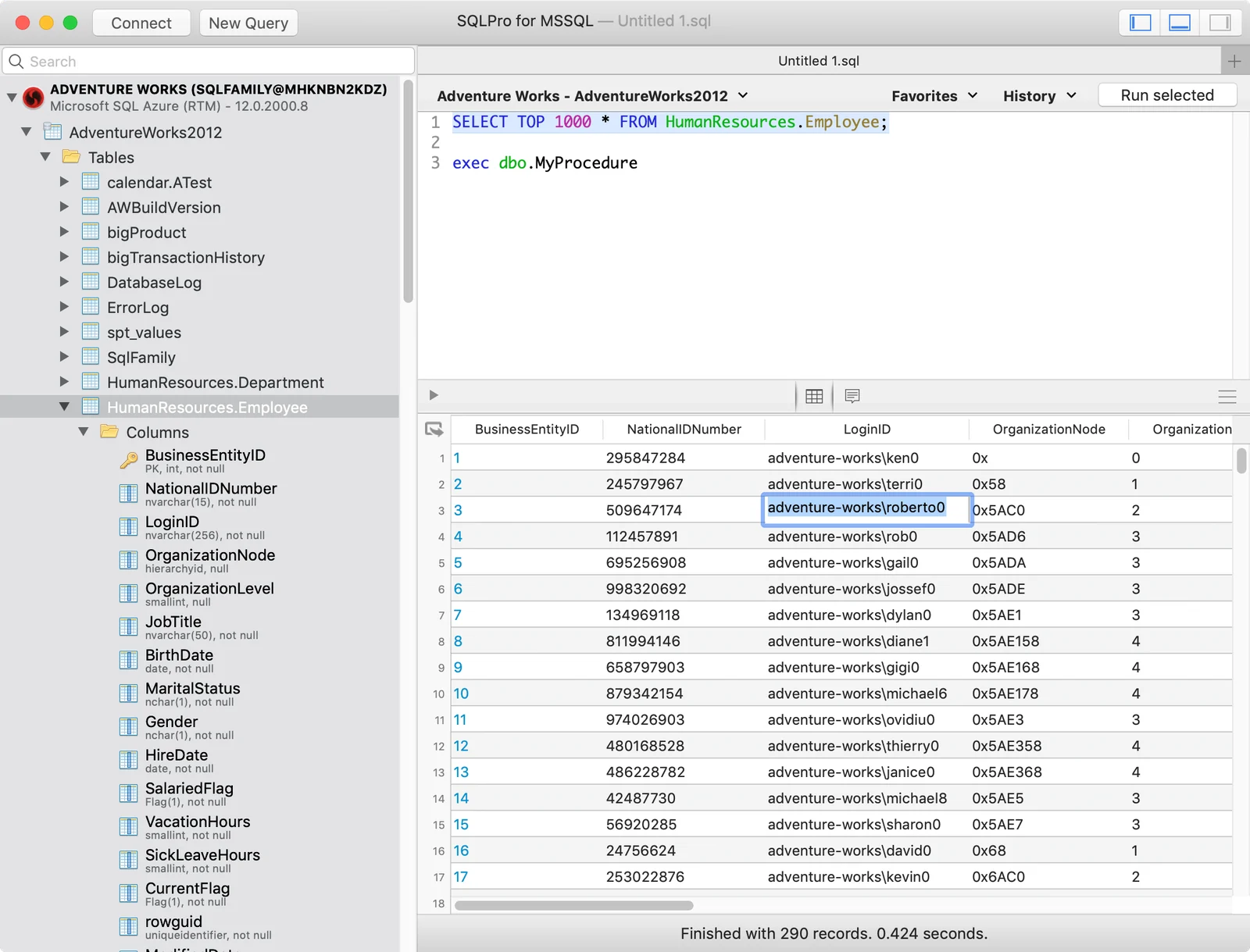
Screenshot: SQLPro for MSSQL’s Mac App Store listing.
SQLPro for MSSQL is one of the longest-running native SQL Server clients for the Mac. It’s made by Hankinsoft, a small shop whose founder is also its sole developer, and these days it’s also available for Windows, iOS, and Android.
The big limitation is right there in the name: it only works with SQL Server. The App Store listing puts it bluntly: “This SQL Client does NOT work with MySQL or Postgres.” If you also work with other databases, you’ll need a second app (Hankinsoft sells a separate one called SQLPro Studio for that).
It’s also pretty old school. It’s a classic-looking Mac app, and the screenshots on its App Store listing still show macOS Mojave, which came out in 2018. It covers the fundamentals (a query editor, a table designer, Windows authentication, Azure SQL, and as of September 2026 Entra ID sign-in), but by the vendor’s own comparison with SSMS it doesn’t have an execution plan viewer or database diagrams.
Finally, the free download is really a trial. You need a Premium upgrade before you can interact with your query results, and that’s $10.99/month, $79.99/year, or $179.99 for a lifetime license on one platform.
Download SQLPro for MSSQL
SQLPro pricing
Official suggestions and semi-official workarounds
What Microsoft recommends instead
Microsoft doesn’t really have a recommendation for SSMS users looking to work on MacOS. Their latest recommendation (in a forum post) was for Azure Data Studio, but as mentioned earlier they’ve retired that product entirely.
The other SQL product that Microsoft builds is the SQL Server Add-in for VSCode. It’s a pale substitute for SSMS and VSCode makes an underwhelming interface for a SQL client, but that’s the most official thing available. There’s not even a real marketing page for the plugin, only the plugin marketplace page and a docs page on Microsoft’s learning portal.
Run the real SSMS in a virtual machine
Technically I lied. It is technically possible to run the real SSMS on MacOS, but you’ll need to use a virtual machine like Parallels, but should you? Personally I hate using a VM to run a single piece of software and I avoid it whenever possible. There are just too many tradeoffs.
For SSMS, the first trade off is that Microsoft’s support for Windows ARM (the type of CPU used in a modern Mac) was only introduced with SSMS version 22+, so if you need an older version for any reason you’re out of luck.
The biggest drawback is that you’ll be running a full version of Windows inside your Mac alongside MacOS. That has a number of consequences:
- Lots of used disk space, usually 20-30GB just for installation.
- 8GB+ of memory usage dedicated to Windows.
- The need to purchase a real Windows license key. A Pro license starts at $200 USD.
- Having to deal with Windows updates, Windows drivers, and other annoying Windows-things.
- Needing to navigate network integration for a virtual operating system on your network - will your corporate IT support this? Probably not.
- If something breaks - is it MacOS or Windows having issues?
Comparison Table
| Tool | Price | Open source | Platforms | Other databases |
|---|---|---|---|---|
| Beekeeper Studio | Free, paid plans for extra features | Yes | MacOS, Windows, Linux | 20+ |
| DBeaver Community | Free | Yes | MacOS, Windows, Linux | 100+ drivers |
| DataGrip | From $109/year, free for non-commercial use | No | MacOS, Windows, Linux | Yes |
| VSCode MSSQL extension | Free (Copilot features need a subscription) | Yes | MacOS, Windows, Linux | No |
| SQLPro for MSSQL | $79.99/year, or $179.99 lifetime for one platform | No | MacOS, Windows, iOS, Android | No |
| SSMS (for reference) | Free | No | Windows only | No |
Wrap up
There are a lot of good choices for an SSMS alternative on MacOS. We recommend Beekeeper Studio because it’s fast and easy to use, but you can’t go wrong with DBeaver if you need something 100% open source.
 Beekeeper Studio Is A Free & Open Source Database GUI
Best SQL query & editor tool I have ever used. It provides everything I need to manage my database. - ⭐⭐⭐⭐⭐ Mit
Beekeeper Studio is fast, intuitive, and easy to use. Beekeeper supports loads of databases, and works great on Windows, Mac and Linux.
What Users Say About Beekeeper Studio
"Beekeeper Studio completely replaced my old SQL workflow. It's fast, intuitive, and makes database work enjoyable again."
"I've tried many database GUIs, but Beekeeper strikes the perfect balance between features and simplicity. It just works."