
A database relationship links rows in one table to rows in another through a foreign key: a column that holds the primary key of the related row. Relationships come in three kinds, one-to-one, one-to-many and many-to-many, and all three are built from foreign keys. The examples work in PostgreSQL, MySQL, SQLite and SQL Server.
How to create database relationships
Give the child table a column for the parent’s id, and declare it as a foreign key so the database refuses values that don’t match a real parent row:
CREATE TABLE customers (
  id INTEGER PRIMARY KEY,
  name VARCHAR(100) NOT NULL
);

CREATE TABLE orders (
  id INTEGER PRIMARY KEY,
  customer_id INTEGER NOT NULL,
  total DECIMAL(10,2) NOT NULL,
  FOREIGN KEY (customer_id) REFERENCES customers(id)
);
Join on the foreign key to bring related rows together. The constraint also stops rows that would point nowhere:
-- Input: customers
-- id | name
-- ---+-----------
-- 1  | Ana Lima
-- 2  | Ben Okafor

-- Input: orders
-- id | customer_id | total
-- ---+-------------+------
-- 10 | 1           | 25.00
-- 11 | 2           | 15.50
-- 12 | 1           | 40.00

SELECT c.name, o.id AS order_id, o.total
FROM orders o
JOIN customers c ON c.id = o.customer_id
ORDER BY o.id;

-- Output:
-- name       | order_id | total
-- -----------+----------+------
-- Ana Lima   | 10       | 25.00
-- Ben Okafor | 11       | 15.50
-- Ana Lima   | 12       | 40.00

INSERT INTO orders (id, customer_id, total) VALUES (13, 99, 10.00);
-- ERROR: insert or update on table "orders" violates foreign key constraint
-- "orders_customer_id_fkey"

DELETE FROM customers WHERE id = 1;
-- ERROR: update or delete on table "customers" violates foreign key constraint
-- "orders_customer_id_fkey" on table "orders"
Rules to know
-
SQLite ignores foreign keys unless you turn them on. Run
PRAGMA foreign_keys = ON;on every connection, or the badINSERTabove goes through. -
Write the foreign key as its own
FOREIGN KEY (...) REFERENCES ...line, as above. MySQL 8.0 silently ignores aREFERENCESwritten on the column itself (customer_id INTEGER REFERENCES customers(id)), so bad rows go straight in. -
Decide what deleting a parent does. By default the database refuses, as above. Add
ON DELETE CASCADEto the foreign key to delete the child rows too, orON DELETE SET NULLto keep them without a parent. -
Index the foreign key column. You’ll join and filter on it all the time, and only MySQL indexes it for you:
CREATE INDEX idx_orders_customer_id ON orders (customer_id); -
Give it the same type as the key it points to, such as
INTEGERfor anINTEGERid. -
Never store a list of ids in one column, such as
'1,3,5'. The database can’t check or join on it. That’s a many-to-many relationship, and it needs a junction table (below).
Alternative syntax
Name the constraint so its errors are easier to read and it’s easier to drop later:
CONSTRAINT fk_orders_customer FOREIGN KEY (customer_id) REFERENCES customers(id)
To add a foreign key to an existing table, use ALTER TABLE orders ADD CONSTRAINT fk_orders_customer FOREIGN KEY (customer_id) REFERENCES customers(id);. SQLite can’t do this: create a new table with the foreign key, copy the rows across and swap the tables.
For ids the database fills in itself, use GENERATED ALWAYS AS IDENTITY (or SERIAL) in PostgreSQL, AUTO_INCREMENT in MySQL, IDENTITY(1,1) in SQL Server and INTEGER PRIMARY KEY in SQLite.
When should you use database relationships?
Use a relationship whenever two kinds of thing are connected. Which kind you need depends on how many rows can sit on each side.
Split one table into two: one-to-one
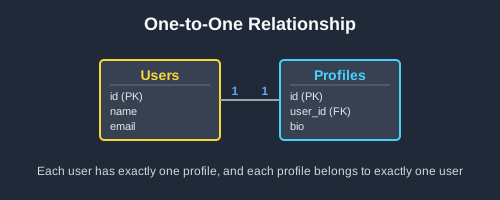
Each row matches at most one row in the other table. Add a UNIQUE foreign key to the second table. Use it to move optional or rarely used columns out of a wide table, or to keep sensitive details (users and their profiles, employees and their salary records) under separate permissions.
Give one row many children: one-to-many
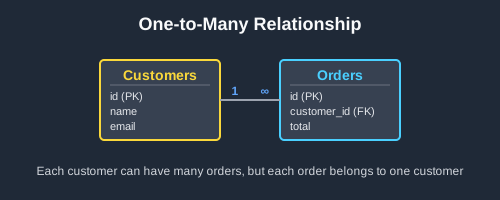
The most common relationship: a customer has many orders, an author many posts. Put a plain foreign key on the “many” side. The parent can even be the same table, as when employees.manager_id points at another employee.
Link many rows to many others: many-to-many
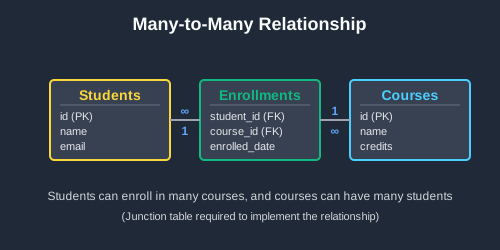
Students take many courses and courses have many students, so neither table can hold the other’s id. Add a junction table with a foreign key to each side and a primary key on the pair, so the same link can’t be stored twice. Facts about the link itself, such as a grade, go in the junction table.
Find rows with nothing on the other side
A relationship also shows what’s missing. A LEFT JOIN on the foreign key keeps every row from the first table and fills in NULLs where nothing matches, so filtering for NULL finds customers with no orders or courses nobody has taken.
Real examples of database relationships
Users and their profiles
profiles.user_id is UNIQUE, so a user can’t get a second profile. The LEFT JOIN keeps users who haven’t written one yet:
-- profiles.user_id is declared as: user_id INTEGER UNIQUE NOT NULL

-- Input: users
-- id | username
-- ---+---------
-- 1  | mia
-- 2  | raj
-- 3  | zoe

-- Input: profiles
-- id | user_id | bio
-- ---+---------+---------------------
-- 1  | 1       | Software developer
-- 2  | 2       | Marketing specialist

SELECT u.username, p.bio
FROM users u
LEFT JOIN profiles p ON p.user_id = u.id
ORDER BY u.id;

-- Output:
-- username | bio
-- ---------+---------------------
-- mia      | Software developer
-- raj      | Marketing specialist
-- zoe      | NULL

INSERT INTO profiles (id, user_id, bio) VALUES (3, 1, 'Second profile');
-- ERROR: duplicate key value violates unique constraint "profiles_user_id_key"
Employees and their managers
A one-to-many relationship inside one table: manager_id is a foreign key to employees.id. Join the table to itself to put each employee next to their manager:
-- Input: employees
-- id | name      | manager_id
-- ---+-----------+-----------
-- 1  | Maya Chen | NULL
-- 2  | Sam Ortiz | 1
-- 3  | Jo Kim    | 2
-- 4  | Lee Ross  | 2

SELECT e.name AS employee, m.name AS manager
FROM employees e
LEFT JOIN employees m ON m.id = e.manager_id
ORDER BY e.id;

-- Output:
-- employee  | manager
-- ----------+----------
-- Maya Chen | NULL
-- Sam Ortiz | Maya Chen
-- Jo Kim    | Sam Ortiz
-- Lee Ross  | Sam Ortiz
Students and their courses
The enrollments junction table has a foreign key to each side and PRIMARY KEY (student_id, course_id). Join through it to list who takes what:
-- Input: students
-- id | name
-- ---+------
-- 1  | Priya
-- 2  | Tomas
-- 3  | Leah

-- Input: courses
-- id | title
-- ---+----------------
-- 1  | Database Design
-- 2  | Web Development
-- 3  | Statistics

-- Input: enrollments
-- student_id | course_id | grade
-- -----------+-----------+------
-- 1          | 1         | A
-- 1          | 2         | B+
-- 2          | 1         | A-
-- 3          | 2         | A

SELECT s.name AS student, c.title AS course, e.grade
FROM enrollments e
JOIN students s ON s.id = e.student_id
JOIN courses c ON c.id = e.course_id
ORDER BY s.name, c.title;

-- Output:
-- student | course          | grade
-- --------+-----------------+------
-- Leah    | Web Development | A
-- Priya   | Database Design | A
-- Priya   | Web Development | B+
-- Tomas   | Database Design | A-

INSERT INTO enrollments VALUES (1, 1, 'B');
-- ERROR: duplicate key value violates unique constraint "enrollments_pkey"
Courses nobody has enrolled in
NOT EXISTS is another way to find rows with no match. It keeps each course that has no row in the junction table:
-- Input: the courses and enrollments tables above

SELECT c.title
FROM courses c
WHERE NOT EXISTS (
  SELECT 1 FROM enrollments e WHERE e.course_id = c.id
);

-- Output:
-- title
-- ----------
-- Statistics
Further reading about database relationships
On this blog:
- One-to-one relationships guide: one-to-one in depth
- One to many relationship guide: joining, counting and aggregating child rows
- Many to many relationship guide: junction tables in depth
- SQL JOIN diagrams guide: every join type you’ll use across a relationship
- How to use foreign keys in PostgreSQL: foreign key options in PostgreSQL
- ON DELETE CASCADE in PostgreSQL: deleting child rows along with their parent
- Composite primary keys in SQL: the two-column key a junction table uses
- SQL CREATE TABLE guide: keys and constraints when you create a table
Official documentation:
- PostgreSQL: foreign keys
- MySQL: FOREIGN KEY constraints
- SQLite: foreign key support
- SQL Server: primary and foreign key constraints
 Beekeeper Studio Is A Free & Open Source Database GUI
Best SQL query & editor tool I have ever used. It provides everything I need to manage my database. - ⭐⭐⭐⭐⭐ Mit
Beekeeper Studio is fast, intuitive, and easy to use. Beekeeper supports loads of databases, and works great on Windows, Mac and Linux.
What Users Say About Beekeeper Studio
"Beekeeper Studio completely replaced my old SQL workflow. It's fast, intuitive, and makes database work enjoyable again."
"I've tried many database GUIs, but Beekeeper strikes the perfect balance between features and simplicity. It just works."