
SQL JOINs combine rows from two tables by matching a column they share, such as a book’s author_id and an author’s id. The type of join decides what happens to the rows that don’t match. The examples work in PostgreSQL, MySQL, SQLite and SQL Server.
How to use SQL JOINs
Put the second table after JOIN, and say how its rows match the first table’s in ON:
SELECT columns
FROM table_a
JOIN table_b ON table_a.key = table_b.key;
Every example in this section joins the same two tables: Butler wrote two of the books, Asimov wrote none of them, and nobody knows who wrote Beowulf.
INNER JOIN
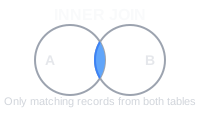
An INNER JOIN returns only the rows that match in both tables. JOIN on its own means INNER JOIN.
-- Input: authors
-- id | name
-- ---+--------
-- 1  | Le Guin
-- 2  | Butler
-- 3  | Asimov

-- Input: books
-- title                | author_id
-- ---------------------+----------
-- The Dispossessed     | 1
-- Kindred              | 2
-- Parable of the Sower | 2
-- Beowulf              | NULL

SELECT a.name, b.title
FROM authors a
INNER JOIN books b ON a.id = b.author_id;

-- Output:
-- name    | title
-- --------+---------------------
-- Le Guin | The Dispossessed
-- Butler  | Kindred
-- Butler  | Parable of the Sower
Asimov has no books and Beowulf has no author, so neither appears.
LEFT JOIN
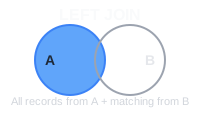
A LEFT JOIN (or LEFT OUTER JOIN) returns every row from the left table, the one after FROM. Where the right table has no match, its columns come back NULL.
-- Input: the authors and books tables above

SELECT a.name, b.title
FROM authors a
LEFT JOIN books b ON a.id = b.author_id;

-- Output:
-- name    | title
-- --------+---------------------
-- Le Guin | The Dispossessed
-- Butler  | Kindred
-- Butler  | Parable of the Sower
-- Asimov  | NULL
RIGHT JOIN
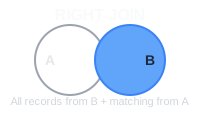
A RIGHT JOIN (or RIGHT OUTER JOIN) is the mirror image: every row from the right table, with NULLs where the left table has no match.
-- Input: the authors and books tables above

SELECT a.name, b.title
FROM authors a
RIGHT JOIN books b ON a.id = b.author_id;

-- Output:
-- name    | title
-- --------+---------------------
-- Le Guin | The Dispossessed
-- Butler  | Kindred
-- Butler  | Parable of the Sower
-- NULL    | Beowulf
FULL OUTER JOIN
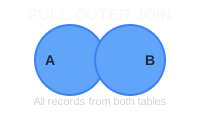
A FULL OUTER JOIN returns every row from both tables, matched where possible and padded with NULLs where not. MySQL doesn’t have it: see “Alternative syntax” below.
-- Input: the authors and books tables above

SELECT a.name, b.title
FROM authors a
FULL OUTER JOIN books b ON a.id = b.author_id;

-- Output:
-- name    | title
-- --------+---------------------
-- Le Guin | The Dispossessed
-- Butler  | Kindred
-- Butler  | Parable of the Sower
-- NULL    | Beowulf
-- Asimov  | NULL
CROSS JOIN
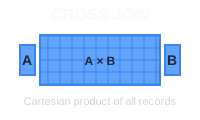
A CROSS JOIN pairs every row of one table with every row of the other, so it has no ON. Two sizes and two colors make four combinations; 1,000 rows by 1,000 rows make a million, so use it on small tables.
-- Input: sizes
-- size
-- ----
-- S
-- M

-- Input: colors
-- color
-- -----
-- Red
-- Blue

SELECT s.size, c.color
FROM sizes s
CROSS JOIN colors c;

-- Output:
-- size | color
-- -----+------
-- S    | Red
-- S    | Blue
-- M    | Red
-- M    | Blue
LEFT ANTI JOIN
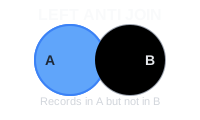
A left anti join returns the rows from the left table that have no match in the right table. There’s no keyword for it: do a LEFT JOIN and keep the rows where the right side came back NULL.
-- Input: the authors and books tables above

SELECT a.name
FROM authors a
LEFT JOIN books b ON a.id = b.author_id
WHERE b.author_id IS NULL;

-- Output:
-- name
-- ------
-- Asimov
RIGHT ANTI JOIN
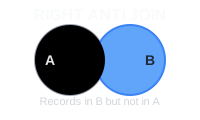
A right anti join returns the rows from the right table that have no match in the left table.
-- Input: the authors and books tables above

SELECT b.title
FROM authors a
RIGHT JOIN books b ON a.id = b.author_id
WHERE a.id IS NULL;

-- Output:
-- title
-- -------
-- Beowulf
Rules to know
-
NULL never matches anything, not even another NULL. Beowulf’s NULL
author_idmatches no author, so only the joins that keep unmatched books return it. - A row appears once for every row it matches. Butler appears twice above because she matches two books. If you then add up a column from the authors table, her values count twice.
-
With an outer join, a condition on the other table belongs in
ON. InWHERE, it runs after the join and throws away the NULL rows the join just kept:
-- Input: the authors and books tables above

-- Only Butler is left: the WHERE drops every author whose title is NULL
SELECT a.name, b.title
FROM authors a
LEFT JOIN books b ON a.id = b.author_id
WHERE b.title LIKE 'K%';

-- Output:
-- name   | title
-- -------+--------
-- Butler | Kindred

-- Every author is kept, with a book only where it starts with K
SELECT a.name, b.title
FROM authors a
LEFT JOIN books b ON a.id = b.author_id AND b.title LIKE 'K%';

-- Output:
-- name    | title
-- --------+--------
-- Le Guin | NULL
-- Butler  | Kindred
-- Asimov  | NULL
Alternative syntax
MySQL has no FULL OUTER JOIN. Combine a LEFT JOIN with the unmatched rows of a RIGHT JOIN instead:
-- MySQL
-- Input: the authors and books tables above

SELECT a.name, b.title
FROM authors a LEFT JOIN books b ON a.id = b.author_id
UNION ALL
SELECT a.name, b.title
FROM authors a RIGHT JOIN books b ON a.id = b.author_id
WHERE a.id IS NULL;

-- Output:
-- name    | title
-- --------+---------------------
-- Le Guin | The Dispossessed
-- Butler  | Parable of the Sower
-- Butler  | Kindred
-- Asimov  | NULL
-- NULL    | Beowulf
SQLite before version 3.39 has no RIGHT JOIN or FULL OUTER JOIN: swap the tables and use a LEFT JOIN.
An anti join can also be written with NOT EXISTS. Avoid NOT IN for this: if the subquery returns a single NULL, as Beowulf’s author_id does here, NOT IN returns nothing at all:
-- Input: the authors and books tables above

SELECT a.name
FROM authors a
WHERE NOT EXISTS (SELECT 1 FROM books b WHERE b.author_id = a.id);

-- Output:
-- name
-- ------
-- Asimov

SELECT a.name
FROM authors a
WHERE a.id NOT IN (SELECT author_id FROM books);

-- Output:
-- name
-- ----
-- (0 rows)
When the matching columns have the same name in both tables, you can write JOIN books USING (author_id) in place of the ON condition, except in SQL Server.
Older code often lists the tables with commas and puts the match in WHERE. That’s an INNER JOIN written another way. Leave out the WHERE and it becomes a CROSS JOIN:
-- Input: the authors and books tables above

SELECT a.name, b.title
FROM authors a, books b
WHERE a.id = b.author_id;

-- Output:
-- name    | title
-- --------+---------------------
-- Le Guin | The Dispossessed
-- Butler  | Kindred
-- Butler  | Parable of the Sower
When should you use SQL JOINs?
Use a join whenever the data you need is split across tables. Which join to use depends on what should happen to the rows that don’t match, and most problems fall into one of these five.
Look up details from a related table
An employee row holds a department ID, but the report needs the department’s name. An INNER JOIN fetches it, and drops any row that has nothing to look up.
Keep rows that have no match
When the related data is optional, such as an employee who hasn’t been assigned a department yet, an INNER JOIN would quietly hide them. A LEFT JOIN keeps every row from the main table and fills the gaps with NULL.
List every item, including empty ones
Reports often need every department, category or customer, including the ones with nothing in them yet. Make that table the one whose rows are all kept: first with a LEFT JOIN, or second with a RIGHT JOIN.
Find rows that have no match
Customers who never ordered, products never sold, employees without a department: an anti join finds what’s missing, which makes it a good data-quality check too.
Build every combination
A CROSS JOIN generates rows that don’t exist yet: every size in every color, every employee against every training course, or every store on every day of a report.
Real examples of SQL JOINs
Students and their courses
A many-to-many relationship needs two INNER JOINs, through the junction table that links students to courses. Mei isn’t enrolled in anything, so she isn’t listed:
-- Input: students
-- id | name
-- ---+------
-- 1  | Amara
-- 2  | Lucas
-- 3  | Mei

-- Input: enrollments
-- student_id | course_id | grade
-- -----------+-----------+------
-- 1          | 10        | A
-- 1          | 20        | B
-- 2          | 10        | B

-- Input: courses
-- id | course_name
-- ---+------------
-- 10 | Databases
-- 20 | Statistics

SELECT s.name, c.course_name, e.grade
FROM students s
INNER JOIN enrollments e ON s.id = e.student_id
INNER JOIN courses c ON e.course_id = c.id;

-- Output:
-- name  | course_name | grade
-- ------+-------------+------
-- Amara | Databases   | A
-- Amara | Statistics  | B
-- Lucas | Databases   | B
Users with optional profiles
Not every user has filled in a profile. A LEFT JOIN keeps them all:
-- Input: users
-- id | username
-- ---+---------
-- 1  | rosa_m
-- 2  | devon
-- 3  | kai_l

-- Input: user_profiles
-- user_id | bio
-- --------+------------------------
-- 1       | Data engineer in Lisbon
-- 3       | Loves SQL puzzles

SELECT u.username, p.bio
FROM users u
LEFT JOIN user_profiles p ON u.id = p.user_id;

-- Output:
-- username | bio
-- ---------+------------------------
-- rosa_m   | Data engineer in Lisbon
-- devon    | NULL
-- kai_l    | Loves SQL puzzles
Order counts for every customer
To include customers with no orders, LEFT JOIN from customers. Then count a column from the orders table: COUNT(*) counts the row the LEFT JOIN made up for Omar, so he’d get 1 instead of 0:
-- Input: customers
-- id | name
-- ---+------------
-- 1  | Harper Lee
-- 2  | Omar Haddad
-- 3  | Yuki Tanaka

-- Input: orders
-- id  | customer_id | total
-- ----+-------------+-------
-- 101 | 1           | 59.90
-- 102 | 3           | 120.00
-- 103 | 1           | 14.50

-- Wrong: COUNT(*) counts Omar's NULL row
SELECT c.name, COUNT(*) AS order_count
FROM customers c
LEFT JOIN orders o ON c.id = o.customer_id
GROUP BY c.id, c.name
ORDER BY c.id;

-- Output:
-- name        | order_count
-- ------------+------------
-- Harper Lee  | 2
-- Omar Haddad | 1
-- Yuki Tanaka | 1

-- Right: COUNT(o.id) skips it
SELECT c.name, COUNT(o.id) AS order_count
FROM customers c
LEFT JOIN orders o ON c.id = o.customer_id
GROUP BY c.id, c.name
ORDER BY c.id;

-- Output:
-- name        | order_count
-- ------------+------------
-- Harper Lee  | 2
-- Omar Haddad | 0
-- Yuki Tanaka | 1
Invoices and payments that don’t match up
A FULL OUTER JOIN that keeps only the unmatched rows checks two lists against each other in one query: invoice 502 hasn’t been paid, and payment 9003 is for an invoice that doesn’t exist:
-- Input: invoices
-- invoice_id | amount
-- -----------+-------
-- 501        | 120.00
-- 502        | 75.50
-- 503        | 300.00

-- Input: payments
-- payment_id | invoice_id | paid
-- -----------+------------+-------
-- 9001       | 501        | 120.00
-- 9002       | 503        | 300.00
-- 9003       | 504        | 42.00

-- MySQL has no FULL OUTER JOIN: use the UNION ALL form under "Alternative syntax"
SELECT i.invoice_id, i.amount, p.payment_id, p.invoice_id AS paid_invoice
FROM invoices i
FULL OUTER JOIN payments p ON p.invoice_id = i.invoice_id
WHERE i.invoice_id IS NULL OR p.payment_id IS NULL;

-- Output:
-- invoice_id | amount | payment_id | paid_invoice
-- -----------+--------+------------+-------------
-- 502        | 75.50  | NULL       | NULL
-- NULL       | NULL   | 9003       | 504
Daily takings for every store, including days with no sales
CROSS JOIN the stores with the days to get one row per store per day, then LEFT JOIN the sales onto that grid. York sold nothing on October 6, and still gets a row:
-- Input: stores
-- store
-- -----
-- Leeds
-- York

-- Input: days
-- day
-- ----------
-- 2026-10-05
-- 2026-10-06

-- Input: sales
-- store | day        | amount
-- ------+------------+-------
-- Leeds | 2026-10-05 | 410.00
-- Leeds | 2026-10-06 | 385.50
-- York  | 2026-10-05 | 220.00

SELECT st.store, d.day, COALESCE(SUM(s.amount), 0.00) AS takings
FROM stores st
CROSS JOIN days d
LEFT JOIN sales s ON s.store = st.store AND s.day = d.day
GROUP BY st.store, d.day
ORDER BY st.store, d.day;

-- Output:
-- store | day        | takings
-- ------+------------+--------
-- Leeds | 2026-10-05 | 410.00
-- Leeds | 2026-10-06 | 385.50
-- York  | 2026-10-05 | 220.00
-- York  | 2026-10-06 | 0.00
Further reading about SQL JOINs
On this blog:
- SQL JOIN cheat sheet: every join type and its diagram on one page
- MySQL FULL OUTER JOIN: more ways around MySQL’s missing FULL OUTER JOIN
- MySQL joins guide: joins in MySQL, with examples
- SQL Server joins guide: joins in T-SQL
- PostgreSQL CROSS JOIN: more uses for every-combination queries
- Database relationships guide: how the tables you join relate to each other
- One-to-one relationships, one to many relationship guide and many to many relationship guide: the join each relationship needs
- SQL COALESCE guide: replace the NULLs an outer join leaves behind
Official documentation:
- PostgreSQL: joined tables
- MySQL: JOIN clause
- SQLite: the FROM clause and joins
- SQL Server: FROM clause plus JOIN
 Beekeeper Studio Is A Free & Open Source Database GUI
Best SQL query & editor tool I have ever used. It provides everything I need to manage my database. - ⭐⭐⭐⭐⭐ Mit
Beekeeper Studio is fast, intuitive, and easy to use. Beekeeper supports loads of databases, and works great on Windows, Mac and Linux.
What Users Say About Beekeeper Studio
"Beekeeper Studio completely replaced my old SQL workflow. It's fast, intuitive, and makes database work enjoyable again."
"I've tried many database GUIs, but Beekeeper strikes the perfect balance between features and simplicity. It just works."