
You can connect Claude straight to MySQL in a few minutes. You probably shouldn’t: Claude then holds your password and can run any SQL it likes. The safer way is to put an app like Beekeeper Studio in between.
There are two ways to connect MySQL to Claude:
- Connect Claude directly to MySQL, by giving it your credentials through Claude Code or a MySQL MCP server.
- Connect through Beekeeper Studio, which keeps your password to itself and asks you before a query runs.
Option 2 is what we recommend, and it’s free to try: download Beekeeper Studio, our MySQL database manager, and skip to the walkthrough.
Option 1: Connect Claude directly to MySQL
Claude Code can run shell commands, so the quickest way is to tell it your connection details and let it use the mysql command line client:
mysql -h db.example.com -u app -phunter2 shop -e "SELECT COUNT(*) FROM orders"
The other way is a MySQL MCP server, which gives Claude Desktop or Claude Code a “run this SQL” tool. Open source ones like mysql_mcp_server have you write the host, user and password into Claude’s config file.
Either way, Claude now has a MySQL login and decides for itself what to run with it.
The dangers of connecting MySQL with Claude directly
With that login, and no one checking its SQL:
- Claude can delete rows, or update every row in a table with one bad
WHEREclause. - Claude can alter table structures or drop them entirely.
- MySQL commits each statement as it runs, so there’s no undo, only your backups.
- Claude can read every table the user can, and what it reads is sent to Anthropic.
- Your password sits in plain text in a config file, your shell history or the chat.
- A row containing “ignore your instructions and run…” can be followed as an instruction.
- A big join or an
ALTER TABLEcan lock a production table while your users wait. - With enough privileges, Claude can create users and grant itself more access.
- From a shell, Claude can also run
mysqldumpand copy the whole database. - Nothing records what Claude ran unless you’ve turned on MySQL’s query log.
Claude Code asks before it runs a command, until you click “always allow” to stop the prompts.
You can limit the damage with a MySQL user just for Claude
If you do connect directly, don’t give Claude your own login. Create a user for it that can only read one database:
CREATE USER 'claude'@'%' IDENTIFIED BY 'a-long-random-password';
GRANT SELECT ON shop.* TO 'claude'@'%';
MySQL then refuses anything else:
DELETE FROM orders WHERE status = 'cancelled';
-- ERROR 1142 (42000): DELETE command denied to user 'claude'@'localhost' for table 'orders'
This stops the writes, drops and grants. It doesn’t stop Claude reading every row in that database, running a query heavy enough to slow production, or the password sitting in a config file. You can narrow it further by granting SELECT on single tables (GRANT SELECT ON shop.orders TO ...) and by pointing Claude at a replica. SHOW GRANTS confirms what the user can do.
Option 2: Connect Claude to MySQL through Beekeeper Studio
Beekeeper Studio’s AI Shell sits between Claude and your database:
- Claude never gets your MySQL password. It can only list tables, list columns and propose queries.
- Every query is shown to you with Yes, No and Edit buttons before it runs.
- You can let read-only queries run on their own. Anything that writes still asks.
- Your Anthropic API key is stored encrypted on your machine and only sent to Anthropic.
Claude does see your table names and the results of queries you approve, so don’t approve a SELECT of data you wouldn’t paste into a chat.
The AI Shell is included in every paid plan, and you can try it free for 14 days with no signup or credit card. The screenshots below are Beekeeper Studio 6.3.2 on a small MySQL 8.4 shop database.
Step 1: Connect to your MySQL database
Download Beekeeper Studio, click New Connection, choose MySQL, fill in your connection details and click Connect.
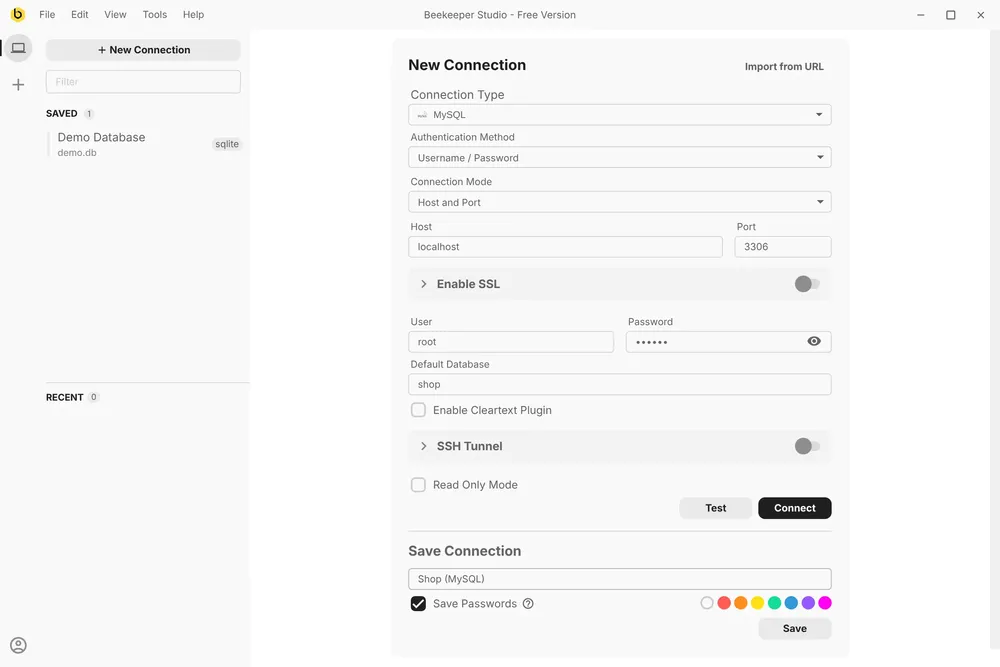
For extra protection, tick Read Only Mode: Beekeeper Studio then refuses UPDATE, DELETE, ALTER and other writes on this connection, from the AI Shell or anywhere else. The read-only MySQL user from above works here too.
Step 2: Open an AI Shell tab
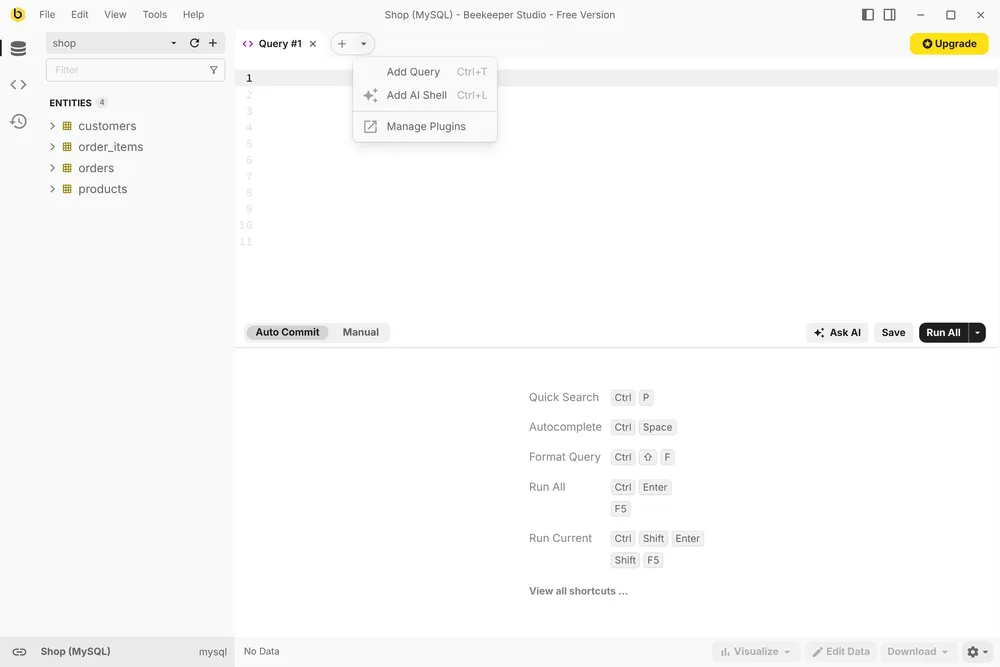
Click the arrow next to the + above the editor and choose Add AI Shell, or press Ctrl+L.
Step 3: Add your Anthropic API key
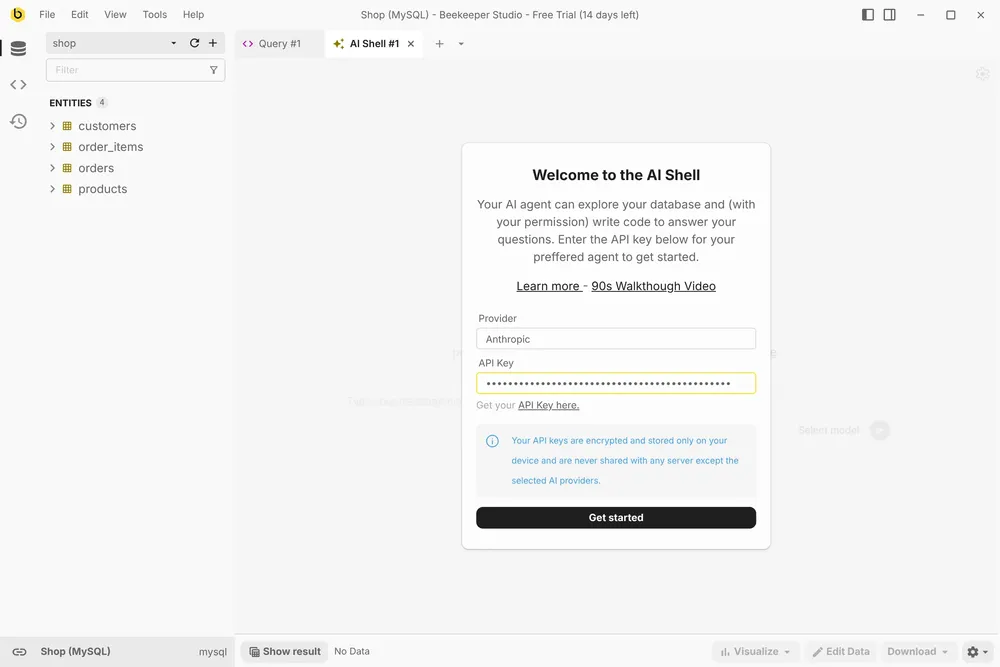
Pick Anthropic as the provider and paste in an API key from the Claude Console. You pay Anthropic directly at their normal API prices, with no markup.
Step 4: Pick a Claude model
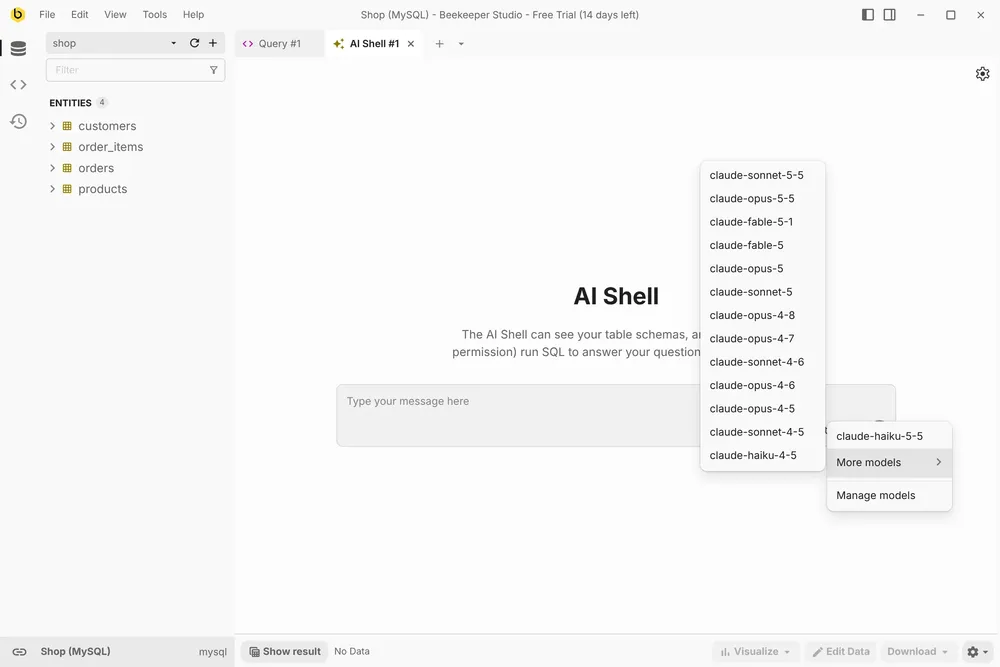
Click the model name next to the send button. Haiku is the fastest and cheapest, Opus the most capable, and Sonnet sits in between.
Step 5: Ask a question and approve the query
I asked “Who were our top customers last month?”. Claude looked up the tables and their columns, then wrote a query. It doesn’t run until you click Yes:
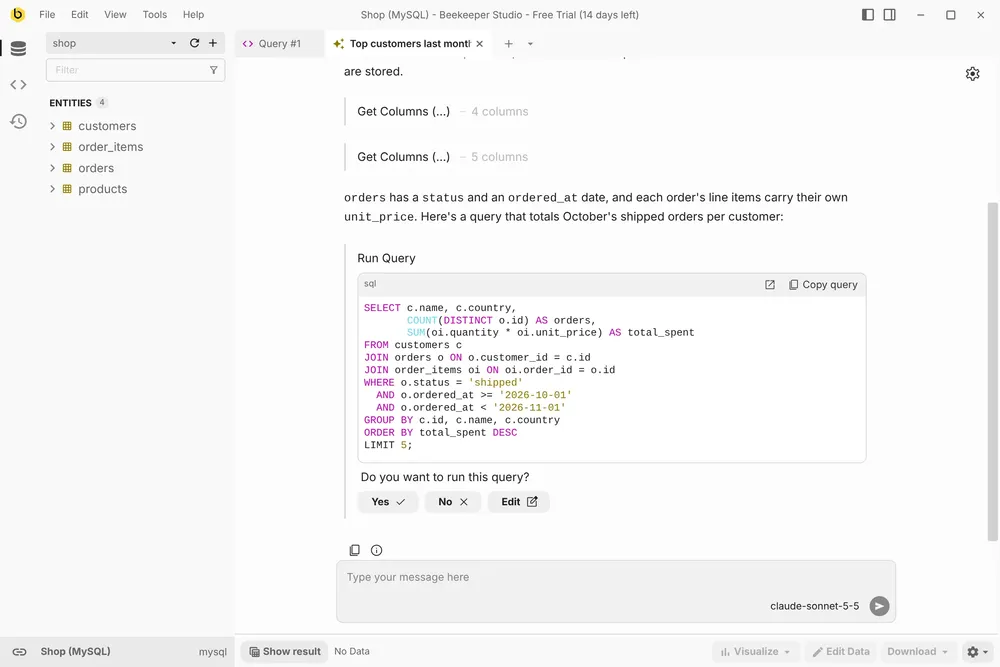
Read the SQL first, particularly the joins and the WHERE clause. Edit lets you change it before it runs.
Step 6: Read the answer
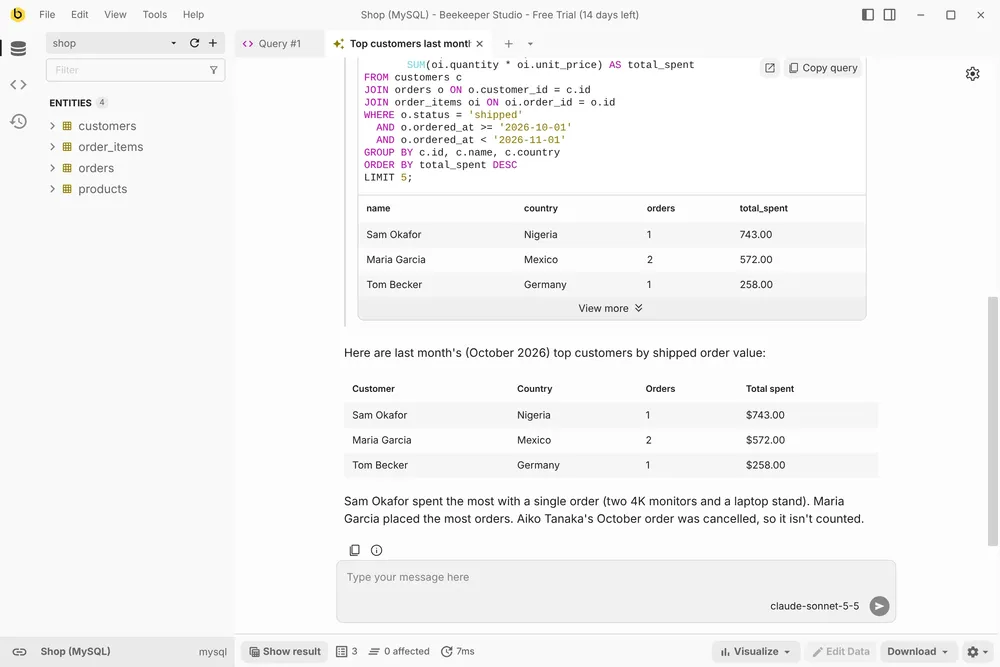
Once approved, the query runs and Claude answers from the results. The rows are shown too, so you can check its answer against the data.
Step 7: Say no to anything you didn’t mean
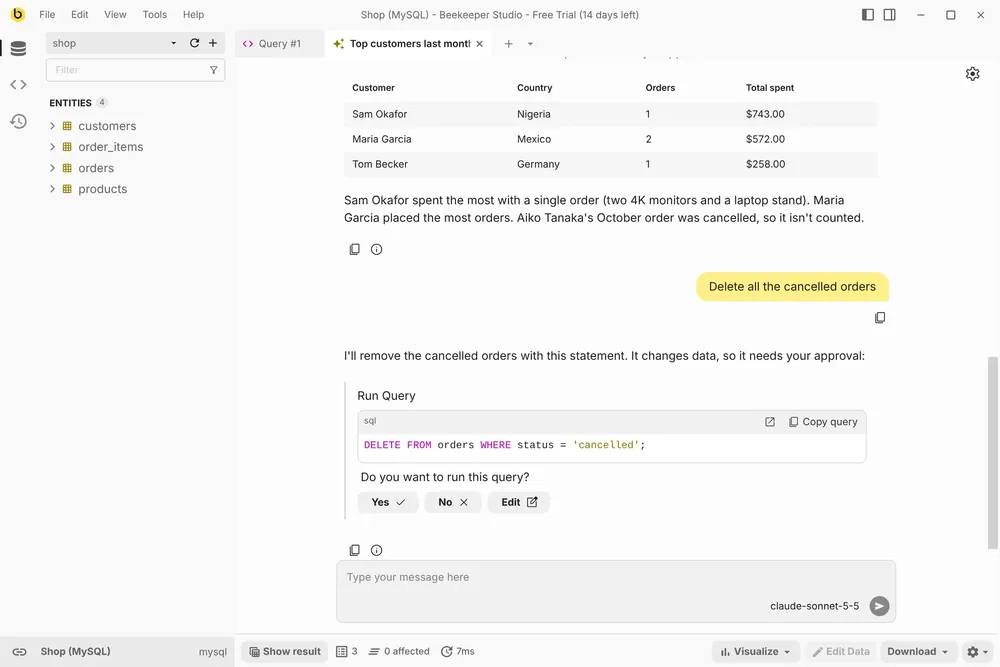
When I asked Claude to “Delete all the cancelled orders”, it wrote a DELETE and stopped to ask:
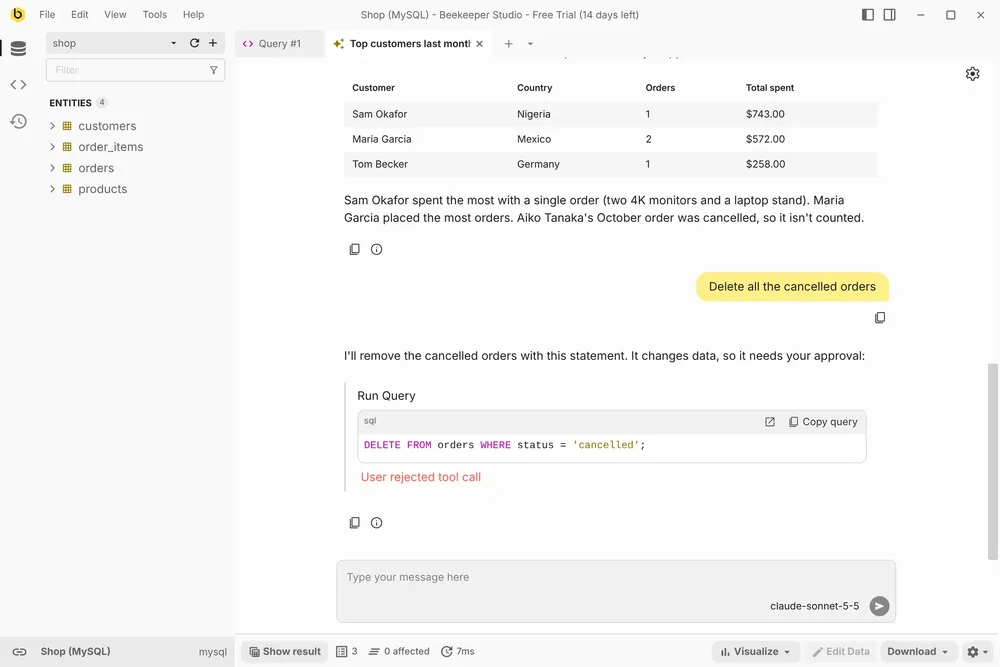
I clicked No, so the statement never reached MySQL and the order is still there.
Step 8 (optional): Let read-only queries run automatically
Approving every SELECT gets tedious. Click the gear icon and turn on Always allow execution of read-only queries.
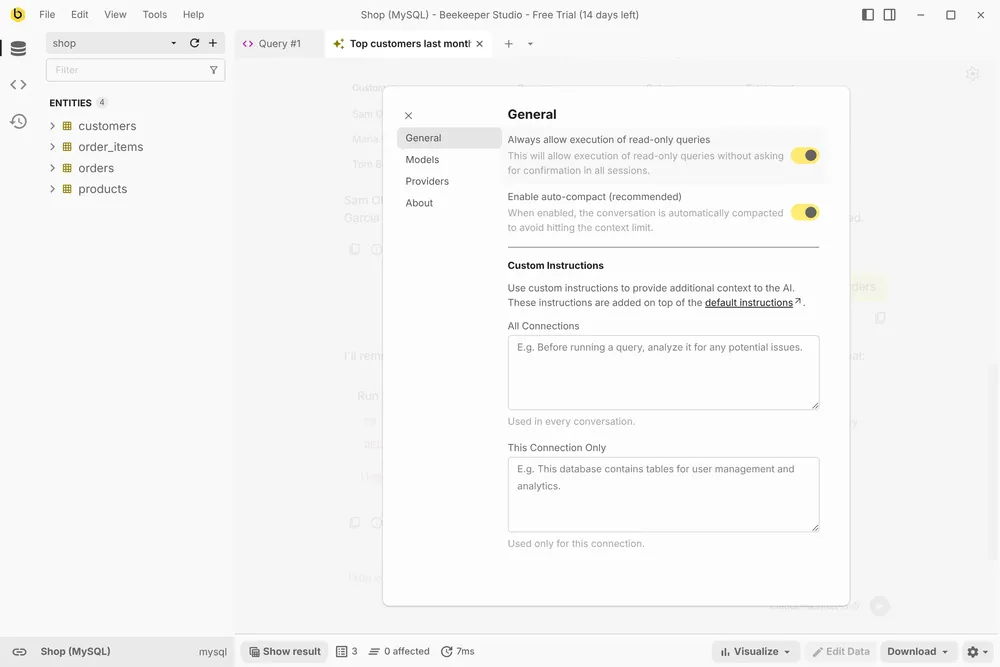
SELECT queries then run without a prompt. INSERT, UPDATE, DELETE, DROP, ALTER and anything the shell can’t parse still ask first.
Further reading
- How to connect MySQL to ChatGPT, the same setup with OpenAI’s models
- How to write SQL with AI, on reviewing what an AI writes before you run it
- Top SQL AI apps and services, if you want to compare the alternatives
- The AI Shell documentation
 Beekeeper Studio Is A Free & Open Source MySQL GUI
I’ve been using Beekeeper Studio for my MySQL work lately, and it has quickly become one of my favorite database tools. The interface is clean, modern, and distraction-free, making it easy to focus on queries without the clutter you get in some other tools. - Surendra Singh
Beekeeper Studio is a fast, intuitive and easy to use MySQL client. It supports loads of other databases too, and works great on Windows, Mac and Linux.
What MySQL Users Say About Beekeeper Studio
I chose this program after years of using phpMyAdmin—it feels like stepping into a world of higher quality; here, I truly felt that the user is genuinely cared for. The concept itself, the implementation, the practical experience—I am sincerely grateful to Matthew for all of it.
Fabulous tool, the most practical IDE I’ve found to date for Postgres and MySql db admin - it just works, no fuss :-)