
The web UI on a Trino coordinator shows you what queries are running, but it can’t run one for you. For that you want a desktop client, and our pick is Beekeeper Studio (we built it, so we’re biased). Below are the other clients that work with Trino and PrestoDB, which of them are free, and what you need to connect.
Beekeeper Studio
Available for Windows, macOS, and Linux - download here
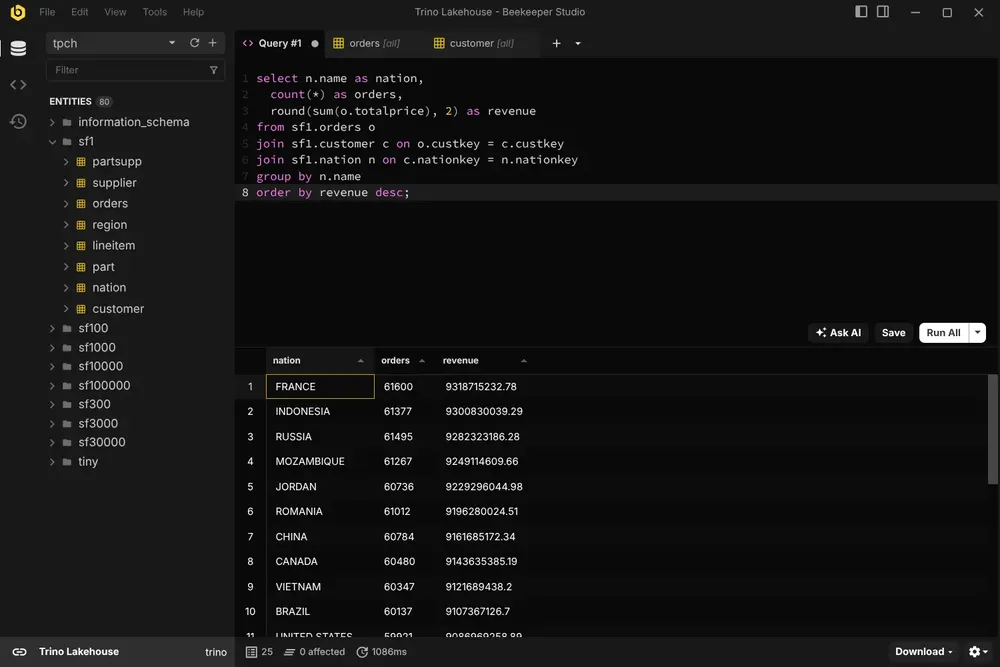
We think Beekeeper Studio is the most pleasant way to query Trino. It’s a fast, uncluttered desktop app that talks to the coordinator over Trino’s own HTTP protocol, so there’s no JDBC driver to download and no Java runtime involved.
Once you’re connected you get a SQL editor with autocomplete, query tabs, saved queries and query history, a spreadsheet-style grid for browsing tables with sorting and filtering, and a structure view for each table. Results export to CSV, JSON or Markdown. Connect over HTTPS with your own CA or client certificates if your cluster needs them (connection guide).
Try Beekeeper Studio free for 14 days
I used to juggle between DBeaver and Prisma Studio, but now Beekeeper handles everything in one clean, intuitive workspace. It’s easily become part of my daily workflow.
Where it pays for itself is when Trino isn’t the only thing you query. The same app connects to PostgreSQL, MySQL, Snowflake, BigQuery, ClickHouse and more, so the warehouse and the app database sit side by side in one window.
Trino is a paid feature, and every paid feature is free for 14 days when you download the app, no account or credit card needed, so you can try it on your own cluster first.
The downsides: Trino support is read-only, there’s no SSH tunnel for Trino connections yet, and PrestoDB isn’t supported. Beekeeper also isn’t an enterprise IDE with every bell and whistle; it’s built for writing queries and looking at data.
Beekeeper Studio Links
DBeaver Community
Available for Windows, macOS, and Linux - free and open source
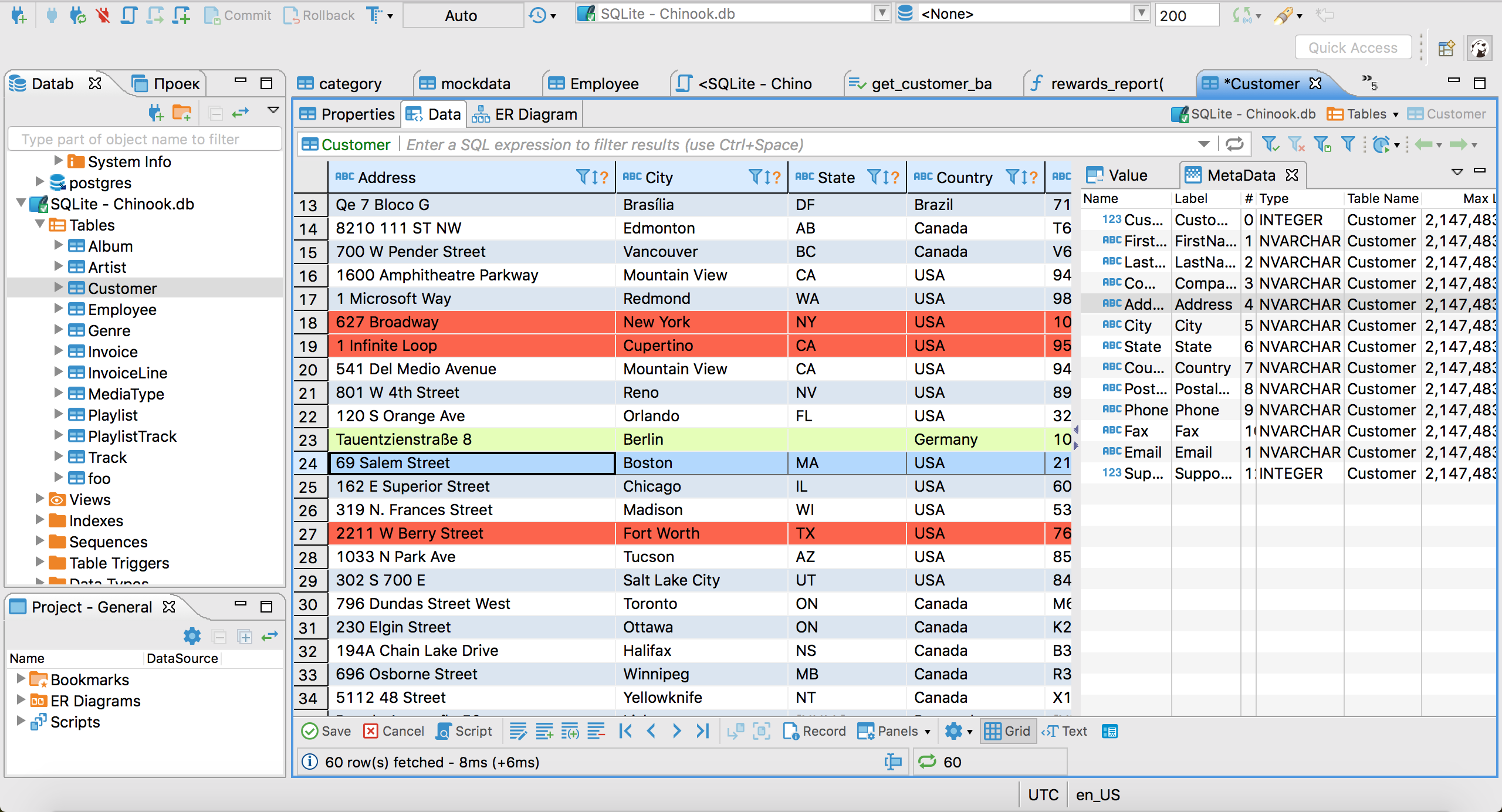
DBeaver Community is the best free desktop client for Trino and PrestoDB. It’s open source (Apache 2.0), actively maintained, and has both engines in its connection list. It downloads the right JDBC driver the first time you connect, so there’s nothing to hunt down.
You get a SQL editor with autocomplete, query history, a schema browser, result grids, ER diagrams and export to CSV, JSON, Excel and more. If you need a free tool for PrestoDB in particular, this is the one.
The tradeoff is the interface. DBeaver is built on Eclipse and it shows: lots of panels, lots of settings, and a slower start than a lighter app. If you’re coming from a smaller tool, expect an adjustment period. Our DBeaver alternatives post covers what else is out there.
DBeaver Links
DbVisualizer
Available for Windows, macOS, and Linux - free edition, paid Pro
DbVisualizer is a long-running Java database client with first-class Trino and Presto support. Its free edition is free for commercial use too, and covers the essentials: connections, a SQL editor, a schema browser and result grids. Pro adds productivity features on top, such as the AI assistant and Git integration.
It’s a solid, conventional desktop client. Like DBeaver it’s Java-based and dense with options, and the line between Free and Pro means some features you see in the menus need a license.
DbVisualizer Links
DataGrip
Available for Windows, macOS, and Linux - free for non-commercial use
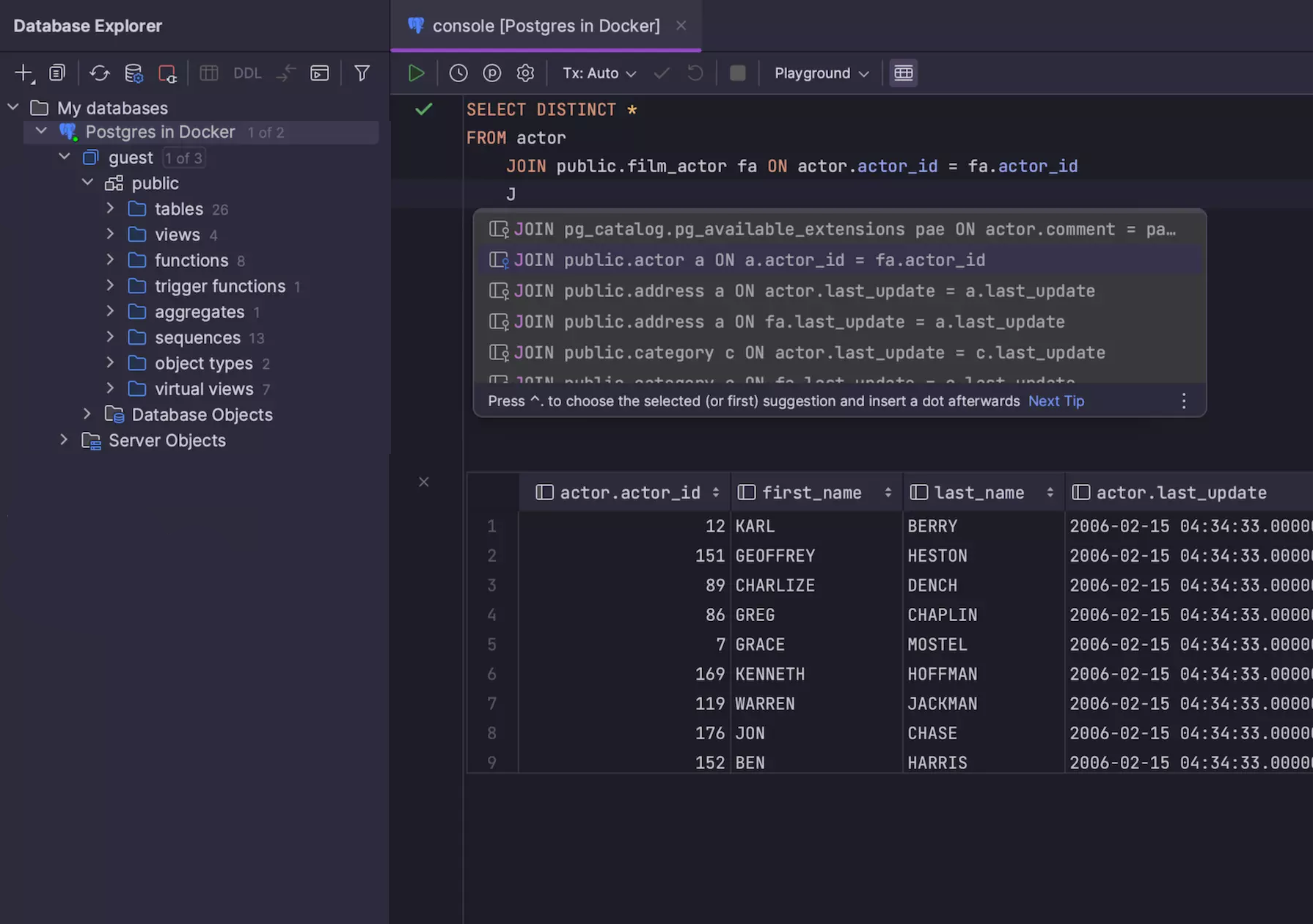
DataGrip is JetBrains’ SQL IDE, and it has Trino and Presto in its data source list. Since October 2025 it’s free for non-commercial use, such as learning, hobby and open source projects. Work for an employer needs a paid subscription, after a 30-day trial.
Be aware that JetBrains lists both engines under “basic support”: you get syntax highlighting and the objects the JDBC driver reports, but not the deep introspection and code completion that make DataGrip shine on PostgreSQL or MySQL. It’s a good choice if you already live in JetBrains tools; it’s a heavy install if Trino is all you need it for.
DataGrip Links
Trino CLI and presto-cli
Available for Linux, macOS, and Windows - requires Java
Not a GUI, but worth having. The Trino CLI is the official client from the Trino project: one executable JAR that opens an interactive SQL prompt against the coordinator. Download it, rename it trino, make it executable and point it at your server:
./trino --server http://trino-coordinator:8080 --catalog hive --schema default
It’s the quickest way to check that a cluster is up and your credentials work before you blame your GUI, and it’s handy for scripts. PrestoDB has its own equivalent, the Presto CLI, which works the same way.
If you like the terminal but want more than a prompt, Harlequin is a free, open source SQL IDE that runs in the terminal and has a Trino adapter.
CLI Links
The built-in web UIs
Runs in your browser, included with the server
Every Trino coordinator serves a web UI at /ui on the same port as queries (http://trino-coordinator:8080/ui by default, with the older design still at /ui/legacy). It lists running and finished queries with their state, user, progress and resource use, and lets you kill one, which makes it the place to find out why a query is slow or stuck. It’s for monitoring, though: you can’t write SQL in it. Log in with any user name if your cluster has no authentication.
PrestoDB goes further: since version 0.286 its web UI includes the Presto Console, a simple SQL client with catalog and schema pickers and a Run button. It’s fine for a quick query, but it has none of the editor features of a desktop client.
Browser-based tools for teams
If what you want is a shared SQL editor or dashboards rather than a desktop app, these open source web apps all connect to Trino: Apache Superset (its SQL Lab is a full query editor), Redash, Metabase, Querybook (from Pinterest) and Hue. Someone has to host them, so they suit a data team more than one person who wants to write a query. Trino keeps a longer list in its client application directory.
Trino and Presto clients compared
| Client | Price | Runs as | Trino | PrestoDB | Java |
|---|---|---|---|---|---|
| Beekeeper Studio | Paid, 14 day free trial | Desktop app | Yes | No | Not needed |
| DBeaver Community | Free, open source | Desktop app | Yes | Yes | Bundled |
| DbVisualizer | Free edition, paid Pro | Desktop app | Yes | Yes | Bundled |
| DataGrip | Free for non-commercial use | Desktop IDE | Basic | Basic | Bundled |
| Trino CLI and presto-cli | Free, open source | Terminal | Yes | Yes | Required |
| Built-in web UIs | Free, part of the server | Browser | Monitoring only | SQL client | Not needed |
Check which engine you run. Trino and PrestoDB both come from Presto, which Facebook built in 2012. Presto’s creators forked it as PrestoSQL in 2019 and renamed it Trino at the end of 2020, while PrestoDB carried on under the Linux Foundation’s Presto Foundation. Trino renamed its protocol headers too, so a Trino client doesn’t talk to a PrestoDB server out of the box, or the other way around. Starburst and Amazon Athena (engine version 3) are built on Trino.
What you need to connect to Trino
Whichever client you use, you’ll fill in the same handful of fields:
- Host: the coordinator’s hostname, not one of the databases behind it.
- Port: 8080 by default over HTTP. Clusters with TLS usually listen on 8443 or 443.
- User: Trino always wants a user name, even with no authentication set up. On an unsecured cluster any name works.
- Password: only over HTTPS. Trino refuses password authentication on a plain HTTP connection, so turn on SSL in your client if you have a password.
-
Catalog and schema (optional): the defaults for your session, so you can write
SELECT * FROM ordersinstead ofhive.sales.orders.
Wrap-up
The short version:
- Nicest desktop app for Trino: Beekeeper Studio, with a 14 day free trial
- Free, open source, Trino and PrestoDB: DBeaver Community
- Free for commercial use, conventional client: DbVisualizer Free
- Already using JetBrains tools: DataGrip
- Terminal and scripts: Trino CLI or presto-cli
- Watching cluster load: the built-in web UI
Trino and Presto don’t have the crowd of GUIs that PostgreSQL or MySQL do, but the options above cover most needs. If you query Trino next to your other databases and want one fast app for all of them, give Beekeeper Studio a try. It’s free for 14 days, and it takes a couple of minutes to connect.
Related reading
- Trino GUI client
- 5 Snowflake GUI Clients for 2026
- Free Amazon Redshift GUI Clients
- Free & Open Source DBeaver Alternatives
 Beekeeper Studio Is A Free & Open Source Database GUI
Best SQL query & editor tool I have ever used. It provides everything I need to manage my database. - ⭐⭐⭐⭐⭐ Mit
Beekeeper Studio is fast, intuitive, and easy to use. Beekeeper supports loads of databases, and works great on Windows, Mac and Linux.
What Users Say About Beekeeper Studio
"Beekeeper Studio completely replaced my old SQL workflow. It's fast, intuitive, and makes database work enjoyable again."
"I've tried many database GUIs, but Beekeeper strikes the perfect balance between features and simplicity. It just works."