
A one-to-many relationship links one row in a parent table to any number of rows in a child table, like a customer and their orders. You build it with a foreign key column in the child table that points at the parent. The examples work in PostgreSQL, MySQL, SQLite and SQL Server.
How to model a one-to-many relationship
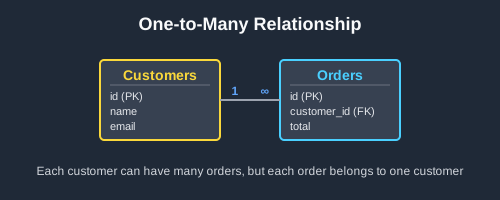
Give the child table, the “many” side, a column that holds its parent’s primary key, and declare it as a foreign key. Each order stores the id of the customer who placed it, and the customers table doesn’t change at all.
CREATE TABLE customers (
    id INTEGER PRIMARY KEY,
    name VARCHAR(100) NOT NULL
);

-- Each order stores the id of the customer who placed it
CREATE TABLE orders (
    id INTEGER PRIMARY KEY,
    customer_id INTEGER NOT NULL,
    order_date DATE NOT NULL,
    total DECIMAL(10,2) NOT NULL,
    FOREIGN KEY (customer_id) REFERENCES customers(id)
);
Join the two tables on the foreign key to see each customer with their orders:
-- Input: customers
-- id | name
-- ---+------
-- 1  | Alice
-- 2  | Bob
-- 3  | Carol

-- Input: orders
-- id | customer_id | order_date | total
-- ---+-------------+------------+-------
-- 1  | 2           | 2026-03-02 | 42.50
-- 2  | 1           | 2026-03-05 | 18.00
-- 3  | 2           | 2026-04-11 | 120.00
-- 4  | 2           | 2026-05-20 | 64.99

SELECT c.name, o.order_date, o.total
FROM customers c
JOIN orders o ON c.id = o.customer_id
ORDER BY c.name, o.order_date;

-- Output:
-- name  | order_date | total
-- ------+------------+-------
-- Alice | 2026-03-05 | 18.00
-- Bob   | 2026-03-02 | 42.50
-- Bob   | 2026-04-11 | 120.00
-- Bob   | 2026-05-20 | 64.99
Bob has three orders and each order has one customer.
Rules to know
-
The foreign key goes in the child table. Each order records its customer. Never give
customersa column that lists order IDs. - A plain JOIN drops parents with no children. Carol isn’t in the output above. Use a LEFT JOIN when every parent should appear, as in the examples further down.
-
Index the foreign key. Joins and lookups by customer need an index on
orders.customer_id(MySQL creates one for you along with the foreign key):
CREATE INDEX idx_orders_customer_id ON orders(customer_id);
-
The foreign key guards both tables. It rejects an order for a customer who doesn’t exist, and by default it refuses to delete a customer who still has orders. Add
ON DELETE CASCADEto delete their orders along with them, orON DELETE SET NULLto keep the orders with no customer (the column must then allow NULL):
-- Input: the customers and orders tables above

INSERT INTO orders VALUES (5, 99, '2026-06-01', 10.00);
-- ERROR: insert or update on table "orders" violates foreign key constraint "orders_customer_id_fkey"

DELETE FROM customers WHERE id = 1;
-- ERROR: update or delete on table "customers" violates foreign key constraint "orders_customer_id_fkey" on table "orders"

-- With FOREIGN KEY (customer_id) REFERENCES customers(id) ON DELETE CASCADE
DELETE FROM customers WHERE id = 1;

-- Output (orders after the DELETE):
-- id | customer_id | order_date | total
-- ---+-------------+------------+-------
-- 1  | 2           | 2026-03-02 | 42.50
-- 3  | 2           | 2026-04-11 | 120.00
-- 4  | 2           | 2026-05-20 | 64.99
-
SQLite ignores foreign keys until you turn them on. Run
PRAGMA foreign_keys = ON;on each connection, or SQLite accepts orders for customers who don’t exist.
Alternative syntax
There are three other ways to declare the same key:
-- Inline on the column (MySQL 8.0 accepts this but silently ignores it)
customer_id INTEGER NOT NULL REFERENCES customers(id)

-- Named, so errors and later changes can refer to it
CONSTRAINT fk_orders_customer FOREIGN KEY (customer_id) REFERENCES customers(id)

-- Added to an existing table (SQLite can't add a foreign key this way)
ALTER TABLE orders ADD CONSTRAINT fk_orders_customer
    FOREIGN KEY (customer_id) REFERENCES customers(id);
For ids the database fills in for you, declare the parent’s key as SERIAL PRIMARY KEY in PostgreSQL, INT AUTO_INCREMENT PRIMARY KEY in MySQL, INTEGER PRIMARY KEY in SQLite or INT IDENTITY PRIMARY KEY in SQL Server. The foreign key column stays a plain integer.
When should you use a one-to-many relationship?
Use one whenever each child belongs to exactly one parent: customers and orders, posts and comments, departments and employees, categories and products. If a child can have several parents, such as a student taking several courses, you need a many-to-many relationship instead. These are the problems a one-to-many relationship lets you solve.
Show each parent with its children
An invoice with its line items, a post with its comments: join the child table to the parent on the foreign key. The parent’s columns repeat on every child row.
Count the children of each parent
How many orders each customer has placed, how many articles each author has written: LEFT JOIN, group by the parent and count a child column. Counting a child column rather than * makes parents with no children come out as 0.
Find parents with no children
Customers who never ordered, departments with no projects, products nobody has reviewed. A LEFT JOIN fills the child columns with NULL when there’s no match, so keep the rows where the child’s id is NULL.
Total up the children’s values
Revenue per customer, stock value per category, hours logged per project: SUM, AVG, MIN or MAX over the child rows, grouped by the parent. A parent with no children gets NULL, which COALESCE turns into 0.
Store a hierarchy in one table
Employees and their managers, folders and subfolders, categories and subcategories: the foreign key points back at the same table, and a NULL in it marks the top of the tree. Join the table to itself to put each row next to its parent.
Real examples of one-to-many relationships
Show each customer’s latest order
ROW_NUMBER() numbers each customer’s orders from newest to oldest. Keep number 1:
-- Input: customers
-- id | name
-- ---+------
-- 1  | Alice
-- 2  | Bob
-- 3  | Carol

-- Input: orders
-- id | customer_id | order_date | total
-- ---+-------------+------------+-------
-- 1  | 2           | 2026-03-02 | 42.50
-- 2  | 1           | 2026-03-05 | 18.00
-- 3  | 2           | 2026-04-11 | 120.00
-- 4  | 2           | 2026-05-20 | 64.99

SELECT name, order_date, total
FROM (
    SELECT c.name, o.order_date, o.total,
           ROW_NUMBER() OVER (PARTITION BY c.id ORDER BY o.order_date DESC) AS rn
    FROM customers c
    JOIN orders o ON c.id = o.customer_id
) latest
WHERE rn = 1
ORDER BY name;

-- Output:
-- name  | order_date | total
-- ------+------------+------
-- Alice | 2026-03-05 | 18.00
-- Bob   | 2026-05-20 | 64.99
Rank customers by number of orders
-- Input: the customers and orders tables above

SELECT c.name, COUNT(o.id) AS order_count
FROM customers c
LEFT JOIN orders o ON c.id = o.customer_id
GROUP BY c.id, c.name
ORDER BY order_count DESC;

-- Output:
-- name  | order_count
-- ------+------------
-- Bob   | 3
-- Alice | 1
-- Carol | 0
Find customers who have never ordered
-- Input: the customers and orders tables above

SELECT c.name
FROM customers c
LEFT JOIN orders o ON c.id = o.customer_id
WHERE o.id IS NULL;

-- Output:
-- name
-- -----
-- Carol
NOT EXISTS does the same job and reads closer to the question:
-- Input: the customers and orders tables above

SELECT c.name
FROM customers c
WHERE NOT EXISTS (
    SELECT 1 FROM orders o WHERE o.customer_id = c.id
);

-- Output:
-- name
-- -----
-- Carol
Find your biggest spenders
SUM over no rows is NULL, so COALESCE turns Carol’s total into 0:
-- Input: the customers and orders tables above

SELECT c.name, COALESCE(SUM(o.total), 0) AS total_spent
FROM customers c
LEFT JOIN orders o ON c.id = o.customer_id
GROUP BY c.id, c.name
ORDER BY total_spent DESC;

-- Output:
-- name  | total_spent
-- ------+------------
-- Bob   | 227.49
-- Alice | 18.00
-- Carol | 0
Walk an org chart from the top down
Each employee’s manager_id points at another employee. A recursive query starts at the person with no manager and adds one level of reports at a time:
CREATE TABLE employees (
    id INTEGER PRIMARY KEY,
    name VARCHAR(100) NOT NULL,
    manager_id INTEGER,  -- NULL for the person at the top
    FOREIGN KEY (manager_id) REFERENCES employees(id)
);

-- Input: employees
-- id | name  | manager_id
-- ---+-------+-----------
-- 1  | Maya  | NULL
-- 2  | Raj   | 1
-- 3  | Lena  | 1
-- 4  | Tom   | 2
-- 5  | Sofia | 2

-- In SQL Server, write WITH instead of WITH RECURSIVE
WITH RECURSIVE org_chart AS (
    -- Start at the top: the employee with no manager
    SELECT id, name, 0 AS level
    FROM employees
    WHERE manager_id IS NULL

    UNION ALL

    -- Then add each employee's direct reports, one level at a time
    SELECT e.id, e.name, oc.level + 1
    FROM employees e
    JOIN org_chart oc ON e.manager_id = oc.id
)
SELECT name, level
FROM org_chart
ORDER BY level, name;

-- Output:
-- name  | level
-- ------+------
-- Maya  | 0
-- Lena  | 1
-- Raj   | 1
-- Sofia | 2
-- Tom   | 2
Further reading about one-to-many relationships
On this blog:
- Database relationships guide: one-to-one, one-to-many and many-to-many side by side
- Many to many relationship guide: when both sides can have many, using a junction table
- One-to-one database relationships: when each row has exactly one partner
- How to use foreign keys in PostgreSQL: creating foreign keys and choosing what happens when a parent changes
- SQL JOIN diagrams guide: INNER and LEFT joins between parent and child tables
- SQL GROUP BY guide: counting and summing child rows per parent
- SQL CTE vs subquery guide: CTEs, including recursive ones
Official documentation:
- PostgreSQL: Foreign keys
- MySQL: FOREIGN KEY constraints
- SQLite: Foreign key support
- SQL Server: Primary and foreign key constraints
 Beekeeper Studio Is A Free & Open Source Database GUI
Best SQL query & editor tool I have ever used. It provides everything I need to manage my database. - ⭐⭐⭐⭐⭐ Mit
Beekeeper Studio is fast, intuitive, and easy to use. Beekeeper supports loads of databases, and works great on Windows, Mac and Linux.
What Users Say About Beekeeper Studio
"Beekeeper Studio completely replaced my old SQL workflow. It's fast, intuitive, and makes database work enjoyable again."
"I've tried many database GUIs, but Beekeeper strikes the perfect balance between features and simplicity. It just works."