

A Beekeeper Studio plugin that turns query execution plans into an interactive diagram, so the slow part of a query is easy to find.
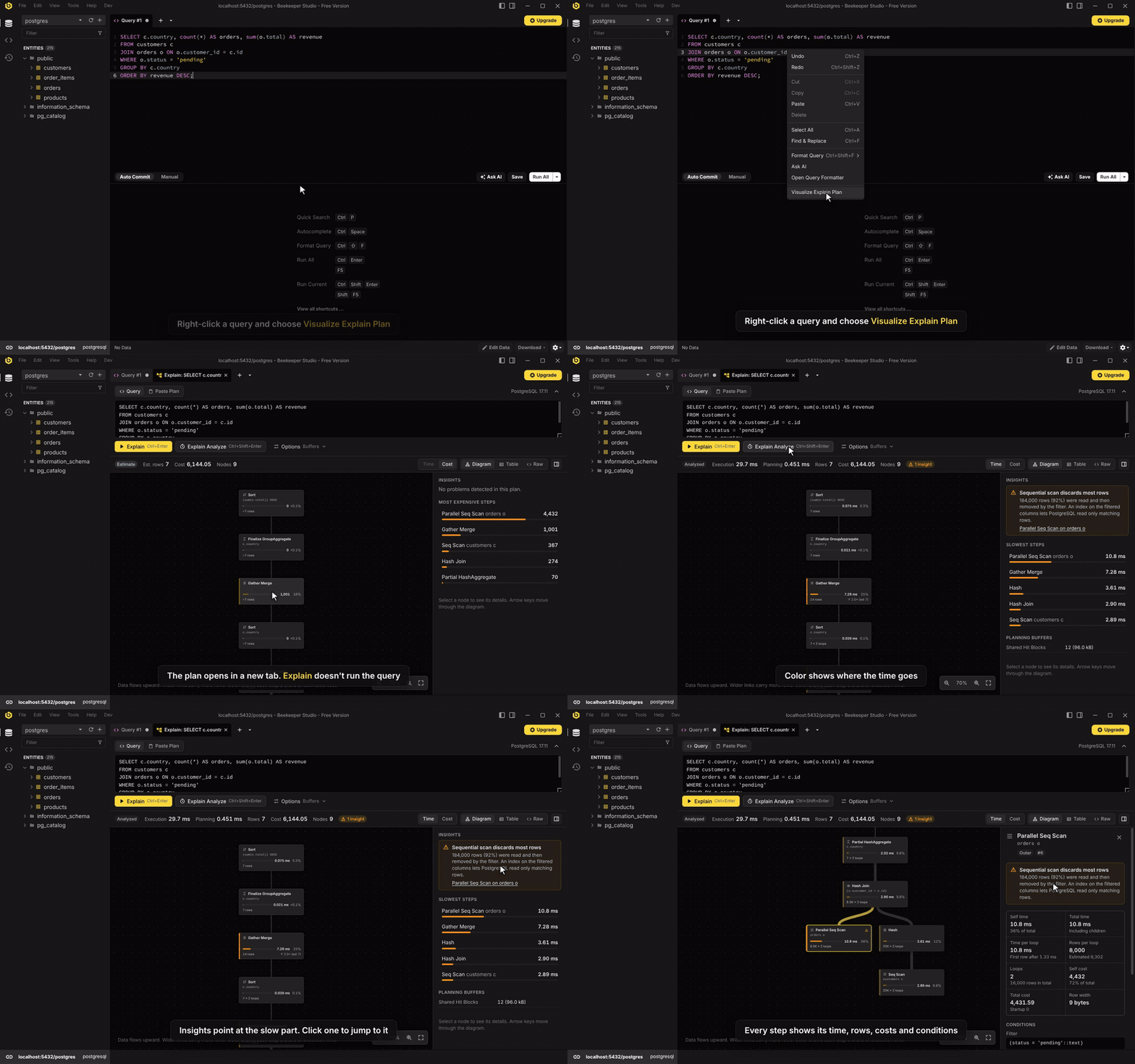
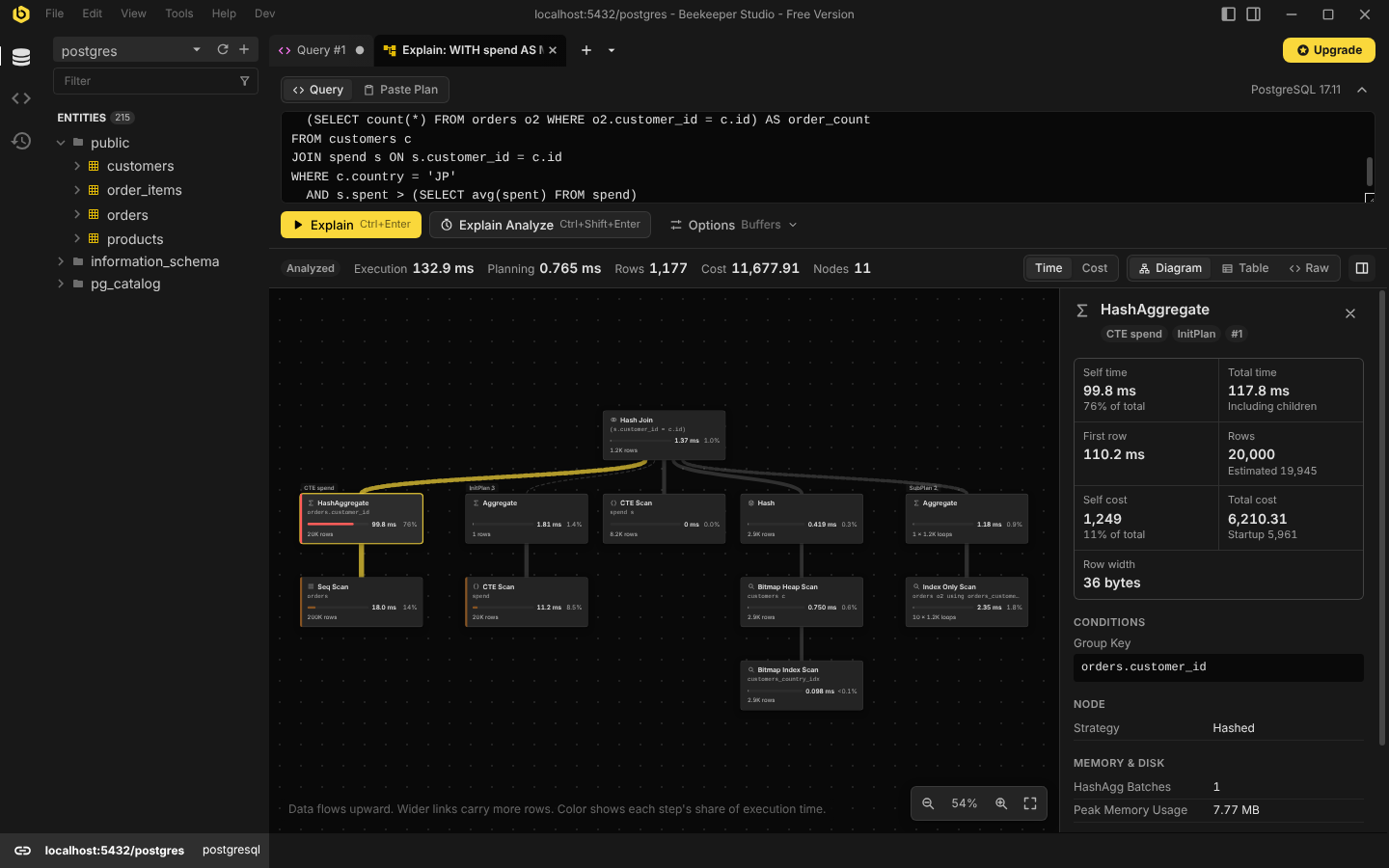
- Diagram of the plan, coloured by each step’s share of execution time (or estimated cost). Wider links carry more rows.
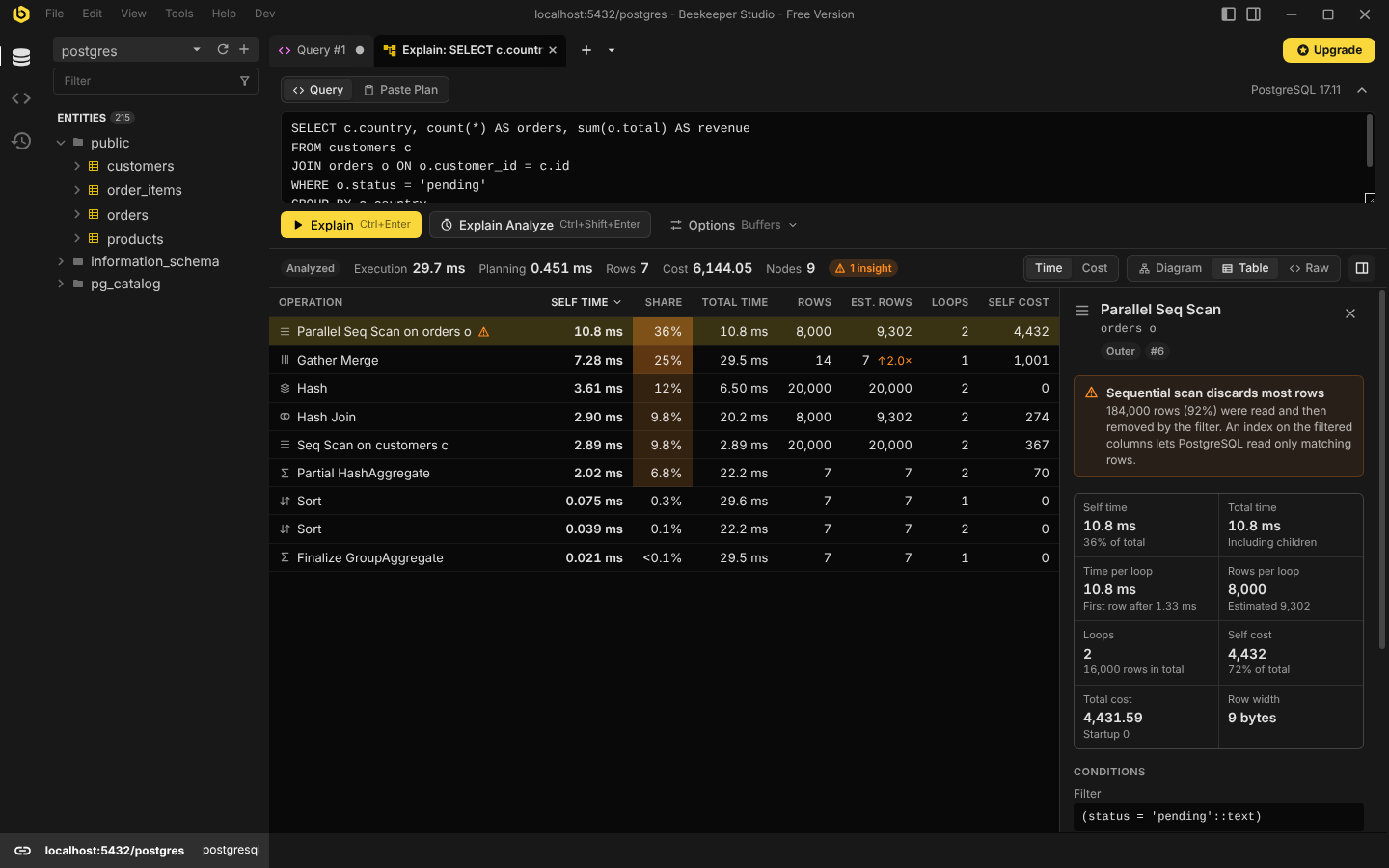
- Table view in the style of
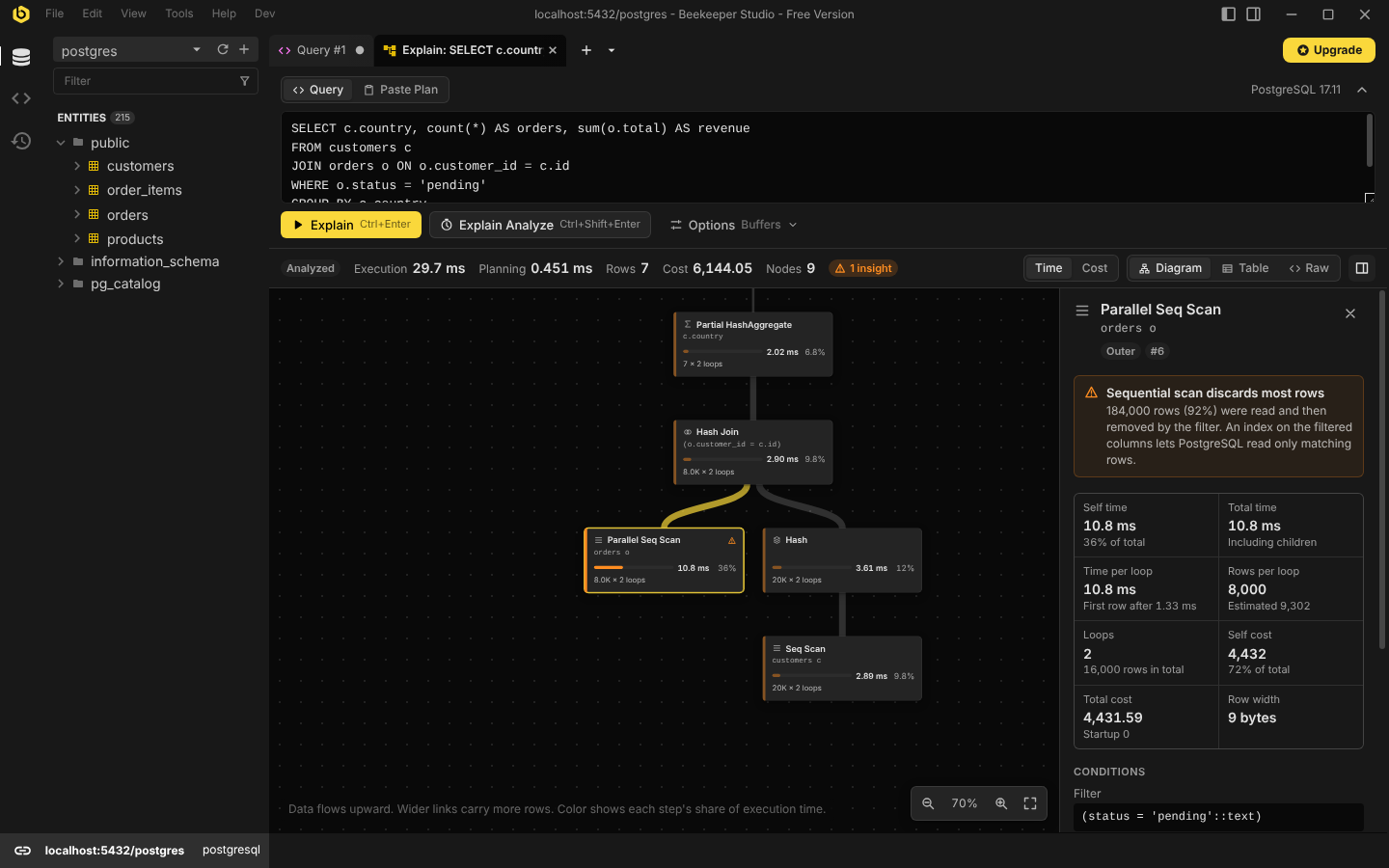
explain.depesz.com, sortable by self time. - Details for every step: self and total time, actual vs. estimated rows, loops, costs, conditions, buffers, memory and disk usage, workers.
- Insights that point at common problems: full scans that discard most rows, tables scanned once per row of a join, sorts and hashes spilling to disk, dependent subqueries, temporary indexes SQLite builds on every run, large row misestimates and more.
- Raw plan output, ready to copy or save.
More in the screenshots below.
Supported databases
| Database | Explain | Explain Analyze | Paste a plan |
|---|---|---|---|
| PostgreSQL | Yes | Yes | JSON and psql text |
| MySQL | Yes | 8.0.18+, statements that read | Tree, JSON (both versions) and the classic table |
| MariaDB | Yes | 10.1+, statements that read | JSON and the classic table |
| SQLite, LibSQL | Yes | No: SQLite has no step timings | The sqlite3 shell’s tree, or the result rows |
| SQL Server | Planned |
Tested with PostgreSQL 12, 17 and 18; MySQL 5.7, 8.0.17, 8.0, 8.4 and 9.7; MariaDB 10.4, 10.6 and 11.4; and SQLite 3.16, 3.27 and 3.45. The plugin is built around a database-neutral plan model so each database only needs an adapter (see Adding a database).
Using it
There are several ways in:
- Query editor: right-click a query and choose Visualize Explain Plan. The selected text is used, or the statement under the cursor.
- New tab menu: open Explain Visualizer, write a statement and choose Explain or Explain Analyze.
- Results grid: after running EXPLAIN yourself, right-click the plan and
choose Visualize Explain Plan:
- a plan in one cell (PostgreSQL’s
FORMAT JSON, MySQL’s tree or JSON): right-click the cell; - a plan spread over rows (PostgreSQL’s text output): right-click the
QUERY PLANcolumn header; - a table (MySQL’s classic
EXPLAIN, SQLite’sEXPLAIN QUERY PLAN): select all of its rows and columns, then right-click the selection. The detail column alone still works for SQLite, without the nesting.
- a plan in one cell (PostgreSQL’s
- Paste Plan: paste EXPLAIN output, for example from psql, the mysql or sqlite3 shell, or a colleague.
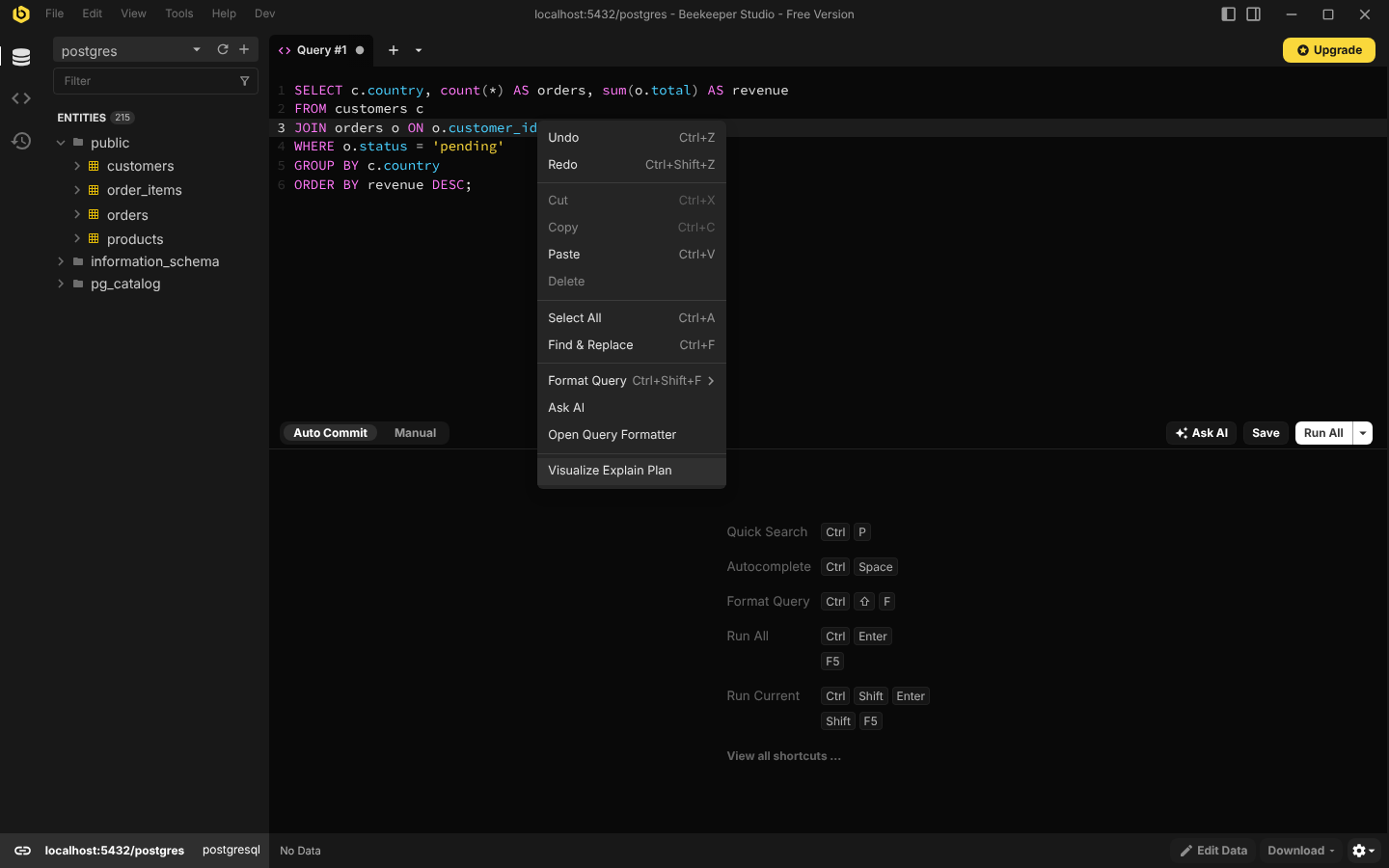
Explain and Explain Analyze
Explain asks the database for its plan without running the statement. It is always safe, so it runs automatically when the tab opens from the editor.
Explain Analyze runs the statement and measures every step. How it keeps
that safe depends on the database, below. If the editor text already starts with
EXPLAIN ANALYZE (or the database’s equivalent), the plugin uses it; when the
statement can’t be analyzed it is explained instead, and the reason is shown
under the editor.
PostgreSQL
The plugin sends EXPLAIN ANALYZE ...; ROLLBACK; as a single request, so both
statements share one implicit transaction and anything the statement changed is
rolled back. That includes plain SELECTs, which can call functions that write.
If the statement fails, the transaction is aborted on its own and the pooled
connection is left clean. Effects outside the transaction, such as sequence
values, are not undone.
Statements that change data (INSERT, UPDATE, DELETE, MERGE,
data-modifying CTEs…) are only analyzed after a confirmation. The plugin reads
the statement with a lexer that follows PostgreSQL’s own rules for strings,
comments and dollar quotes, and refuses input that contains more than one
statement.
On read-only connections Beekeeper Studio does not allow the ROLLBACK, so
statements that change data can only be explained, and Explain Analyze never
runs automatically. A SELECT that calls a function which writes is not
detected there, the same as when running it in a query tab.
The Options menu toggles BUFFERS, VERBOSE, SETTINGS and WAL. Options
the server doesn’t support are disabled. Statements with $1 parameters are
explained with GENERIC_PLAN on PostgreSQL 16+.
MySQL and MariaDB
The plugin reads the server’s version and uses the newest plan format it has:
| Server | Explain | Explain Analyze |
|---|---|---|
| MySQL 8.0.18+ | EXPLAIN FORMAT=TREE |
EXPLAIN ANALYZE |
| MySQL 5.6 to 8.0.17 | EXPLAIN FORMAT=JSON |
Not available |
| MariaDB 10.1+ | EXPLAIN FORMAT=JSON |
ANALYZE FORMAT=JSON |
| Older servers | The classic EXPLAIN table |
Not available |
Single-table UPDATE and DELETE have no tree; the plugin falls back to
FORMAT=JSON, and on MySQL 9, whose JSON can’t show them either, to the classic
table. TiDB is recognised and refused rather than misread.
Explain Analyze only runs statements that read. Unlike PostgreSQL, MySQL can’t
be relied on to undo a failed request: sent as START TRANSACTION; ...;
ROLLBACK;, a statement that failed would leave the transaction open on a pooled
connection that other tabs then use. A SELECT that calls a stored function
which writes commits what the function did, the same as running it in a query
tab. On MariaDB, Beekeeper Studio’s read-only mode refuses the ANALYZE
statement, so Explain Analyze is not available on read-only connections.
The statement is read with MySQL’s rules: # and -- comments that end only
at a line feed, backslash escapes, "..." strings, and /*! ... */ comments,
whose contents MySQL runs. NO_BACKSLASH_ESCAPES and ANSI_QUOTES change how
strings end, and a pooled connection may have either, so a statement has to
read as one statement, and as a read, under every combination of them. Text a
server may read in more than one way is refused rather than guessed at: a
version-gated /*!50700 ... */ or MariaDB-only /*M! ... */ comment, a
carriage return inside a -- comment, or a NUL character.
MariaDB times each table rather than each step, so the time of a join or a temporary table is what the query took beyond the tables it read.
SQLite
EXPLAIN QUERY PLAN shows which tables are read, in which order, and with which
index. SQLite reports no costs, row counts or timings, so the diagram shows the
steps and the table view their details, and there is no Explain Analyze.
Insights point at temporary indexes SQLite builds on every run, tables scanned
once per row of a join or a correlated subquery, and sorts in a temporary
B-tree. LibSQL connections use the same engine.
Beekeeper Studio splits SQLite text into statements with its own parser before running them, so a statement with a semicolon inside it (in a string, name or comment) is refused: no splitter can then find a second statement in it.
Screenshots
Explain Analyze, with the slow step selected and an insight about it:
The same plan as a table, sorted by self time:
A query with a CTE, an InitPlan and a SubPlan, each shown as its own branch:
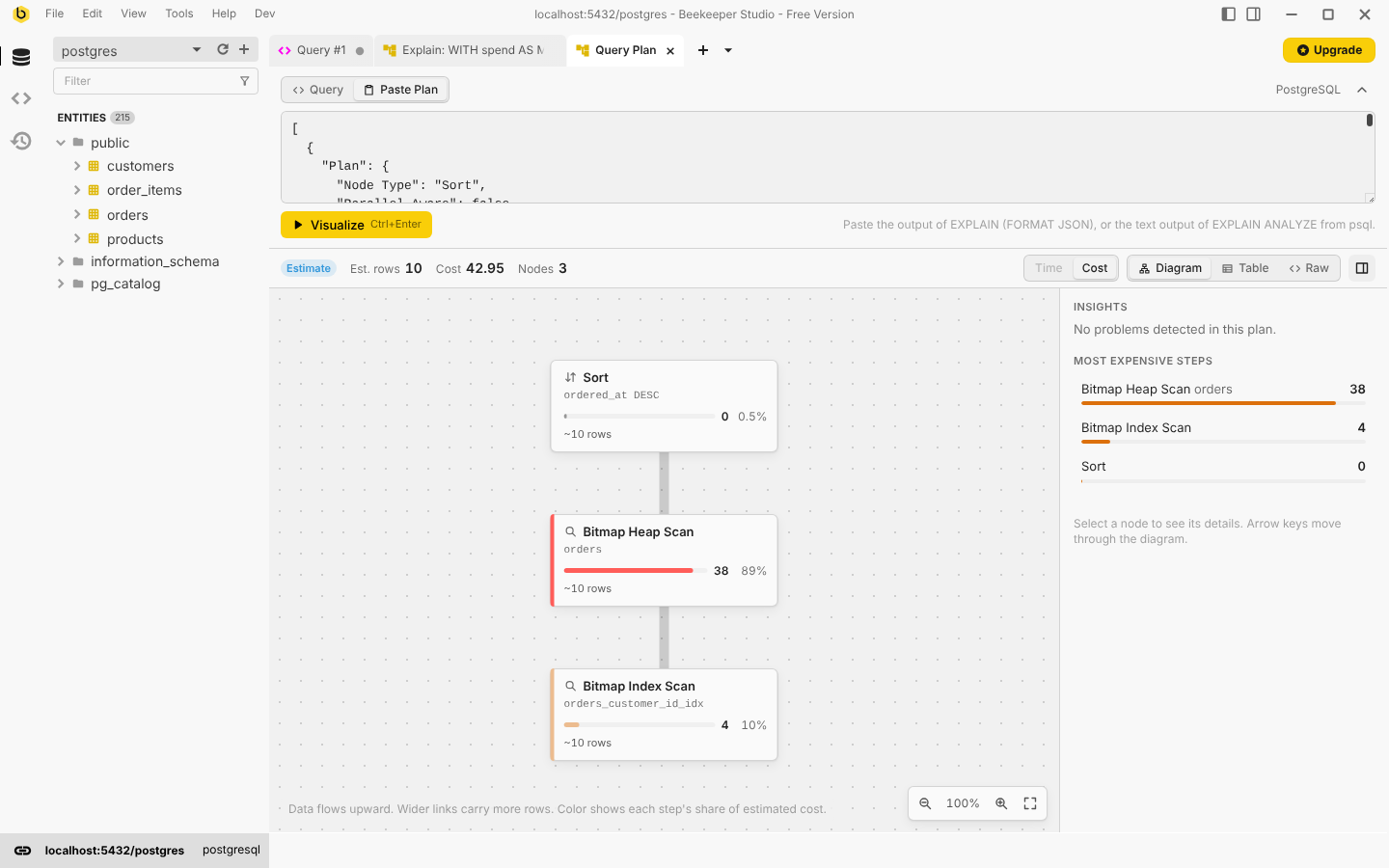
The plugin follows Beekeeper Studio’s theme:
Development
Requires Node.js 22+ and Yarn 1.
yarn install
yarn dev        # builds with hot reload and links the plugin into Beekeeper Studio
yarn test       # unit tests
yarn build      # type-check and build into dist/
yarn dev uses @beekeeperstudio/vite-plugin,
which symlinks this folder into Beekeeper Studio’s plugin directory.
By default Beekeeper Studio only loads its own allow-listed plugins. To load this one, add the following to your user configuration file and restart the app:
[pluginSystem]
disabled = false
Then connect to a database: Visualize Explain Plan appears in the query editor’s context menu and Explain Visualizer in the new tab menu.
Harness
dev/harness.html stands in for Beekeeper Studio: it loads the plugin in an
iframe and answers its requests with the same messages the app uses, running
queries against real databases. It is the quickest way to work on the UI, try
every way the tab can be opened, switch databases and switch themes.
docker run -d --name pg -e POSTGRES_PASSWORD=pw -p 5432:5432 postgres:17
psql postgres://postgres:pw@localhost:5432/postgres -f scripts/fixtures/seed.sql

docker run -d --name mysql -e MYSQL_ROOT_PASSWORD=pw -e MYSQL_DATABASE=shop -p 3306:3306 mysql:8.4
mysql -h127.0.0.1 -uroot -ppw shop < scripts/fixtures/seed-mysql.sql

PG_URL=postgres://postgres:pw@localhost:5432/postgres \
MYSQL_URL=mysql://root:pw@127.0.0.1:3306/shop \
yarn harness
MARIADB_URL points the harness’s MariaDB at another server (it uses
MYSQL_URL otherwise). SQLite needs nothing: a temporary database is seeded
from scripts/fixtures/seed-sqlite.sql on first use, or SQLITE_PATH names one.
Tests
tests/postgresparses real plans captured from PostgreSQL 12, 17 and 18 (tests/fixtures/postgres). Each fixture has the same plan in JSON and text form, and the tests check both produce the same tree.tests/mysqlparses plans captured from MySQL 5.7, 8.0.17, 8.0, 8.4 and 9.7 and MariaDB 10.4, 10.6 and 11.4 (tests/fixtures/mysql). Each fixture has every format its server has for one statement: tree,EXPLAIN ANALYZE, both JSON versions, MariaDB’sANALYZEand the classic table. The tests check the formats agree.tests/sqliteparsesEXPLAIN QUERY PLANrows from SQLite 3.16 (the format before 3.24), 3.27 and 3.45 (tests/fixtures/sqlite).tests/integrationruns EXPLAIN against live servers: PostgreSQL whenPG_URLis set, MySQL or MariaDB whenMYSQL_URLis set, and SQLite always, through Node’s built-innode:sqlite.tests/statecovers the tab’s behaviour with a fake host.
To capture fixtures from another server version, seed it and run its capture script:
# PostgreSQL: seed with scripts/fixtures/seed.sql
PG_URL=postgres://... FIXTURE_PREFIX=pg16- node scripts/fixtures/capture-postgres.mjs
# MySQL or MariaDB: seed with scripts/fixtures/seed-mysql.sql; named after the server
MYSQL_URL=mysql://root:pw@127.0.0.1:3306/shop node scripts/fixtures/capture-mysql.mjs
# SQLite: uses Python's bundled SQLite, so older Python images give older SQLite
python3 scripts/fixtures/capture-sqlite.py
docker run --rm -v "$PWD:/w" -w /w python:3.6-stretch python3 scripts/fixtures/capture-sqlite.py
How it works
src/
  core/        database-neutral plan model, analysis, metrics, layout, formatting
  engines/     one adapter per database family, plus the registry
    postgres/  EXPLAIN builder, JSON and text parsers, timing rules, insights
    mysql/     version detection; tree, JSON (both versions) and table readers; insights
    sqlite/    EXPLAIN QUERY PLAN rows and shell text; insights
    shared/    helpers adapters build on: a configurable SQL lexer, statement
               checks, Explain Analyze policies, result readers, a JSON parser
               that keeps repeated keys
  host/        everything that talks to Beekeeper Studio
  state/       the tab's state and actions
  components/  Vue components: diagram, table, details, raw view
Every adapter converts its database’s EXPLAIN output into the Plan model in
src/core/plan.ts. A PlanNode has an operation name, a kind (scan, index,
join, filter, sort…), optional estimates (totalCost, estimatedRows),
optional measurements (actualRows, loops, times), derived inclusiveTime,
exclusiveTime and exclusiveCost, plus conditions and grouped properties for
the details panel. Every metric is optional, and the UI only shows what an
engine provides: a SQLite plan has no numbers, so the table shows each step’s
details instead of costs.
Self time is engine-specific, so the adapter computes it. PostgreSQL’s rules
live in src/engines/postgres/timing.ts: per-loop times are multiplied by
loops, parallel workers are counted once, CTE time is charged to the CTE scans
that read it, and an InitPlan’s time is charged to the node that evaluates it.
MySQL reports times per loop too and uses the shared computeLoopTimings
(src/core/metrics.ts), with subqueries in the select list added on top of the
query, which doesn’t include them. MariaDB times tables and whole queries, not
steps; computeMixedTimings fills in the rest.
MySQL’s three formats are read into the same operation names: tree text and JSON version 2 list the same iterators, and the query-block JSON (and the classic table, rebuilt into it) becomes a chain of joins in the tables’ order. The insight rules work on those names, not on the native output.
src/core/analysis.ts adds what every engine shares: shares of time and cost,
the slowest steps, and row misestimate insights.
Adding a database
Nothing outside the engine’s folder and the registry needs to change.
- Create
src/engines/<name>/with an object implementingExplainEngine(src/engines/types.ts):connectionTypes: the Beekeeper Studio connection types it handles, andproductswhen it covers several (MySQL and MariaDB).inspect(sql, server): split and classify the statement (does it change data?).src/engines/shared/lexer.tstakes a dialect: comment styles, quotes, placeholders.analyzePolicy(statement, context): whether Explain Analyze may run it, what to ask first and what to say under the editor.src/engines/shared/analyzePolicy.tshas the rollback and reads-only policies.explain(request, runQuery): send whatever SQL the database needs and parse the result. It may callrunQueryseveral times, for example to fall back to an older format.loadServerInfo(runQuery): the version, and anything else the engine needs to know (MySQL’s SQL mode). ExtendServerInfowith your own fields.canParse/parse: read pasted output and values from the results grid. The raw text a parse returns must parse back into the same plan: restored tabs are rebuilt from it.options: toggles shown in the Options menu, each withunavailable(server)when it needs a newer server.
- Map native operators to
NodeKinds and fill in whichever metrics exist. Use the helpers insrc/core/metrics.tsfor costs and times where they fit, and callfinishPlan()fromsrc/core/analysis.tsat the end. - Register it in
src/engines/registry.ts, add fixtures captured from real servers (a capture script inscripts/fixtures/) and tests like the others.
Notes for SQL Server, which is planned:
- Beekeeper Studio’s SQL Server client splits a request on
;and may run each statement on a different pooled connection.SET SHOWPLAN_XML ONmust be alone in its batch and applies to the next batch on the same connection, so an estimated plan needs a new host API that runs batches on one connection. SET STATISTICS XML ONwith the statement in one batch (no;) gives the actual plan, but runs the statement and returns its rows to the plugin.- Plan XML pasted from SSMS (
.sqlplan) needs no host support.
Releasing
- Run
bin/make-release.sh. It suggests the next version from the existing tags, setsversioninmanifest.jsonandpackage.json, commits, and pushes a matching tag such asv0.1.0. - The release workflow builds, tests and creates a draft GitHub release with
manifest.jsonandexplain-visualizer-<version>.zip. Publish the draft.
yarn build && yarn package creates the same archive locally.
License
GPL-3.0. See LICENSE.