
The DynamoDB console is fine for a quick look at a table, and gets old fast once you’re paging through results, juggling three tables, or developing against DynamoDB Local. Below are six DynamoDB GUI clients that do better, what each one costs, and which work with DynamoDB Local. We make one of them, Beekeeper Studio, so of course it’s first. Feel free to roll your eyes.
Beekeeper Studio
Available for Windows, macOS, and Linux - download here
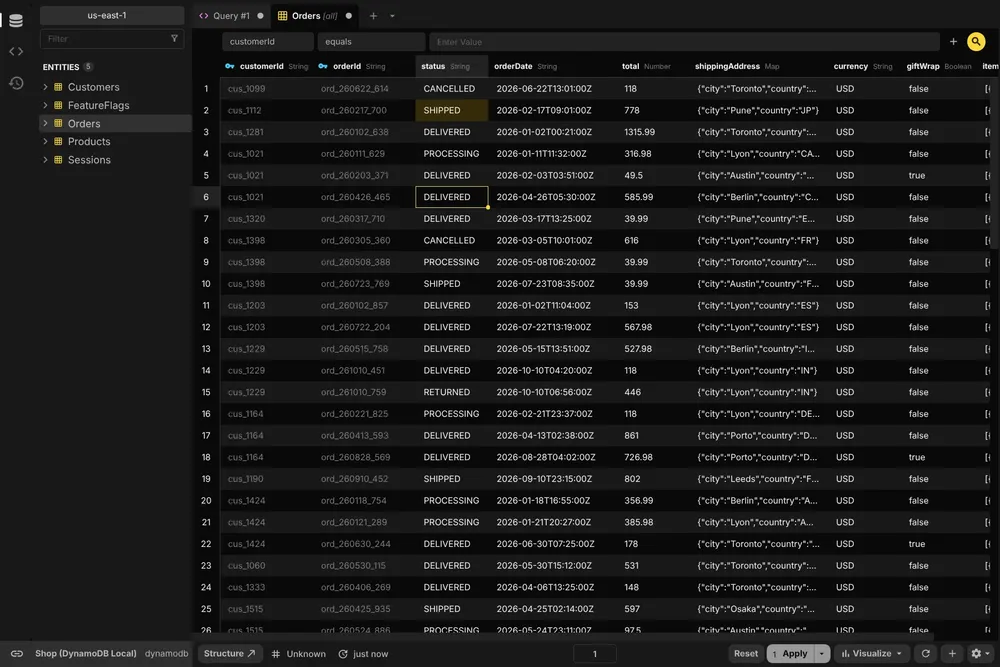
We’re obviously biased, but we think Beekeeper Studio is the nicest way to work with DynamoDB when it isn’t the only database you use. It opens a DynamoDB table the way it opens a Postgres or MySQL one: a spreadsheet-style grid you can filter, where you edit items inline, add new ones and delete old ones without hand-writing an UpdateItem call.
For anything more specific there’s the SQL editor, which runs PartiQL, DynamoDB’s SQL-compatible query language, against your tables. It’s the same editor, with the same tabs and saved queries, that you’d use for every other database.
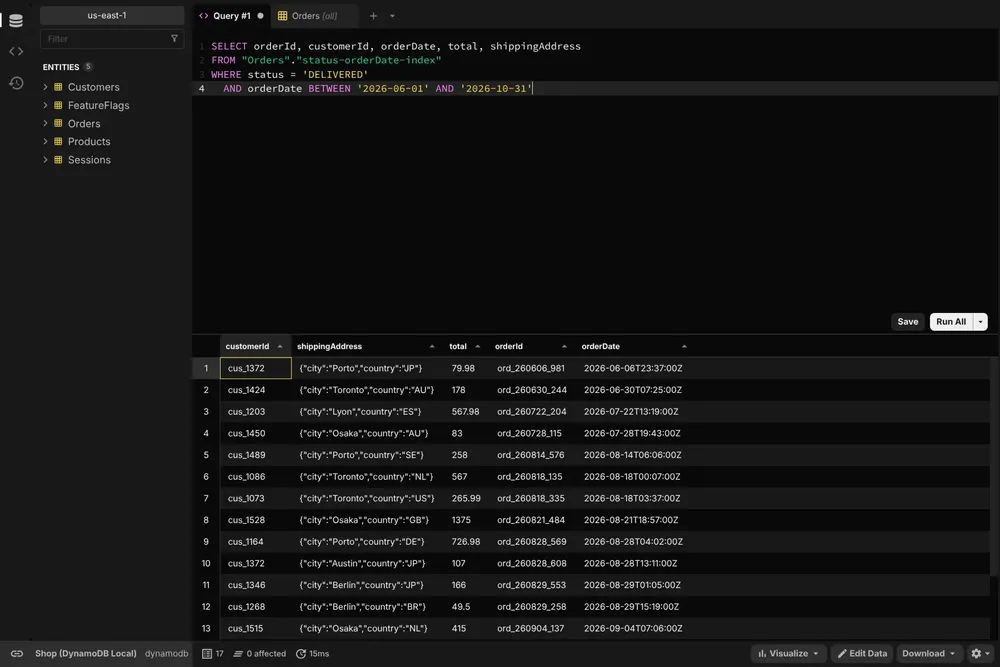
Try Beekeeper Studio free for 14 days
I love beekeeper–it made all my other DB clients obsolete on day one. It is so nice to be able to keep the same client for different kinds of database, because let’s face it: modern apps need both SQL and NOSQL DBs and there is often a DWH involved also.
Connecting works the way the AWS CLI does: an access key and secret, a named profile from your AWS credentials file, or the credentials of your existing AWS CLI setup. For local development, put http://localhost:8000 in the custom endpoint field to reach DynamoDB Local. Read-only mode keeps you from editing a production table by accident.
DynamoDB is a paid feature, included in the Professional and Business plans. Every paid feature is free for 14 days when you download the app, with no account or credit card needed, so you can try it on your own tables first. Beekeeper Studio’s core is open source (GPLv3), and the paid features are commercial source available.
The downsides: DynamoDB can’t sort a Scan on the server, so the table view has no column sorting, and filters apply after the scan, so a very selective filter on a big table can still mean a long scan. You can’t create tables or indexes from Beekeeper, and it isn’t a data modeling tool (NoSQL Workbench, below, is much better at that). It’s also not an enterprise IDE with every bell and whistle; it’s built for querying and editing data quickly.
Beekeeper Studio links
- DynamoDB GUI client details
- How to connect to DynamoDB
- Beekeeper Studio 5.8 release notes, where DynamoDB support arrived
- Pricing
- Source code on GitHub
NoSQL Workbench for DynamoDB
Available for Windows, macOS, and Linux - free, from AWS
NoSQL Workbench is AWS’s own DynamoDB GUI, and it tops Google for “DynamoDB GUI” for good reason: it’s free, it’s official, and it does things nothing else on this list does.
The headline is the data modeler. You design tables and global secondary indexes, fill them with sample data (typed in or imported from CSV), define your access patterns and check them as real operations, then commit the model to DynamoDB Local or your AWS account, or export it as CloudFormation. If you’re working out a single-table design, start here.
The operation builder covers day-to-day work: Scan and Query with projection and condition expressions, put, update and delete item, transactions, table and index management, and a PartiQL editor. It saves up to 50 operations, generates code for them, exports results to CSV and can clone a table between accounts, Regions and DynamoDB Local. DynamoDB Local comes with the installer, and you start it from a toggle in the app (it needs Java 17 or newer).
The tradeoffs: it only does DynamoDB, and it isn’t open source. AWS’s docs only describe connecting with an access key (with an optional session token or role ARN), not with a named profile or SSO. And it’s more of a modeling and operations tool than a quick way to browse a table.
NoSQL Workbench links
Dynobase
Available for Windows, macOS, and Linux - paid, 7-day free trial
Dynobase is the best-known dedicated DynamoDB desktop client, and the most feature-packed option here if DynamoDB is your whole world. Version 3.0 (September 2026) was a full rewrite, so if an older roundup told you it was abandoned, that’s out of date: it has had point releases every week or two since.
Its query builder picks Query or Scan for you and estimates what a scan will cost. It runs PartiQL reads, writes and transactions, imports CSV and JSON, exports to a file or to S3, generates SDK and CLI code, and has a single-table designer that deploys or exports to CloudFormation. It handles AWS CLI profiles, IAM Identity Center (SSO), assumed roles and MFA, and connects to DynamoDB Local and LocalStack.
It costs $9 a month billed yearly ($108) for one user, or a one-time lifetime license (currently $199), with team plans above that. There’s a 7-day free trial, no card needed. Like NoSQL Workbench, it’s closed source and only does DynamoDB.
Dynobase links
DataGrip
Available for Windows, macOS, and Linux - free for non-commercial use
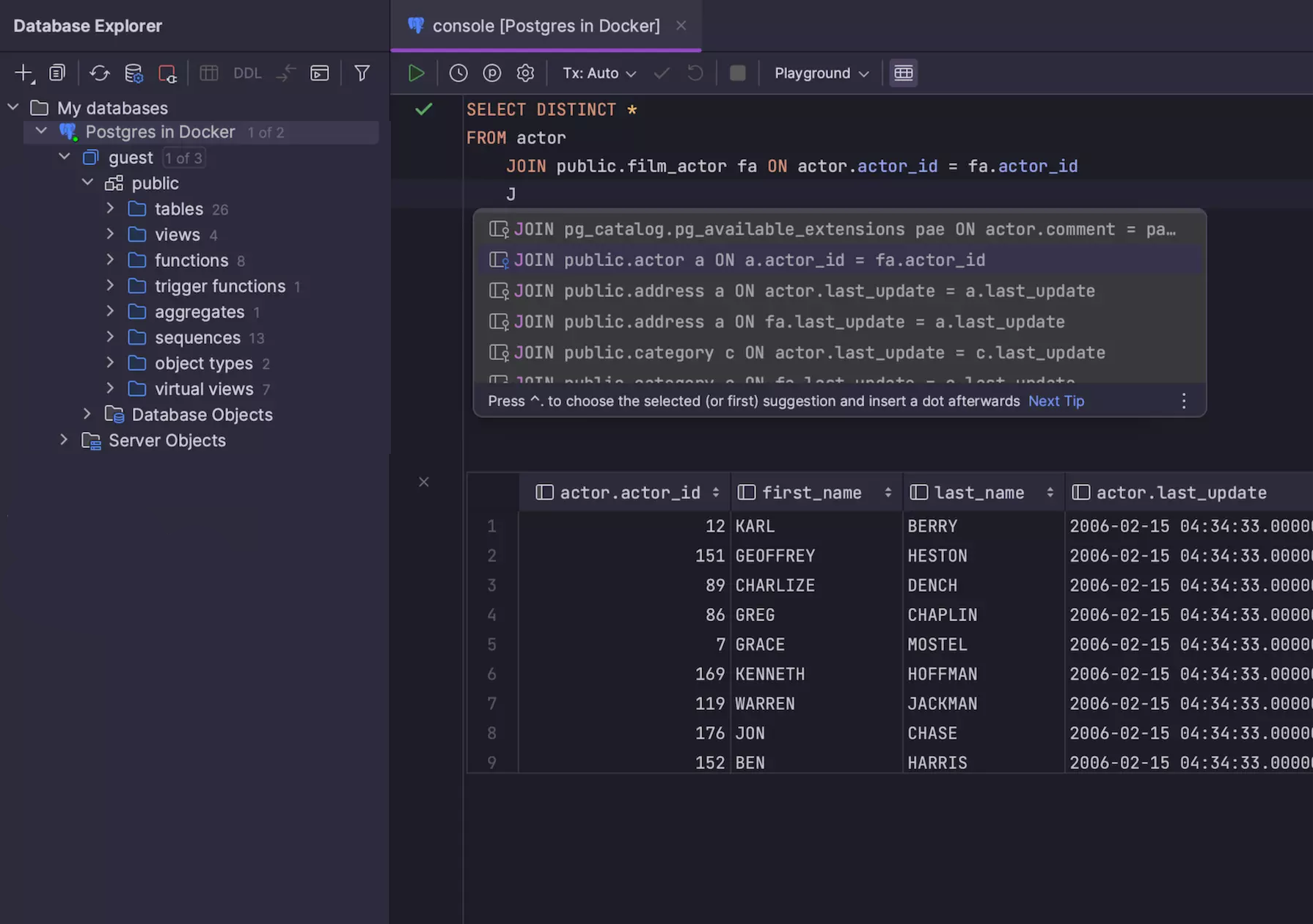
DataGrip is JetBrains’ SQL IDE, and it has supported DynamoDB since version 2023.3: tables with their keys and indexes in the database explorer, a data viewer, and the subset of PartiQL that DynamoDB supports in its editor, with JetBrains’ usual code completion. It signs in with a named profile from your AWS credentials file, and reaches DynamoDB Local at jdbc:dynamodb://localhost:8000.
Since October 2025 DataGrip has been free for non-commercial use, such as learning, hobby and open source projects (the free license sends anonymous usage statistics). Work for an employer needs a subscription after a 30-day trial: $259 per user per year for organizations, or $109 for the first year for individuals.
It’s a big IDE, so it makes the most sense if you already use JetBrains tools or work with several databases. If DynamoDB is all you need, it’s a lot of IDE.
DataGrip links
DbVisualizer
Available for Windows, macOS, and Linux - free edition, paid Pro
DbVisualizer added DynamoDB in version 25.1 (March 2025). It shows your tables with their partition and sort keys and local and global indexes, and runs PartiQL scripts in its SQL Commander editor.
The free edition covers browsing tables and running queries. Editing data in the grid or form editor, and creating tables, need Pro, which costs $199 per user for the first year and $89 a year after that, with a 21-day trial.
DbVisualizer is a mature, conventional Java database client with a lot of panels and options. It’s a sensible choice if you already use it for your relational databases and want DynamoDB in the same place.
DbVisualizer links
dynamodb-admin
Self-hosted web app (npm or Docker) - free and open source (MIT)
dynamodb-admin is a small web UI for local development. Its README calls it a “GUI for DynamoDB Local, dynalite, localstack etc.” Install it with npm, point it at your emulator, and open http://localhost:8001 to look through your local tables:
npm install -g dynamodb-admin
dynamodb-admin --dynamo-endpoint=http://localhost:8000
There’s also a Docker image (aaronshaf/dynamodb-admin), handy as one more service in the docker-compose file that already runs DynamoDB Local. It’s MIT licensed, small and still maintained (5.3.3 came out in June 2026).
It’s deliberately simple, though: no PartiQL editor, no data modeling and no code generation. And it’s built for local emulators; the README doesn’t describe using it against your real AWS tables.
dynamodb-admin links
The AWS console: the baseline
Web-based, part of your AWS account
Everything above is really competing with the DynamoDB console, which is free and probably already open in a tab. “Explore table items” switches between Query and Scan and lets you edit items, and the PartiQL editor in the left navigation runs statements and shows the results as a table or as JSON.
For a quick look at production data, that’s often enough. It gets tiresome when you’re paging through results (each Query or Scan returns at most 1 MB), hopping between tables, accounts and Regions, or working against DynamoDB Local, which the console can’t reach at all.
A few honorable mentions
- TablePlus added DynamoDB in version 6.7 (September 2025, macOS and Windows), and it’s still labeled beta. If you already pay for TablePlus, it’s worth a try.
- DBeaver supports DynamoDB only in its paid Lite, Enterprise and Ultimate editions (from $113 a year). The free Community edition doesn’t include it. See how Beekeeper Studio compares to DBeaver.
- Dynomate is a newer dedicated desktop client for macOS, Windows and Linux, with SSO, DynamoDB Local and LocalStack support, and import and export. It has a free Community tier, and paid plans from $10 a month, billed yearly.
- DynamoIt is an open source (GPL-3.0) JavaFX client that uses your AWS CLI profiles and works with DynamoDB Local. Its last binary release was in October 2024.
- DocKit is an open source (Apache 2.0) client for DynamoDB, Elasticsearch, OpenSearch and MongoDB, with a PartiQL editor. Since version 2.0 (October 2026), signing in with an AWS profile or SSO is part of its paid plan.
Working with DynamoDB Local
A lot of people go looking for a DynamoDB GUI because they’re developing against DynamoDB Local, AWS’s free downloadable version of DynamoDB, and the console can’t see it. The quickest way to run it is AWS’s Docker image:
docker run -p 8000:8000 amazon/dynamodb-local -jar DynamoDBLocal.jar -sharedDb
It listens on http://localhost:8000. Any credentials work, but the access key ID can only contain letters and numbers. Then:
-
Beekeeper Studio: put
http://localhost:8000in the custom endpoint field. - NoSQL Workbench: ships with DynamoDB Local, so you can start it from the app instead of running the container.
- Dynobase: add a DynamoDB Local (or LocalStack) endpoint.
-
DataGrip: use the URL
jdbc:dynamodb://localhost:8000. -
dynamodb-admin: connects to
http://localhost:8000by default.
Keep the -sharedDb flag. Without it, DynamoDB Local keeps a separate database file for each access key ID and Region, so a GUI that connects with different dummy credentials than your app will show you an empty list of tables. It’s the most common “where did my tables go?” moment with DynamoDB Local.
Which DynamoDB GUI should you use?
- Free, official, and best for data modeling: NoSQL Workbench
- DynamoDB is all you work with, and you want every feature: Dynobase
- DynamoDB is one of several databases you use: Beekeeper Studio, or DataGrip or DbVisualizer if you already use them
- Free, open source, for local development: dynamodb-admin
- A quick look at production data: the AWS console
DynamoDB doesn’t have the crowd of GUIs that PostgreSQL or MySQL does, but between these you’re covered. If you query DynamoDB next to your SQL databases and want one fast app for all of them, give Beekeeper Studio a try: it’s free for 14 days, and connecting takes a couple of minutes.
DynamoDB GUI clients compared
| Client | Price | Runs as | Open source | PartiQL | DynamoDB Local |
|---|---|---|---|---|---|
| Beekeeper Studio | Professional plan, 14-day free trial | Desktop app | Core is GPLv3, DynamoDB is a paid feature | Yes | Yes, custom endpoint |
| NoSQL Workbench | Free | Desktop app | No | Yes | Bundled |
| Dynobase | From $9/month billed yearly, 7-day trial | Desktop app | No | Yes | Yes |
| DataGrip | Free for non-commercial use, paid for work | Desktop IDE | No | Yes | Yes, by URL |
| DbVisualizer | Free edition, Pro $199 for the first year | Desktop app | No | Yes | Not documented |
| dynamodb-admin | Free | Web app (npm or Docker) | Yes, MIT | No | Built for it |
| AWS console | Free with your AWS account | Browser | No | Yes | No |
Related posts
- DynamoDB GUI client details
- Top 5 MongoDB GUI Clients
- Free Redis GUI Clients
- Top 5 Cassandra GUI Clients
 Beekeeper Studio Is An Open Source DynamoDB GUI
Beekeeper Studio is a fast, intuitive and easy to use DynamoDB client. It supports loads of other databases too, and works great on Windows, Mac and Linux.
What DynamoDB Users Say About Beekeeper Studio
Guys, WOW,
I have been using the AI to interact with my database today and I am thoroughly impressed.
I am genuinely curious about how you managed to make it generate queries so quickly and accurately.
Ive been asking some pretty complex questions but still, all my inquiries got a response. Freaking dope
Beekeeper Studio is BY FAR the most user-friendly DB GUI out there! I started using it a year ago and now our whole team bought a license. The multi-DB support is simply awesome as I use 4 different types of databases on a regular basis. Plus it works on Windows and Mac.