
A many-to-many relationship links two tables where a row on either side can match many rows on the other: a student takes many courses, and a course has many students. You model it with a junction table that stores one row per link. The examples work in PostgreSQL, MySQL, SQLite and SQL Server.
How to model a many-to-many relationship
Create a third table, the junction table (also called a bridge, association or join table), with a foreign key to each side. Each row is one link: this student takes this course.
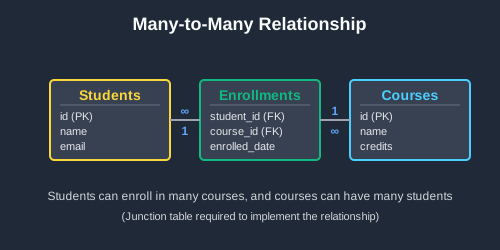
CREATE TABLE students (
    id INTEGER PRIMARY KEY,
    name VARCHAR(100) NOT NULL
);

CREATE TABLE courses (
    id INTEGER PRIMARY KEY,
    course_name VARCHAR(100) NOT NULL
);

-- The junction table: one row per student per course
CREATE TABLE enrollments (
    student_id INTEGER NOT NULL,
    course_id INTEGER NOT NULL,
    PRIMARY KEY (student_id, course_id),
    FOREIGN KEY (student_id) REFERENCES students(id),
    FOREIGN KEY (course_id) REFERENCES courses(id)
);
To get from one side to the other, join through the junction table:
-- Input: students
-- id | name
-- ---+------
-- 1  | Ana
-- 2  | Ben
-- 3  | Chloe

-- Input: courses
-- id | course_name
-- ---+------------
-- 1  | Biology
-- 2  | Chemistry
-- 3  | Physics

-- Input: enrollments
-- student_id | course_id
-- -----------+----------
-- 1          | 1
-- 1          | 2
-- 2          | 1
-- 3          | 1

SELECT s.name, c.course_name
FROM students s
JOIN enrollments e ON s.id = e.student_id
JOIN courses c ON e.course_id = c.id
ORDER BY s.name, c.course_name;

-- Output:
-- name  | course_name
-- ------+------------
-- Ana   | Biology
-- Ana   | Chemistry
-- Ben   | Biology
-- Chloe | Biology
Ana takes two courses and Biology has three students, so the relationship runs “many” in both directions.
Rules to know
-
Make the pair the primary key.
PRIMARY KEY (student_id, course_id)stops the same link being stored twice:
-- Input: the enrollments table above

INSERT INTO enrollments VALUES (1, 1);
-- ERROR: duplicate key value violates unique constraint "enrollments_pkey"
-
Index the second column. The primary key’s index starts with
student_id, so it already finds a student’s courses quickly. Finding a course’s students quickly needs an index that starts withcourse_id(MySQL creates one for you along with the foreign key):
CREATE INDEX idx_enrollments_course_id ON enrollments(course_id);
-
Store one row per link, never a list. A
course_idscolumn holding'1,2'can’t be joined, indexed or checked by a foreign key. -
SQLite ignores foreign keys until you turn them on. Run
PRAGMA foreign_keys = ON;on each connection, or SQLite will accept an enrollment for a student who doesn’t exist.
Alternative syntax
Some frameworks give every table its own id column, junction tables included. That works as long as you add a UNIQUE constraint on the pair, because the id alone doesn’t stop duplicate links. Only the id column changes between databases:
-- PostgreSQL
CREATE TABLE enrollments (
    id SERIAL PRIMARY KEY,
    student_id INTEGER NOT NULL,
    course_id INTEGER NOT NULL,
    UNIQUE (student_id, course_id),
    FOREIGN KEY (student_id) REFERENCES students(id),
    FOREIGN KEY (course_id) REFERENCES courses(id)
);

-- MySQL:      id INT AUTO_INCREMENT PRIMARY KEY
-- SQLite:     id INTEGER PRIMARY KEY
-- SQL Server: id INT IDENTITY PRIMARY KEY
You can also declare a foreign key inline: student_id INTEGER NOT NULL REFERENCES students(id). MySQL 8.0 accepts that form but silently ignores it, so keep the separate FOREIGN KEY clause there.
When should you use a many-to-many relationship?
Use one whenever rows on both sides can have many partners: students and courses, posts and tags, users and roles, products and categories. If each row on one side only ever has one partner, a one-to-many relationship is all you need. Once the junction table is in place, it solves these problems.
Look up what a row is linked to
Which courses does a student take? Which tags are on a post? Join from the row to the junction table and on to the other side. The same junction table answers the question in both directions.
Count the links on each side
The fullest course, the most-used tag, the member in the most clubs: group by one side and count its rows in the junction table. Use a LEFT JOIN when rows with no links should count as 0 instead of disappearing.
Store details about each link
A grade belongs to a student in a course, not to the student or the course alone, and a royalty share belongs to an author on a particular book. Put these columns on the junction table and query them like any other column.
Link rows in the same table
Followers, friends and mentors connect people to other people. Both of the junction table’s foreign keys point at the same table, so you join that table twice, with a different alias each time.
Real examples of many-to-many relationships
Find posts that have every tag in a list
A tag filter usually means “posts with all of these tags”. Match any of the tags, then keep the posts that matched all of them:
-- Input: posts
-- id | title
-- ---+----------------
-- 1  | Indexing basics
-- 2  | Weekend hiking
-- 3  | Joins explained

-- Input: tags
-- id | name
-- ---+---------
-- 1  | sql
-- 2  | outdoors
-- 3  | beginner

-- Input: post_tags
-- post_id | tag_id
-- --------+-------
-- 1       | 1
-- 1       | 3
-- 2       | 2
-- 2       | 3
-- 3       | 1

SELECT p.title
FROM posts p
JOIN post_tags pt ON p.id = pt.post_id
JOIN tags t ON pt.tag_id = t.id
WHERE t.name IN ('sql', 'beginner')
GROUP BY p.id, p.title
HAVING COUNT(*) = 2;

-- Output:
-- title
-- ---------------
-- Indexing basics
“Joins explained” has only one of the two tags, so it drops out at the HAVING. Change the 2 to match the number of tags in the list.
Find the most popular courses
Count each course’s enrollments. The LEFT JOIN keeps Physics, which nobody has signed up for:
-- Input: courses
-- id | course_name
-- ---+------------
-- 1  | Biology
-- 2  | Chemistry
-- 3  | Physics

-- Input: enrollments
-- student_id | course_id
-- -----------+----------
-- 1          | 1
-- 1          | 2
-- 2          | 1
-- 3          | 1

SELECT c.course_name, COUNT(e.student_id) AS student_count
FROM courses c
LEFT JOIN enrollments e ON c.id = e.course_id
GROUP BY c.id, c.course_name
ORDER BY student_count DESC;

-- Output:
-- course_name | student_count
-- ------------+--------------
-- Biology     | 3
-- Chemistry   | 1
-- Physics     | 0
Track who worked where, and when
Give each link a start and end date and the junction table keeps a history. Someone can return to a department they left, so the pair is no longer unique and the start date joins the primary key. The current department is the row with no end date:
CREATE TABLE employee_departments (
    employee_id INTEGER NOT NULL,
    department_id INTEGER NOT NULL,
    start_date DATE NOT NULL,
    end_date DATE,  -- NULL while it's their current department
    PRIMARY KEY (employee_id, department_id, start_date),
    FOREIGN KEY (employee_id) REFERENCES employees(id),
    FOREIGN KEY (department_id) REFERENCES departments(id)
);

-- Input: employees
-- id | name
-- ---+------
-- 1  | Grace
-- 2  | Omar
-- 3  | Wei

-- Input: departments
-- id | name
-- ---+------------
-- 1  | Sales
-- 2  | Support
-- 3  | Engineering

-- Input: employee_departments
-- employee_id | department_id | start_date | end_date
-- ------------+---------------+------------+-----------
-- 1           | 1             | 2022-03-01 | 2024-06-30
-- 1           | 3             | 2024-07-01 | NULL
-- 2           | 2             | 2023-01-09 | NULL
-- 3           | 1             | 2021-05-17 | NULL

SELECT e.name, d.name AS department, ed.start_date
FROM employees e
JOIN employee_departments ed ON e.id = ed.employee_id
JOIN departments d ON ed.department_id = d.id
WHERE ed.end_date IS NULL
ORDER BY e.name;

-- Output:
-- name  | department  | start_date
-- ------+-------------+-----------
-- Grace | Engineering | 2024-07-01
-- Omar  | Support     | 2023-01-09
-- Wei   | Sales       | 2021-05-17
To stop anyone having two current departments, add a partial unique index: CREATE UNIQUE INDEX idx_current_dept ON employee_departments(employee_id) WHERE end_date IS NULL;. MySQL has no partial indexes, so this one doesn’t work there.
Find users who follow each other
A follows table links users to users. A CHECK constraint stops anyone following themselves, and joining the table to itself finds the pairs that follow each other:
CREATE TABLE follows (
    follower_id INTEGER NOT NULL,
    followed_id INTEGER NOT NULL,
    PRIMARY KEY (follower_id, followed_id),
    FOREIGN KEY (follower_id) REFERENCES users(id),
    FOREIGN KEY (followed_id) REFERENCES users(id),
    CONSTRAINT no_self_follow CHECK (follower_id <> followed_id)
);

-- INSERT INTO follows VALUES (2, 2);
-- ERROR: new row for relation "follows" violates check constraint "no_self_follow"

-- Input: users
-- id | name
-- ---+-----
-- 1  | Ava
-- 2  | Leo
-- 3  | Mia
-- 4  | Noah

-- Input: follows
-- follower_id | followed_id
-- ------------+------------
-- 1           | 2
-- 2           | 1
-- 1           | 3
-- 3           | 4
-- 4           | 3

SELECT u1.name AS user_a, u2.name AS user_b
FROM follows f
JOIN follows back ON back.follower_id = f.followed_id
                 AND back.followed_id = f.follower_id
JOIN users u1 ON u1.id = f.follower_id
JOIN users u2 ON u2.id = f.followed_id
WHERE f.follower_id < f.followed_id
ORDER BY user_a;

-- Output:
-- user_a | user_b
-- -------+-------
-- Ava    | Leo
-- Mia    | Noah
Ava follows Mia, but Mia doesn’t follow her back, so that pair isn’t listed. The f.follower_id < f.followed_id condition lists each mutual pair once instead of twice.
Further reading about many-to-many relationships
On this blog:
- Database relationships guide: one-to-one, one-to-many and many-to-many side by side
- One to many relationship guide: a foreign key on the “many” side, with no junction table
- One-to-one database relationships: when each row has exactly one partner
- Composite primary keys in SQL: the two-column key a junction table uses
- SQL JOIN diagrams guide: the joins that walk through a junction table
- SQL GROUP BY guide: counting and summing across links
Official documentation:
- PostgreSQL: Foreign keys
- MySQL: FOREIGN KEY constraints
- SQLite: Foreign key support
- SQL Server: Primary and foreign key constraints
 Beekeeper Studio Is A Free & Open Source Database GUI
Best SQL query & editor tool I have ever used. It provides everything I need to manage my database. - ⭐⭐⭐⭐⭐ Mit
Beekeeper Studio is fast, intuitive, and easy to use. Beekeeper supports loads of databases, and works great on Windows, Mac and Linux.
What Users Say About Beekeeper Studio
"Beekeeper Studio completely replaced my old SQL workflow. It's fast, intuitive, and makes database work enjoyable again."
"I've tried many database GUIs, but Beekeeper strikes the perfect balance between features and simplicity. It just works."